- 많은 수(예를 들면 10^5 정도의 큰 수)의 비슷한 객체를 생성할 때, 객체를 각각 새로 생성하지 않고 공유 객체를 사용하여 메모리를 절약하는 패턴이다. 한번 생성된 객체는 두번 생성되지 않으며, 풀(pool)이 이를 관리한다.
- 상태는 Intrinsic State와 Extrinsic State로 나뉜다.
- Intrinsic : Immutable / Permanent인 상태 (외부에서 변화를 줄 수 없는 상태) which can be shared with others
- Extrinsic : 외부에서 변화를 줄 수 있는 상태 which cannot be shared
왜 메모리를 절약해야 할까?
- 적은 수의 객체 생성은 메모리 사용을 줄여준다. 따라서
java.lang.OutOfMemoryError등의 Exception을 사전에 방지할 수 있다. - 아무리 Java에서 객체가 빠르게 생성된다 하더라도, 공유 객체를 이용하면 성능을 더욱 최적화 할 수 있다.
- 어떤 요소에 Intrinsic / Extrinsic 상태를 부여할 것인지 정한다.
- Flyweight 객체를 가져오거나 생성할 때 Intrinsic State(key)를 매개변수로 넘길 수 있도록 한다.
- Factory Method 패턴을 적용하여 Flyweight 객체를, 있으면 가져오거나 없으면 생성한다.
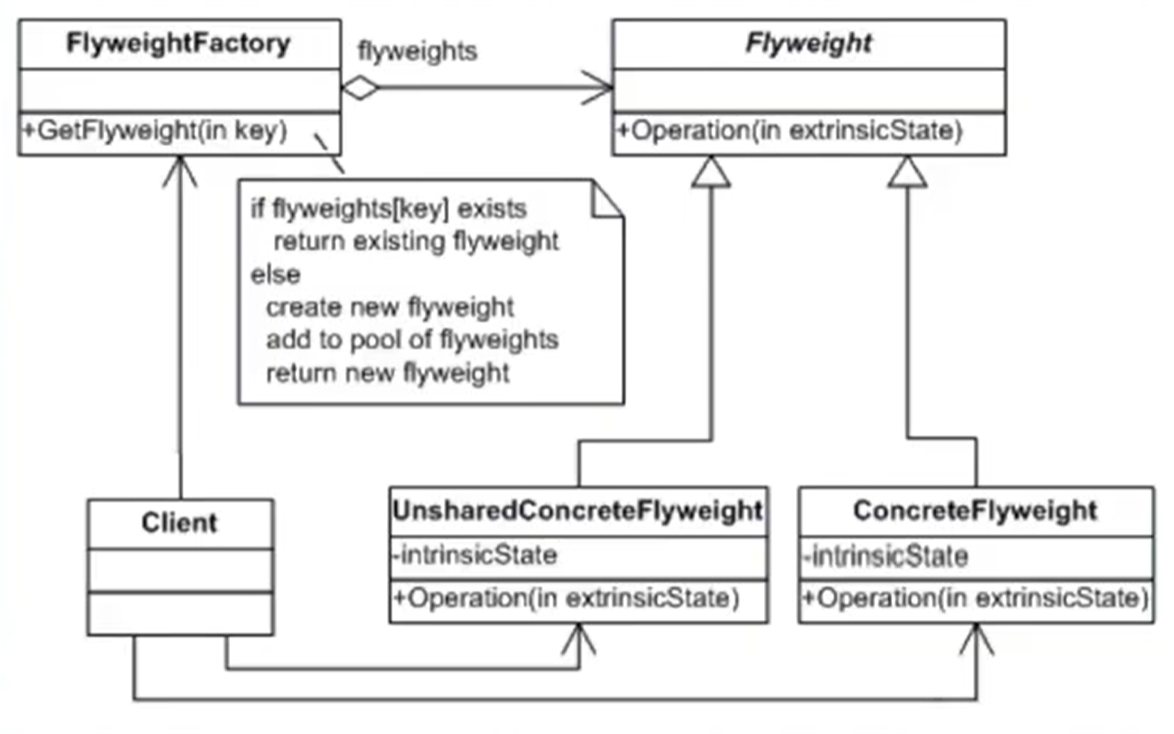
- Flyweight : 추상 클래스
- ConcreteFlyweight : Flyweight 추상클래스를 구현한 서브 클래스
- UnsharedConcreteFlyweight : 공유하는 Intrinsic State가 없는 예외 클래스 (필요할 때만 사용)
- FlyweightFactory의 Pool에서 관리되는 Flyweight 객체가 아니므로, 항상 new로 생성해야 한다.
- FlyweightFactory : 이름처럼 Factory Method 패턴을 이용한 클래스. Flyweight 객체를 HashMap 풀에 담아 관리하고, 필요할 때 찾아주거나 없으면 생성한다.
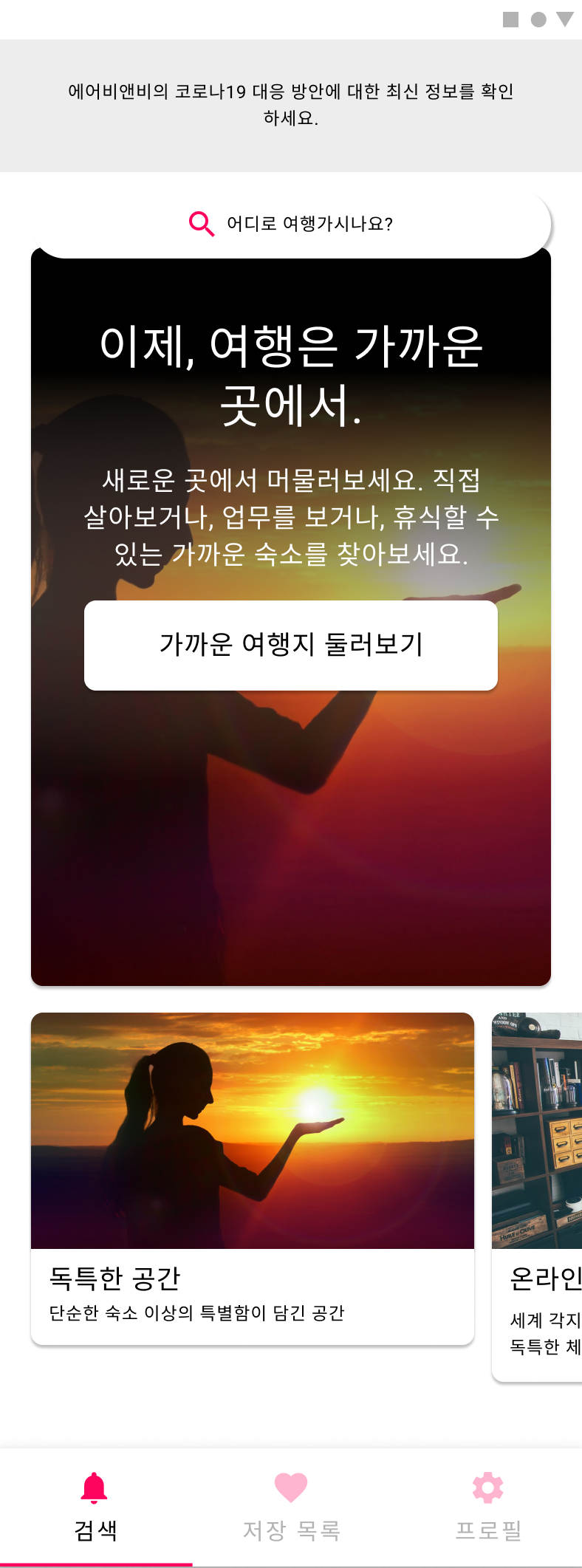
한 화면에서 같은 이미지 파일이지만, 크기만 다르게 여러 곳에 배치되는 경우가 있다. 동일한 리소스를 여러 번 생성하는 것은 자원 낭비일 것이다. Flyweight 패턴을 사용하면 한 번만 이미지를 생성하고, 이를 장소마다 재사용할 수 있게 된다.
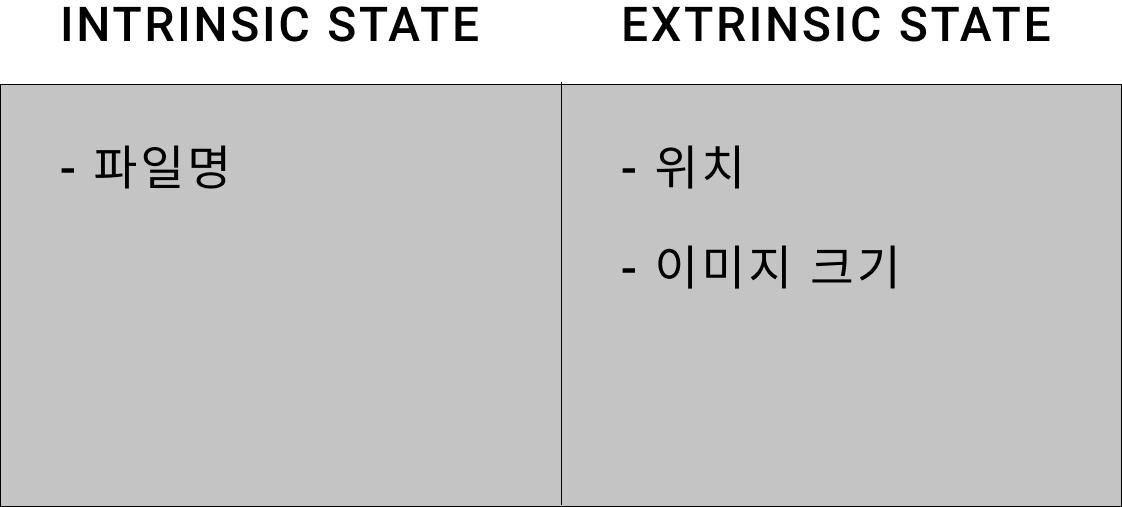
먼저 State를 나눈다. 이미지 파일에서 바뀌지 않는 Intrinsic State는 파일명(fileName), 외부 환경에 따라 바뀌는 변수는 위치(position)와 이미지 크기(size)로 구분할 수 있다.
이미지 로딩에 Flyweight Pattern을 적용한 예시는 다음과 같다.
| 패턴 클래스 | 예시 클래스 |
|---|---|
| Flyweight | Base Image |
| ConcreteFlyweight | Image |
| UnsharedConcreteFlyweight | - |
| FlyweightFactory | ImageFactory |
| Client | HomeRenderer |
- Flyweight class
abstract class BaseImage {
    // Flyweight 추상 클래스의 Operation(in extinsicState) 메소드
    abstract fun display(x: Int, y: Int, width: Int, height: Int)
}- ConcreteFlyweight class
// intrinsic state
class Image(private val fileName: String): BaseImage() {

    // extrinsic state
    override fun display(x: Int, y: Int, width: Int, height: Int) {
        println("<img src=$fileName style=left:${x}px; top:${y}px; width:${width}px; height:${height}px/>\n")
    }
}- Flyweight Factory class
class ImageFactory {
    private val flyweights = hashMapOf<String, BaseImage>()

    fun getFlyweight(fileName: String): BaseImage {
        val flyweight: BaseImage?

        if(flyweights.contains(fileName)){
            flyweight = flyweights[fileName] as BaseImage
            println("캐시된 이미지를 반환합니다. $fileName")
        } else {
            flyweight = Image(fileName)
            flyweights[fileName] = flyweight
            println("새로운 이미지 객체를 생성합니다. $fileName")
        }

        return flyweight
    }
}- Client class
class HomeRenderer {
    fun render(){
        val factory = ImageFactory()
        var image = factory.getFlyweight("image.png")
        image.display(0, 0, 360, 640)

        image = factory.getFlyweight("image.png")
        image.display(30, 60, 720, 1280)

        image = factory.getFlyweight("image.png")
        image.display(70, 120, 1440, 2560)

        image = factory.getFlyweight("another_image.png")
        image.display(90, 180, 180, 320)
    }
}- 메인 메소드에서 실행한다.
fun main(){
    val renderer = HomeRenderer()
    renderer.render()
}- 결과
새로운 이미지 객체를 생성합니다. image.png
<img src=image.png style=left:0px; top:0px; width:360px; height:640px/>

캐시된 이미지를 반환합니다. image.png
<img src=image.png style=left:30px; top:60px; width:720px; height:1280px/>

캐시된 이미지를 반환합니다. image.png
<img src=image.png style=left:70px; top:120px; width:1440px; height:2560px/>

새로운 이미지 객체를 생성합니다. another_image.png
<img src=another_image.png style=left:90px; top:180px; width:180px; height:320px/>