GitHub is an online provider for code hosting. GitHub uses git for
version control in "repositories", or projects.
Think of GitHub as a Google Drive for code. You can store files, you can edit files with multiple people, etc.
Git is a version control tool. GitHub uses Git to manage versions of sources of code. Git is not used on GitHub exclusively and it's commands are transferable to other providers. GitHub is a provider which utilizes Git for version control.

Things to remember:
git addgit commitgit pushgit branchgit checkout
Things to note:
Commit Messages should be detailed in explaining anything added, fixed, or removed. You should also include any know bugs or issues your commit might have introduced.
Example of commit message:
Implemented drive train which allows the robot to drive using arcade drive with an Xbox Controller.

Implemented arcade drive using the DifferentialDrive class and 4
FalconFX motors wired in CAN. Added DrivetrainCommand which uses the DrivetrainSubsystem
to drive. The left joystick controls all drive train logic. X-axis defines rotation.
Y-axis defines throttle.

Things to remember:
- Creating a GitHub repository
- Git Clone
git pushgit pull- Creating a pull request
- Code review
Things to note:
- Branch names should follow the following style:
<github username>-<issue number><github username>: Your github username in all lowercase<issue number>: The issue number you are addressing (see next section)

Things to remember:
- How to create an issue
- How to assign a user to issues & other assignable information
- How to reference issues in comments & commits
- How to reference commits in comments & issues
- How to resolve issues
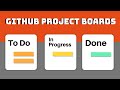
Things to remember:
- Where to find the boards view
- How to create a task
- How to interact with tasks
- How to add an issue to the board