


Languages: English | 中文 | हिन्दी | Español | العربية | Français | Português | Русский | Bahasa Indonesia | Deutsch | 日本語 | 한국어 | Italiano | Nederlands
KDA CUDA Trainer is a compact, trainable causal language model example built from scratch. Its sequence-mixing module uses Kimi Delta Attention (KDA): CUDA training uses the chunked Triton kernel from FLA, and a differentiable token-by-token PyTorch reference implementation is included for readability and CPU experiments.
This repository implements a pure-KDA teaching model (not full Kimi Linear). It uses UTF-8 bytes as tokens to avoid tokenizer dependencies, and includes next-byte language modeling, AdamW, warmup/cosine LR schedule, gradient accumulation, mixed precision, validation loss, checkpoints, and sampling.
Official project homepage: kda-cuda-trainer.pages.dev
The website is the primary public landing page for demos and analytics-backed visitor geography, while GitHub remains the canonical source for code and releases.
For consistency across all language versions, core technical terms are kept in English: token, backend, kernel, head, layer, query, key, value, gate, and delta rule.
- Python 3.10+
- For CUDA training: NVIDIA GPU and CUDA-enabled PyTorch
- BF16-capable GPUs are recommended; older GPUs can use FP16
Install CUDA-matched PyTorch first, then install the project and FLA kernel:
pip install -e '.[cuda]'
For a CPU smoke test, install the base package with pip install -e .; FLA is not required.
Train on the included tiny text corpus:
python -m kda_train.train --device cuda --steps 1000
Use your own UTF-8 text corpus:
python -m kda_train.train --dataset /path/to/corpus.txt --device cuda --seq-len 512 --batch-size 8
Generate text:
python -m kda_train.generate outputs/kda.pt --prompt 'Once upon a time' --tokens 200
From the repository root, run a tiny reference-backend model for two training steps, then load its checkpoint to generate eight bytes:
python -m kda_train.train --device cpu --kda-backend reference --amp off --steps 2 --batch-size 1 --seq-len 16 --dim 32 --heads 2 --layers 1 --eval-interval 1 --eval-batches 1 --out outputs/cpu-smoke.pt
python -m kda_train.generate outputs/cpu-smoke.pt --device cpu --prompt 'Hello' --tokens 8
This checks training, checkpoint saving, and generation. Two steps are not enough to learn meaningful text; use CUDA for larger training runs.
auto: Usesfla.ops.kda.chunk_kdaon CUDA whenfla-coreis installed; otherwise falls back to the differentiable PyTorch reference path.fla: Forces FLA CUDA kernel.reference: Forces token-by-token PyTorch scan. This keeps a full graph and is not suitable for long-sequence training.
Use fla-core >= 0.5.2 to ensure KDA beta sigmoid support in CUDA path.
Each head maintains a K×V state matrix. For each token, a per-key forget gate decays the state; then key-prediction error is computed and written back to value via delta rule. Query vectors read from the updated state. Each layer also includes input projection, beta and per-channel gate, output gating, and MLP.
This implementation prioritizes a readable training pipeline. Full Kimi Linear reproduction requires additional components such as hybrid MLA layers, short convolution, larger scale, and full training recipe.
- Kimi Team, Kimi Linear: An Expressive, Efficient Attention Architecture
- Moonshot AI, Kimi-Linear official repository
- Flash Linear Attention (FLA) KDA implementation
Install test dependencies:
pip install -e '.[test]'
pytest -q
Tests force the PyTorch reference backend so they can run on CPU. For CUDA kernel training path, use the .[cuda] extra. Please read CONTRIBUTING.md before opening a PR.
Please do not disclose potential vulnerabilities in public issues. Reporting guidance is in SECURITY.md.
The existing Cloudflare Pages project serves the website and a read-only /stats.svg
Pages Function. The function queries Cloudflare Web Analytics, filters the project hostname
and site tag, and caches the statistics card for five minutes. Loading the card does not
increment a visitor counter. These website figures are independent of the
VisitorBadge and FlagCounter images in the GitHub Repository Traffic section below.
See deployment and analytics configuration for the three required Pages bindings. Until they are configured, or when the upstream API fails, the card explicitly reports that statistics are unavailable rather than showing fake zeros.
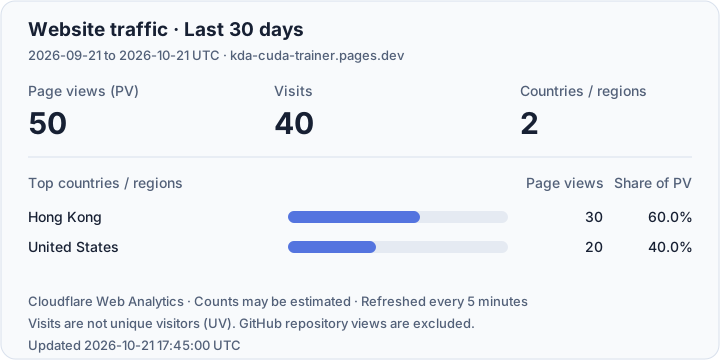
Cloudflare Web Analytics statistics for the project website over the last 30 days. The website and this README share the same statistics card, refreshed every five minutes (GitHub's image cache may delay updates). Visits are not unique visitors (UV). GitHub repository views are excluded. Country / region percentages use all website page views.
The counters below track this repository's README image requests, separately from the official website's Cloudflare statistics. The existing counter identifiers are retained and shared across the README language versions.
README views (VisitorBadge):
README visitor countries / regions (FlagCounter):
These are approximate image-based counters: GitHub's image proxy and cache can affect both counts and apparent regions. They are not GitHub's official Traffic metrics. Website and README counts are reported separately and are not added together.