



With this repo you can cap costs and stop usage for a Google Cloud project by disabling Cloud Billing automatically. Removing the billing account from a project will cause all Google Cloud services in the project to terminate, including free-tier services.
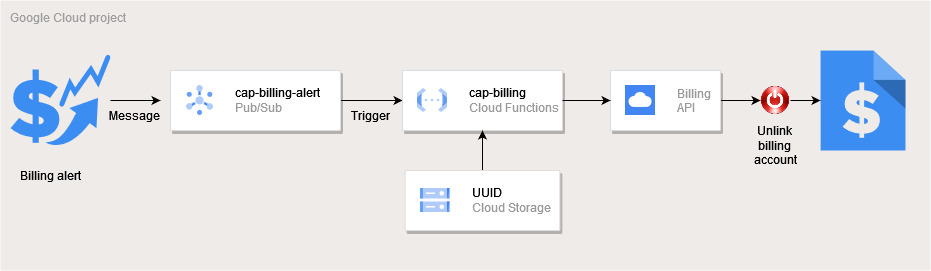
You might want cap costs because you have a hard limit on how much money you can spend on Google Cloud. This is typical for students, researchers, or developers working in sandbox environments. In these cases you want to stop the spending and might be willing to shutdown all your Google Cloud services and usage when your budget limit is reached.
Warning When you remove Cloud Billing from your project, all resources are shut down. The resources may not shut down gracefully and be irretrievably deleted. There is no gracefully recovery if you disable Cloud Billing. You can re-enable Cloud Billing, but there is no guarantee that the service will be restored and manual configuration is required.
Everything is based on the original Google Cloud documentation.
This repo has the advantage that everything is deployed automatically thanks to Terraform. You don't have to set up all the steps each time for additional projects.
It also creates a separate custom role that can only unlink the billing account from the project, but not enable it. This has the advantage that only a billing administrator can enable the billing back and not the project itself.
Recommendation: If you have a hard funds limit, set your maximum budget below your available funds to account for billing delays.
Run all tasks in the free Google Cloud Shell.
All necessary tools (gcloud and terraform) are already installed.

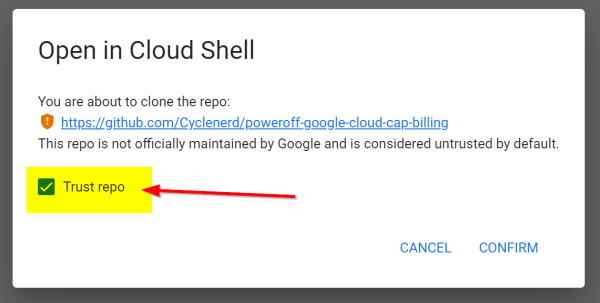
Trust repo:
You need to be the Owner and Billing Account Administrator of the project.
Clone this repo and initial setup:
git clone https://github.com/Cyclenerd/poweroff-google-cloud-cap-billing.git
cd poweroff-google-cloud-cap-billing
terraform initAuthenticate with Google Cloud:
gcloud auth login --update-adcSet the project that should be stopped when a certain amount is exceeded
Replace YOUR-GOOGLE-CLOUD-PROJECT with your Google Cloud project ID:
export GOOGLE_CLOUD_PROJECT="YOUR-GOOGLE-CLOUD-PROJECT"
gcloud config set project "$GOOGLE_CLOUD_PROJECT"Now you can create a budget alert and Cloud Function for this project:
# Stop billing if 1000 USD are exceeded
terraform apply \
  -var="project_id=$GOOGLE_CLOUD_PROJECT" \
  -var="target_amount=1000"
The required Google Cloud APIs and services are enabled automatically by Terraform
before any other resources are created.
The APIs are not disabled again on terraform destroy.
In detail the following is added to the project:
- Required Google Cloud APIs and services
- Service account :
sa-cap-billing@... - Custom role :
myCapBilling - Pub/Sub topic :
cap-billing-alert - Pub/Sub subscription :
cap-billing-alert-pull - Budget alert :
Unlink YOUR-GOOGLE-CLOUD-PROJECT from billing account - Storage bucket for Cloud Function source code :
RANDOM-UUID - Cloud Function with Pub/Sub event trigger :
cap-billing-RANDOM-HEX
You can customize the setup with the following Terraform input variables:
| Variable | Description | Default |
|---|---|---|
project_id |
The project ID for the resources and budget alert | |
pubsub_topic |
Name of the Pub/Sub topic | cap-billing-alert |
target_amount |
Set maximum monthly budget amount (currency as in billing account) | 1000 |
region |
Region for the resources | us-central1 |
Examples
Via command:
# Stop billing if 5 USD are exceeded and deploy everything in europe-west4
terraform apply \
  -var="project_id=$GOOGLE_CLOUD_PROJECT" \
  -var="target_amount=5" \
  -var="region=europe-west4"
Or via config file terraform.tfvars:
# Project ID
project_id=bla-fa-123
# Target amount
target_amount=10
# Pub/Sub topic
pubsub_topic=stop-billing-alert
Apply with config file:
terraform applyYou can perform a test. The billing account will be removed. Do it only if you are sure and the project is not important.
Check active billing account:
gcloud beta billing projects describe "$GOOGLE_CLOUD_PROJECT" | grep billingAccountNameSend a message that triggers the Cloud Function and disables billing:
gcloud pubsub topics publish "cap-billing-alert" --message='{ "costAmount" : 2, "budgetAmount": 1 }'Wait a while... Billing should then be disabled.
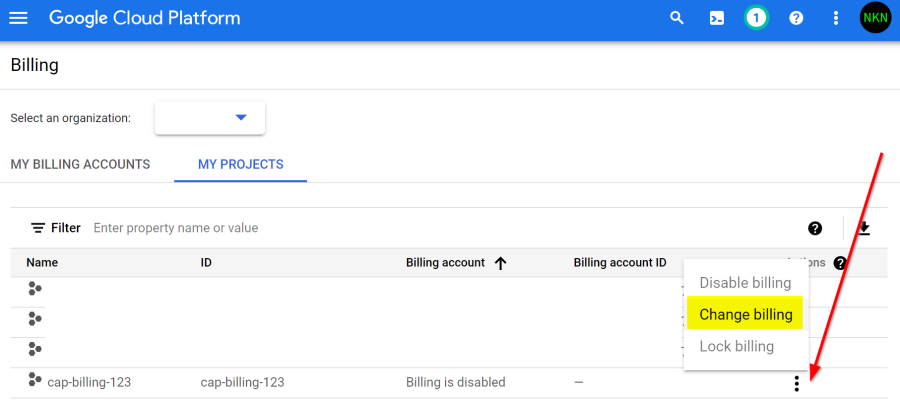
gcloud beta billing projects describe "$GOOGLE_CLOUD_PROJECT" | grep billingAccountNameEnable billing for an existing project:
To run the commands described in this repo, you need the following:
- Install the Google Cloud CLI version 585.0.0 or later
- Install Terraform version 1.12.2 or later.
- Set up a Google Cloud billing account and project.
Have a patch that will benefit this project? Awesome! Follow these steps to have it accepted.
- Please read how to contribute.
- Fork this Git repository and make your changes.
- Create a Pull Request.
- Incorporate review feedback to your changes.
- Accepted!
All files in this repository are under the Apache License, Version 2.0 unless noted otherwise.
Please note:
- No warranty
- No official Google product