
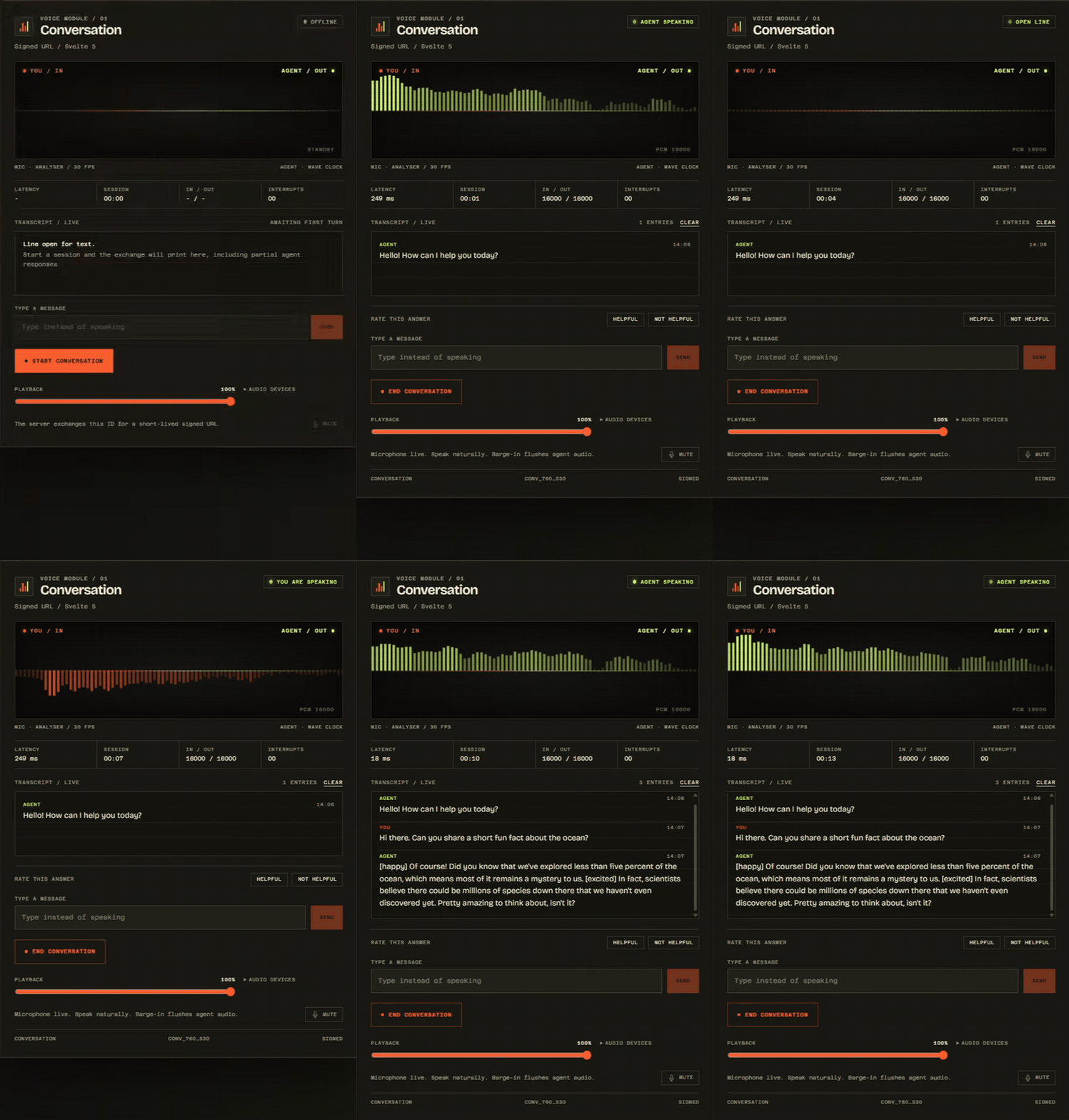
A live session recorded from the showcase at /demo. Click the preview for the MP4 with sound.
This is an independent community project. Not affiliated with or endorsed by ElevenLabs Inc.
A Svelte 5 library and SvelteKit 3 showcase for ElevenLabs Conversational AI. One controller opens a low-latency voice or text session, exposes reactive call state, streams PCM audio over a WebSocket, and releases its sockets, media tracks, audio nodes, and timers on teardown.
The showcase server and package tooling run on Node 22.17 or newer and Bun 1.4 or newer. The controller and components run in the browser. Built with Svelte 5, SvelteKit 3, TypeScript, and TailwindCSS 4.
- Controller-first state:
status,isSpeaking,isListening,volume,transcripts, anderrorupdate directly in your markup. - Signed URLs without leaks: the API key stays in the SvelteKit server process. The browser receives only a short-lived URL.
- Real audio: AudioWorklet capture, low-pass anti-aliasing, sample-rate conversion, PCM16 little-endian base64, one-clock playback scheduling, and immediate barge-in flushing.
- Text only sessions: skip microphone permission and audio contexts while keeping typed turns, transcripts, client tools, and feedback on the same socket.
- Conversation tools: named client tools, a provider scoped
useConversationClientToolhook, MCP approval handling, feedback, user activity throttling, and audio alignment callbacks. - Audio controls: input and output device selection, live device switching, playback gain, mute, and analyser data for custom visuals.
- Clean teardown:
useConversationregisters an$effectteardown. UsecreateConversationwhen you want to own the lifecycle. - Ready-made UI: an analyser-driven
<AudioVisualizer>and a complete<ConversationWidget>ship in the same package. - Two hosting paths: a safe static GitHub Pages demo with public agent ids, and a full Node or Bun server build with signed URL exchange.
- Typed public surface: public types, helpers, and controller members carry JSDoc for editor IntelliSense.
svelte-elevenlabs connects a Svelte 5 component to an ElevenLabs Conversational AI agent over a WebSocket. It owns the browser side of one live session:
- Reactive session state.
ConversationControllerexposes connection status, speaking and listening flags, microphone and playback levels, transcripts, errors, latency, queue state, negotiated audio formats, context usage, VAD score, and device ids as Svelte state and derived values. - Voice or text. A session can capture microphone audio, play streamed agent audio, or run in text only mode. Text only sessions skip microphone permission and Web Audio contexts while keeping the same WebSocket protocol, transcripts, tools, and feedback.
- Local audio pipeline. Capture uses an
AudioWorkletwith aScriptProcessorfallback, a low-pass filter, linear resampling, and PCM16 base64 framing. Playback decodes PCM16 or G.711 µ-law and schedules accepted chunks on oneAudioContextclock. - Conversation features. Client tools, an MCP approval callback, typed user turns, contextual updates, feedback, user activity signals, audio alignment, agent tool events, guardrails, and context usage are part of the controller.
- Control over audio routing. Select input and output devices, switch devices during a session, set playback gain, mute the microphone, and read analyser data for custom visuals.
- Svelte lifecycle integration.
useConversationregisters an$effectteardown that closes the socket, stops media tracks, clears timers, aborts signed URL requests, and closes audio contexts.createConversationis available for stores, tests, and custom lifecycle code. - Provider and tools.
ConversationProvidershares one controller through Svelte context, anduseConversationClientToolregisters a component scoped client tool that is removed on unmount. - Ready-made UI.
<AudioVisualizer>and<ConversationWidget>consume the same controller. The widget supports voice, text, feedback, playback volume, device selection, transcripts, queue state, and theming through CSS custom properties. - Safe signed URLs. The included SvelteKit route validates
agent_andseng_ids, setsCache-Control: no-store, and keepsELEVENLABS_API_KEYon the server. The static Pages build removes the route and disables signed mode in the UI.
The repository also contains a runnable SvelteKit 3 showcase in src/routes. It demonstrates the controller, signed and public connection modes, voice and text sessions, device controls, feedback, and the diagnostic console. The /demo page renders <ConversationWidget> on its own, with a focus view for recording, and the svelte-elevenlabs agents command installs a reviewed guide for coding agents.
The showcase ships a documentation section at gabryca.github.io/svelte-elevenlabs/docs. It covers the same API as this guide, organized by task:
- Start here: overview, install, and quickstart.
- Guides: sessions, audio, client tools, components, and signed URLs.
- Tooling: the agent kit for coding agents.
- Reference: API reference and troubleshooting.
Run bun run dev and open http://localhost:5173/docs to read it locally. The static Pages build includes the same pages and respects PAGES_BASE_PATH, while the signed URL guide explains why that route only exists on the Node or Bun server.
The showcase and docs share a light and dark theme. The first visit follows the system color scheme, the toggle in the masthead or docs top bar saves a choice, and both palettes keep the warm paper and chassis character. Documentation code samples are tokenized for TypeScript, Svelte, shell, CSS, JSON, and HTTP. The right rail marks the section currently in view and moves between entries smoothly, and each docs article enters with a short, reduced-motion-aware transition.
The same material is published as plain Markdown for coding agents and other language model tools:
/llms.txtis a compact index with a short summary and links to every guide./llms-full.txtis the complete reference, including options, controller fields, methods, error codes, and deployment notes./docs/llms.txtmirrors the compact index under the docs path.
The files are prerendered, so they exist in the Node, Bun, and static Pages builds. Absolute links follow PAGES_BASE_PATH, and the reference version is read from package.json.
The agent kit is a shorter, decision-focused companion for project work. It installs into the consumer project instead of replacing these endpoints.
The package ships a canonical guide for coding agents and a small installer that writes it into the file each tool already reads.
# Bun
bunx svelte-elevenlabs agents install

# npm
npx svelte-elevenlabs agents install
With no target names, the command detects Claude Code, Cursor, OpenCode, GitHub Copilot, Windsurf, Cline, Gemini CLI, and AGENTS.md aware tools in the current project. When it cannot detect one, it adds a managed block to AGENTS.md. Choose targets explicitly when you want more:
bunx svelte-elevenlabs agents install claude cursor opencode
bunx svelte-elevenlabs agents install --all
bunx svelte-elevenlabs agents install claude --dry-run
Targets are claude, cursor, opencode, copilot, windsurf, cline, gemini, and agents. Shared files such as AGENTS.md, GEMINI.md, and .github/copilot-instructions.md keep their existing content. The installer updates only the block between svelte-elevenlabs:agent-kit:start and svelte-elevenlabs:agent-kit:end. Dedicated skill and rule files are skipped when they already exist without a managed block unless you pass --force.
Use agents list to print every destination path and agents print to send the guide to standard output. The canonical source is agent-kit/instructions.md, and the full guide is at gabryca.github.io/svelte-elevenlabs/docs/agents.
The showcase includes a focus view at gabryca.github.io/svelte-elevenlabs/demo. It renders <ConversationWidget> against a live agent with the same controller as the main console. The Node and Bun builds use signed URLs; the static Pages build uses a public agent id.
| Requirement | Version or note |
|---|---|
| Node | 22.17 or newer for the server build and package tooling |
| Bun | 1.4 or newer for installs, scripts, and the optional Bun server adapter |
| Svelte | 5.x peer dependency |
| SvelteKit | 3.x for the included showcase. The controller itself only needs Svelte. |
| TypeScript | Strict mode with no implicit any |
| Browser | WebSocket; for voice, Web Audio, getUserMedia, and a secure context |
| ElevenLabs | An agent id and, for signed mode, a workspace API key |
The microphone requires HTTPS or localhost. Browsers block getUserMedia in insecure contexts. The library reports this as a clear insecure-context error instead of failing silently.
# Bun
bun add svelte-elevenlabs

# npm
npm install svelte-elevenlabs
The package is ESM-only and declares Svelte 5 as a peer dependency. The root entry contains Svelte components, so use a Svelte-aware bundler. For Node scripts, tests, or server code, use the Node-safe subpaths:
import { parseAudioFormat, resampleLinear } from 'svelte-elevenlabs/audio';
import type { AudioFormat, ConversationOptions } from 'svelte-elevenlabs/types';
Published subpaths:
svelte-elevenlabsfor the controller, audio engine, types, and components.svelte-elevenlabs/audiofor the framework-agnostic audio manager and helpers.svelte-elevenlabs/typesfor the public type surface andConversationError.svelte-elevenlabs/package.jsonfor tooling.
No global CSS import is required for the components. Their styles are scoped and use themeable CSS variables. If you use the ready-made components inside a Tailwind v4 app, make the package output discoverable:
/* app.css */
@import 'tailwindcss';
@source '../node_modules/svelte-elevenlabs/dist';<script lang="ts">
import { useConversation } from 'svelte-elevenlabs';
const conversation = useConversation({ agentId: 'agent_...' });
</script>
<button onclick={() => conversation.startConversation()}>Talk</button>Call useConversation during component initialisation so its cleanup effect can register. Use createConversation in stores, tests, or other non-component code and call destroy() yourself.
Signed URLs are recommended for production. Pass
{ signed: true }as the second argument tostartConversationand provide the server route shown below. Public agent ids connect directly and are convenient for demos.
Set textOnly on the controller, or pass it per start call. Text only sessions skip microphone permission and Web Audio setup, but still need a browser and an open WebSocket.
<script lang="ts">
	import { useConversation } from 'svelte-elevenlabs';
	const conversation = useConversation({ agentId: 'agent_...', textOnly: true });
</script>

<button onclick={() => conversation.startConversation()}>Open chat</button>

<form
	onsubmit={(event) => {
		event.preventDefault();
		conversation.sendUserMessage('Hello from a typed turn.');
	}}
>
	<input aria-label="Message" />
	<button type="submit">Send</button>
</form>
A per-session override is available when the same controller needs both modes:
await conversation.startConversation('agent_...', { textOnly: true });Public agent ids use the US origin by default. Set serverLocation to eu-residency or in-residency to use a regional origin. global maps to the US origin. An explicit origin takes precedence.
const conversation = useConversation({
	agentId: 'agent_...',
	serverLocation: 'eu-residency'
});Register named tools once on the controller or per component inside a provider. Named tools take precedence over the onClientToolCall fallback.
<!-- ToolRow.svelte -->
<script lang="ts">
	import { useConversationClientTool } from 'svelte-elevenlabs';

	useConversationClientTool('get_order', async ({ orderId }) => {
		return { orderId, status: 'shipped' };
	});
</script>

<span>Tool ready</span>
<!-- App.svelte -->
<script lang="ts">
import { ConversationProvider } from 'svelte-elevenlabs';
import ToolRow from './ToolRow.svelte';
</script>
<ConversationProvider options={{ agentId: 'agent_...' }}>
<ToolRow />
</ConversationProvider>conversation.setVolume(0.8);
await conversation.changeInputDevice('microphone-id');
await conversation.changeOutputDevice('speaker-id');
conversation.sendFeedback(true);
conversation.sendUserActivity();Feedback is accepted after a response event id is available. Device switching requires an active voice session. Both methods return a boolean and publish a typed error when they cannot complete.
The included workflow builds a prerendered demo with @sveltejs/adapter-static. It sets PUBLIC_HOSTING_MODE=static, hides and disables the signed URL radio, and never includes the API route or the API key in the artifact.
Use this mode when you only have a public agent id, or when visitors paste a signed URL they already have. GitHub Pages cannot mint signed URLs because it has no server runtime.
PUBLIC_ELEVENLABS_AGENT_ID=agent_examplePublicId bun run build:pagesOn Windows PowerShell:
$env:PUBLIC_ELEVENLABS_AGENT_ID = 'agent_examplePublicId'
bun run build:pages
The default Pages output is build. To preview it locally, serve that directory with any static file server, for example bunx serve build.
The default application build uses @sveltejs/adapter-node and runs on Node 22.17+ or Bun 1.4+. This is the mode that can keep ELEVENLABS_API_KEY on the server and exchange it for signed URLs.
bun install
cp .env.example .env
# add ELEVENLABS_API_KEY and PUBLIC_ELEVENLABS_AGENT_ID
bun run dev
In PowerShell, use Copy-Item .env.example .env instead of cp.
Production build and start:
bun run build
bun run start
The default port is 3000. Set PORT to change it. The same build runs with Node:
npm run build
npm start
The start script adds --env-file-if-exists=.env, so Node reads the same .env file that Bun loads automatically. In a container or a hosting platform, set the variables in the process environment instead.
For a dedicated Bun server bundle:
bun run build:bun
bun run start:bun
build:bun runs Vite with bun --bun because the Bun adapter requires the Bun runtime during the build. Do not run the Node and Bun builds against the same build directory at the same time. The last build wins.
Never put ELEVENLABS_API_KEY in a PUBLIC_* variable, a client component, or a browser request. The included route is src/routes/api/signed-url/+server.ts. Its contract:
GET /api/signed-url?agent_id=agent_...Success response:
{ "signed_url": "wss://api.elevenlabs.io/v1/convai/conversation?agent_id=..." }Error response:
{ "error": { "message": "Human-readable explanation." } }The server validates the agent id, calls the ElevenLabs signed URL endpoint with xi-api-key, and returns a short-lived WebSocket URL. The response is marked Cache-Control: no-store. The API key is never echoed to the client.
The controller fetches this same-origin route only when you ask for it:
await conversation.startConversation('agent_...', { signed: true });You can also pass an already-minted signed URL directly:
await conversation.startConversation('wss://api.elevenlabs.io/v1/convai/conversation?agent_id=...');Deploying a public server? Add authentication or rate limiting to
/api/signed-url. A public endpoint that mints signed URLs for arbitrary agent ids can spend your ElevenLabs quota.
# .env: server only
ELEVENLABS_API_KEY=your_key_here

# Optional and public: prefills the demo target field
PUBLIC_ELEVENLABS_AGENT_ID=agent_examplePublicId

# Static build only. build:pages sets this automatically.
PUBLIC_HOSTING_MODE=static

# Static build only. GitHub project sites use /<repository>.
PAGES_BASE_PATH=/svelte-elevenlabs
The demo reads public values through SvelteKit 3's explicit environment contract in src/env.ts and $app/env/public. The API key is read from process.env only inside the server route. The legacy $env/dynamic/* modules are deprecated in SvelteKit 3.
build:pages forces PUBLIC_HOSTING_MODE=static. PAGES_BASE_PATH is read from the environment for any build, because SvelteKit reloads the Vite config after the build without the original mode. The release workflow provides both values.
The repository ships two workflows. Both install Bun 1.4.3 and use the current major versions of the official GitHub Actions.
.github/workflows/release.yml runs on every push to main and on manual dispatch:
- It reads the version from
package.json. - It checks for the matching
v<version>tag and GitHub release. - When either is missing, it creates an annotated tag on the pushed commit and publishes a GitHub release with generated notes and the packed npm tarball.
- It builds the static demo, uploads the Pages artifact and a downloadable demo artifact, then deploys GitHub Pages.
- It builds the library with
prepackand uploadssvelte-elevenlabs-<version>.tgzas a workflow artifact.
A version bump is the release switch. Update package.json and CHANGELOG.md in the same pull request, merge to main, and the tag is created automatically. A push without a version bump still deploys Pages and refreshes the artifacts, but it does not create a duplicate tag or release.
Workflow artifacts are retained for 14 days:
svelte-elevenlabs-<version>contains the publishable npm tarball.svelte-elevenlabs-static-democontains the full static demo, including.nojekyll.
To enable Pages:
- Open repository Settings, then Pages, and set the source to GitHub Actions.
- Optionally add the repository variable
PUBLIC_ELEVENLABS_AGENT_IDwith a public agent id. - Optionally set the repository variable
PAGES_BASE_PATHfor a custom domain or user site. When it is empty, the workflow uses thebase_pathoutput fromactions/configure-pages. - Confirm that the repository allows the workflow token to write contents. The release job requests
contents: writeonly for the tag push and GitHub release.
The static artifact contains index.html, _app assets, favicon.svg, and .nojekyll. Asset URLs are relative, so the same build works at a project site path or at a domain root.
Do not add ELEVENLABS_API_KEY to repository variables, Pages secrets, or any PUBLIC_* name. The static build cannot use it and must not receive it.
.github/workflows/ci.yml runs on pull requests and manual dispatch. It type-checks Svelte and TypeScript, runs the offline test suite, checks formatting and lint, builds the Node app and package, and builds the static demo. A second job runs the same offline suite under Node 22.17, the minimum supported Node version. Live ElevenLabs tests are never enabled in CI.
Creates a reactive ConversationController and registers an $effect that destroys it on unmount.
const conversation = useConversation({
	agentId: 'agent_...',
	signedUrlEndpoint: '/api/signed-url',
	dynamicVariables: { customer_name: 'Ada' },
	debug: false
});| Option | Type | Default | Purpose |
|---|---|---|---|
agentId |
string |
- | Default public agent id. |
signedUrl |
string |
- | Default signed WebSocket URL. |
signedUrlEndpoint |
string |
'/api/signed-url' |
Same-origin route used by signed mode. |
origin |
string |
wss://api.elevenlabs.io |
WebSocket origin for public ids. |
serverLocation |
"us" | "eu-residency" | "in-residency" | "global" |
"us" |
Data residency used for public ids. |
connectionType |
"websocket" | "webrtc" |
"websocket" |
Only WebSocket is implemented. |
textOnly |
boolean |
false |
Skip microphone and audio contexts. |
dynamicVariables |
Record<string, string | number | boolean> |
- | Values available to the agent prompt. |
userId |
string |
- | Stable end-user id for analytics and memory. |
overrides |
ConversationConfigOverride |
- | Per-session prompt, TTS, and ASR overrides. |
clientTools |
Record<string, ClientToolHandler> |
- | Named client tool handlers. |
onClientToolCall |
(call) => string | object | Promise<...> |
- | Fallback handler for unmatched client tools. |
inputDeviceId |
string |
system default | Preferred microphone. |
outputDeviceId |
string |
system default | Preferred speaker, when supported. |
micMuted |
boolean |
false |
Start with the microphone muted. |
outputVolume |
number |
1 |
Initial playback gain, 0..1. |
inputChunkDurationMs |
number |
100 |
Mic chunk size, clamped to 50 to 250 ms. |
interruptOnUserSpeech |
boolean |
true |
Local VAD flushes playback when you speak. |
vadThreshold |
number |
0.075 |
Normalized RMS threshold for local VAD. |
maxTranscripts |
number |
250 |
Maximum retained transcript entries. |
resetTranscriptsOnStart |
boolean |
true |
Clear the log when a new session starts. |
autoCleanup |
boolean |
true in useConversation |
Register the $effect teardown. |
debug |
boolean |
false |
Print diagnostics without transcript text or credentials. |
onStatusChange |
(status) => void |
- | Connection lifecycle callback. |
onConnect |
({ conversationId }) => void |
- | Handshake metadata is ready. |
onTranscript |
(message) => void |
- | Called on transcript create or update. |
onMessage |
(message) => void |
- | Alias for onTranscript. |
onModeChange |
(mode) => void |
- | High-level mode transitions. |
onCanSendFeedbackChange |
(canSendFeedback) => void |
- | Feedback availability changes. |
onVadScore |
(score) => void |
- | Server side voice activity score. |
onAudioAlignment |
(alignment) => void |
- | Character timing for an audio chunk. |
onContextUsage |
(usage) => void |
- | LLM context window usage. |
onMCPToolCall |
(call) => void |
- | MCP tool lifecycle updates. |
onMCPToolApprovalRequest |
(call, context) => boolean | Promise<boolean> |
- | Decide an MCP approval request. |
onGuardrailTriggered |
(event) => void |
- | Guardrail notifications. |
onError |
(error: ConversationError) => void |
- | Human-readable error callback. |
onLatency |
(ms) => void |
- | Time-to-first-audio measurement. |
onInterruption |
() => void |
- | Local or server barge-in. |
onDisconnect |
(details) => void |
- | WebSocket close details. |
onConversationId |
(id) => void |
- | Negotiated ElevenLabs conversation id. |
onDebug |
(event: DebugEvent) => void |
- | Structured debug events with safe metadata. |
The type surface also includes callbacks for streaming agent response parts, response corrections, completion, response metadata, keep-alive pings, agent tool requests and responses, MCP connection status, conversation metadata, incoming and outgoing protocol events, unhandled client tools, and audio chunks.
These fields are Svelte state or derived values. isTextOnly is a getter. Treat them as read-only and change state through the methods below.
| Member | Type | Description |
|---|---|---|
status |
"disconnected" | "connecting" | "connected" |
Connection lifecycle. |
isSpeaking |
boolean |
Agent playback is scheduled or audible. |
isListening |
boolean |
Microphone is live and the agent can hear it. |
isUserSpeaking |
boolean |
Local VAD currently detects speech. |
isMuted |
boolean |
Outgoing microphone audio is suppressed. |
volume |
number |
Loudest normalized level, 0..1. |
inputVolume and outputVolume |
number |
Per-direction normalized levels. |
transcripts |
TranscriptMessage[] |
Live transcript entries. |
error |
string | null |
UI-safe error message. |
errorCode |
ConversationErrorCode | null |
Stable error category. |
latency |
number | null |
Latest first-audio latency in ms. |
latencyHistory |
number[] |
Up to 12 recent measurements. |
conversationId |
string | null |
ElevenLabs conversation id. |
inputAudioFormat and outputAudioFormat |
AudioFormatId | null |
Negotiated formats. |
queueStatus |
QueueStatus | null |
Concurrency queue state. |
interruptions |
number |
Barge-in count for this session. |
messageCount |
number |
Derived transcript length. |
message |
TranscriptMessage | null |
Latest transcript entry. |
mode |
"disconnected" | "connecting" | "ready" | "listening" | "speaking" |
Single status label. |
canStart |
boolean |
True when disconnected. |
isTextOnly |
boolean |
Current or configured text only mode. |
canSendFeedback |
boolean |
Feedback is available for the latest turn. |
vadScore |
number |
Latest server side voice activity score. |
contextUsage |
ContextUsage | null |
Latest LLM context window usage. |
outputGain |
number |
Playback gain, 0..1. |
inputDeviceId and outputDeviceId |
string | null |
Selected audio devices. |
| Method | Description |
|---|---|
startConversation(target?, startOptions?) |
Starts a public agent, signed URL, or configured default. startOptions.signed requests a signed URL, and startOptions.textOnly overrides the controller mode. Connection and audio failures populate error instead of rejecting. |
stopConversation() and endSession() |
Closes the socket, stops the mic, flushes playback, closes contexts, clears timers, and keeps transcripts. |
toggleMute() and setMuted(muted) |
Suppress outgoing chunks without closing the device. |
setVolume(volume) |
Sets playback gain from a number or { volume }. Values are clamped to 0..1. |
getInputVolume() and getOutputVolume() |
Read the latest normalized levels. |
sendContextualUpdate(text, contextId?) |
Adds non-interrupting context for the next agent turn. |
sendUserMessage(text) |
Sends a typed user turn over the same socket. |
sendFeedback(like, eventId?) |
Sends like or dislike feedback for an agent response. |
sendUserActivity() |
Sends at most one activity frame per second. |
sendMCPToolApprovalResult(id, approved) |
Answers an MCP approval request manually. |
registerClientTool(name, handler) |
Registers a named tool and returns an unregister function. |
changeInputDevice(id?) |
Switches the microphone during a voice session. |
changeOutputDevice(id?) |
Routes playback to a speaker, when the browser supports it. |
listAudioDevices() |
Lists available audio input and output devices. |
getInputFrequencyData(target?) |
Reads microphone analyser bins (0 to 255) for custom visuals. |
getOutputFrequencyData(target?) |
Reads agent playback analyser bins. |
clearTranscripts() |
Clears the local log only. |
clearError() |
Dismisses the current error banner. |
destroy() |
Idempotent teardown. Called automatically by useConversation. |
The lifecycle-free factory. It returns a controller without registering an $effect. Use it in stores, tests, or custom lifecycle code, and call destroy() when finished.
Shares one controller with a component subtree through Svelte context. When conversation is omitted, the provider creates its own controller from options and destroys it on unmount. A supplied controller stays owned by the caller.
<script lang="ts">
	import { ConversationProvider } from 'svelte-elevenlabs';
</script>

<ConversationProvider options={{ agentId: 'agent_...', textOnly: true }}>
	<SupportPanel />
</ConversationProvider><script lang="ts">
import { getConversationContext } from 'svelte-elevenlabs';
const conversation = getConversationContext();
</script>
<button onclick={() => conversation.startConversation()}>Start</button>The provider captures its conversation and options props once. Keep them stable for the lifetime of the provider; use a keyed block when you need a new session configuration.
Registers a component scoped client tool on the nearest provider. The registration is removed when the component unmounts.
<script lang="ts">
	import { useConversationClientTool } from 'svelte-elevenlabs';

	useConversationClientTool('get_weather', async ({ city }) => {
		return { city, temperature: 21 };
	});
</script>All helpers are exported. The codec, resampling, and format parsers are pure. listAudioDevices reads browser devices, and AudioManager owns the browser audio graph.
import {
	AudioManager,
	AudioManagerError,
	encodePcm16Base64,
	decodePcm16,
	decodeUlaw,
	decodeAudioChunk,
	listAudioDevices,
	parseAudioFormat,
	resampleLinear
} from 'svelte-elevenlabs/audio';parseAudioFormat('pcm_16000')returns{ encoding: 'pcm', sampleRate: 16000, channels: 1 }.resampleLinear(samples, sourceRate, targetRate)returns a newFloat32Array.encodePcm16Base64(samples)anddecodePcm16(base64)implement the exact wire encoding.decodeUlaw(bytes)anddecodeAudioChunk(base64, format)add G.711 support.listAudioDevices()returns audio input and output devices, or an empty array outside a browser.AudioManageris the low-level browser audio graph used by the controller. Create one per session and callclose()when done.AudioManagerErrorcarries a stable code such aspermission-denied,insecure-context,device-busy,decode-failed, orclosed.
<script lang="ts">
	import { AudioVisualizer, ConversationWidget, useConversation } from 'svelte-elevenlabs';
	const conversation = useConversation({ agentId: 'agent_...' });
</script>

<AudioVisualizer {conversation} height={200} />
<ConversationWidget
	controller={conversation}
	title="Support line"
	signed={true}
	textOnly={false}
	showTelemetry={true}
	showTextInput={true}
	showFeedback={true}
	showAudioControls={true}
/>
<AudioVisualizer> reads real analyser data from the controller and draws both the microphone and agent spectra with DPR scaling, ResizeObserver sizing, and a reduced-motion path. It does not synthesize audio levels.
<ConversationWidget> is self-contained when given an agentId, or it can mirror a controller you already created. It includes the target field, public or signed start flow, live status, transcript, typed messages, feedback buttons, playback volume, device selectors, mute, telemetry, and clear or dismiss controls. Set textOnly on a widget that owns its controller to skip audio setup. Theme it through CSS custom properties:
.my-line {
	--se-signal: #ff5d2b;
	--se-agent: #cdf66c;
	--se-panel: #12120f;
	--se-ink: #f1eadb;
	--se-font-display: 'Bricolage Grotesque Variable', sans-serif;
	--se-font-mono: 'Azeret Mono Variable', monospace;
}- Format negotiation is mandatory. Read
conversation.inputAudioFormatandoutputAudioFormat. Do not assume 16 kHz. The library supportspcm_8000throughpcm_48000andulaw_8000. - Capture uses an inline AudioWorklet through a revocable Blob URL. If Worklets are blocked, it falls back to a ScriptProcessor. Chunks are low-pass filtered before decimation, linearly resampled on the main thread, and encoded as mono PCM16 little-endian base64.
- Playback schedules decoded chunks on one
AudioContextclock to avoid overlap. Flushing uses a 12 ms exponential gain ramp to prevent clicks. - Interruptions from the local VAD or the server flush queued audio immediately. Chunks with event ids older than the latest interruption are dropped.
- Keep-alives are answered as
pongafter the server-requested delay, with timers cleared on teardown. - Text only sessions set
text_onlyin the initiation override, skipAudioManager, and never request microphone permission. Typed turns usesendUserMessage. - Server locations map
usandglobaltowss://api.elevenlabs.io, and the residency values to their regional origins. An explicitoriginwins. - Audio routing uses
enumerateDevices,setSinkIdwhere supported, and a playback gain node. Device switching swaps the microphone track without restarting the session. - Feedback and activity are sent only while connected. Feedback uses the latest agent response event id, and user activity is throttled to one frame per second.
- Client tools and MCP approvals resolve once per tool call. MCP approvals are aborted when the session ends or the server leaves the approval state.
- Microphone denial maps to a clear message and an
errorCodeofpermission-deniedorinsecure-context. The audio graph is closed and no partial session remains. - SSR safety: the controller state is server-safe, but
startConversationrefuses to run outside a browser. Use it in event handlers. - Cleanup: sockets,
MediaStreamtracks, AudioWorklet URLs, analyser nodes, both audio contexts, ping timers, signed URL aborts, scroll timers, and animation frames are released. - Target validation: the client rejects malformed agent ids and non-WebSocket URLs before it asks for microphone permission.
The default suite is offline and deterministic:
bun run testIt covers audio format parsing, resampling, PCM16 and µ-law encoding and decoding, AudioManager browser guards, device enumeration guards, protocol parsing, target validation, URL normalization, server locations, close messages, error classes, the signed URL route, and reactive controller state. Controller coverage includes text only guards, feedback, user activity throttling, client tools, MCP approvals, volume clamping, and mode transitions. Vitest runs in the Node environment with the Svelte plugin, so controller modules compile without a browser. No microphone, Web Audio, network, or API key is required.
Live tests are opt-in because they consume ElevenLabs quota and are not part of the default suite, CI, or the release workflow:
ELEVENLABS_LIVE_TESTS=1 \
ELEVENLABS_API_KEY=your_key_here \
ELEVENLABS_AGENT_ID=agent_yourAgentId \
bun run test:live
On Windows PowerShell:
$env:ELEVENLABS_LIVE_TESTS = '1'
$env:ELEVENLABS_API_KEY = 'your_key_here'
$env:ELEVENLABS_AGENT_ID = 'agent_yourAgentId'
bun run test:live
The live suite checks agent REST access and signed URL minting. Set ELEVENLABS_LIVE_CONVERSATION=1 to also open a real WebSocket conversation and wait for the initiation metadata. That last test is the most expensive, so it stays skipped unless you ask for it explicitly. The live suite fails fast with a clear message when a required variable is missing.
Bun 1.4 or newer is required for the repository scripts. Node 22.17 or newer is supported for running the default server output.
bun install
bun run dev          # showcase at http://localhost:5173
bun run check        # strict TypeScript and Svelte diagnostics
bun run test         # offline Vitest suite
bun run test:live    # opt-in ElevenLabs API tests
bun run build        # Node app build, package prepack, and publint
bun run build:pages  # static GitHub Pages build
bun run build:bun    # optional Bun server build
bun run prepack      # package-only build
bun run lint         # Prettier and ESLint
bun run format
The project uses SvelteKit 3, whose Vite configuration lives in vite.config.ts. There is no svelte.config.js. Route-level prerendering is enabled only for the Pages mode in src/routes/+layout.ts.
The release workflow runs on every push to main, tags new package versions, publishes GitHub releases, deploys Pages, and uploads build artifacts. Pull request CI runs the same checks without touching ElevenLabs quota. Both install with a frozen lockfile.
agent-kit/
  instructions.md                 # canonical guide for coding agents
  README.md                       # install notes and target table
bin/
  svelte-elevenlabs.js            # dependency free agents CLI
docs/media/
  conversation-widget-demo.gif    # README preview
  conversation-widget-demo.mp4    # clip with sound
  conversation-widget-demo-poster.jpg
src/
  env.ts                          # explicit public demo env for SvelteKit 3
  lib/
    index.ts                      # public export surface
    types/index.ts                # strict protocol and public API types
    runes/useConversation.svelte.ts
    runes/context.svelte.ts       # provider context getter and setter
    runes/useConversationClientTool.svelte.ts
    protocol/helpers.ts           # testable protocol and target helpers
    audio/audioManager.ts
    components/AudioVisualizer.svelte
    components/ConversationProvider.svelte
    components/ConversationWidget.svelte
  routes/
    +layout.ts                    # prerender only in Pages mode
    +page.svelte                  # live signal-console showcase
    demo/+page.svelte             # ConversationWidget demo and focus view
    docs/agents/+page.svelte      # agent kit documentation
    api/signed-url/+server.ts     # server-only signed URL exchange
The published tarball contains dist, agent-kit, bin, README.md, and LICENSE. The showcase in src and the media in docs stay in the repository.
The package version is 0.6.1. prepack runs svelte-kit sync, svelte-package, and publint, so dist is rebuilt from source before every publish.
bun run prepack
npm pack --dry-run
npm publish --access public
publishConfig.access is already public. The published files include dist, agent-kit, and bin. The package exposes the root entry plus the audio, types, and package.json subpaths, and the svelte-elevenlabs bin entry provides the agent kit command.
When you push a version bump to main, the release workflow creates the v<version> tag, publishes the GitHub release, and attaches the same tarball that bun pm pack produces. You can still publish to npm manually from that tarball.
- Keep
ELEVENLABS_API_KEYserver-side. Never use aPUBLIC_prefix for it. - Require an authenticated session or rate limiting on
/api/signed-urlin production. - Prefer signed URLs for non-public agents.
- Serve over HTTPS or localhost so microphone access is available.
- Debug diagnostics are opt-in and do not log signed URLs, tokens, or transcript text.
onTranscript,onIncomingEvent, andonOutgoingEventreceive raw data only when you opt in. - Build GitHub Pages with
PUBLIC_HOSTING_MODE=static. The signed URL route is not part of that artifact. - Treat public agent ids as public. Do not put private agent configuration in the static build.
This project is community-maintained. The wire protocol can change independently. The parser ignores unknown events instead of crashing. Audio runs only in the browser. Text only sessions still require a WebSocket connection. The included server route is a starter implementation, not a multi-tenant authorization system.
If you need server-side audio processing, telephony, or a managed token broker, add that layer around this client instead of exposing an API key to it. WebSocket is the only transport; WebRTC is rejected with a not-supported error.
See CHANGELOG.md for release notes and upcoming changes. The changelog follows Keep a Changelog 1.1.0, and releases follow Semantic Versioning.
Created and maintained by AnonymousGCA.
MIT. Copyright 2026 AnonymousGCA and svelte-elevenlabs contributors.
This is an independent community project. Not affiliated with or endorsed by ElevenLabs Inc.