An Open, Portable Specification for Executable Multi-Agent Workflows







What OpenAPI is for REST APIs, OpenAgentFlow (
.oaf) is for AI agent workflows.
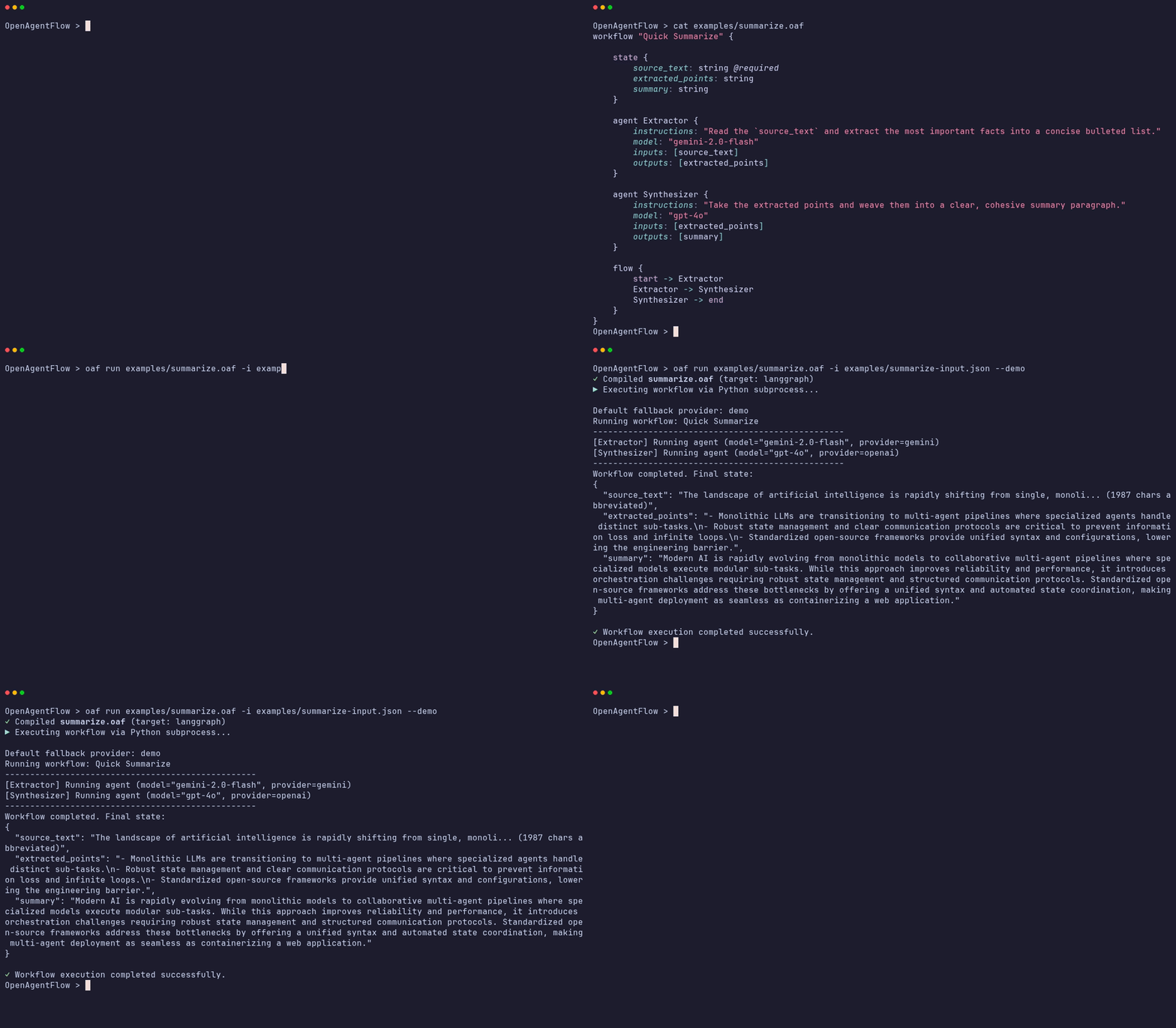
Define your multi-agent workflow in clean, human-readable .oaf text—completely decoupled from Python/Node boilerplate:
workflow "Quick Summarize" {

    state {
        source_text: string @required
        extracted_points: string
        summary: string
    }

    agent Extractor {
        instructions: "Read the `source_text` and extract the most important facts into a concise bulleted list."
        model: "gemini-2.0-flash"
        inputs: [source_text]
        outputs: [extracted_points]
    }

    agent Synthesizer {
        instructions: "Take the extracted points and weave them into a clear, cohesive summary paragraph."
        model: "gpt-4o"
        inputs: [extracted_points]
        outputs: [summary]
    }

    flow {
        start -> Extractor
        Extractor -> Synthesizer
        Synthesizer -> end
    }
}
Install the CLI globally and execute your workflow immediately (or clone our Starter Repository):
# Option A: Save the block above to summarize.oaf and run directly
npm install -g openagentflow
oaf run summarize.oaf

# Option B: Clone our official starter repository with pre-built workflows & inputs
git clone https://github.com/OpenAgentFlow/OpenAgentFlow-starter.git my-agents
cd my-agents && npm run setup && npm run triageModern AI agent frameworks (like LangGraph, AutoGen, and CrewAI) each introduce distinct concepts, Python/Node boilerplate, and proprietary APIs. OpenAgentFlow introduces a neutral, human-readable authoring language (.oaf) that separates workflow definition from execution runtimes.
- Write Once, Run Anywhere: Define multi-agent topologies, state schemas, and agent instructions once in pure
.oaftext and compile deterministically to production-ready Python code. - Strict Semantic Validation: Three-phase checking catches dead ends, unreachable agents, and missing fields before running expensive LLM calls.
- Zero-Config Multi-LLM: Auto-detects and adapts to Gemini, OpenAI, and Anthropic endpoints without changing your
.oafcode. - 4-Tier Env Hierarchy & Auth: Seamlessly resolve API keys across CLI flags, local
.envfiles, system variables, and global~/.oaf/.envcredentials (oaf auth). - Push-Model State Injection: Inject JSON payloads (
--input data.json) directly into workflows for easy backend/API integration. - Zero Core Dependencies: Pure Node.js compiler (
lexer,parser,validator,IR generator, andLangGraph adapter).
The fastest way to start building executable multi-agent workflows without manual setup or missing file errors is using our official template repository:
-
Clone the Starter Project:
git clone https://github.com/OpenAgentFlow/OpenAgentFlow-starter.git my-agents cd my-agents -
Run Automated Environment Setup: Our cross-platform setup script (
setup.js) checks your system, creates your Python virtual environment (venv), installs LangGraph dependencies, and initializes your.envconfiguration automatically across Windows, macOS, and Linux:npm install npm run setup
-
Configure API Keys (
oaf auth): Set your keys interactively via CLI (or edit the.envfile generated in your project root):npx openagentflow auth
-
Run Your First Workflow Live! Execute pre-built multi-agent topologies immediately:
# Run Customer Support Triage Workflow with injected JSON state
npm run triage

# Or compile directly to a LangGraph Python application
npm run compile-triage
If you prefer creating workflows from scratch in your own workspace without cloning a template:
-
Install Prerequisites & CLI: Ensure Node.js (v22+) and Python (v3.10+) are installed, then install the CLI globally:
npm install -g openagentflow
-
Set Your API Keys (
oaf auth): Configure credentials securely in~/.oaf/.env(0o600permissions):oaf auth # Or set manually: export GOOGLE_API_KEY="your-key" / $env:GOOGLE_API_KEY="your-key" -
Set Up Python Runtime & Virtual Environment: To execute compiled
.oafworkflows live via LangGraph against real LLM endpoints:# Create and activate Python virtual environment python -m venv venv source venv/bin/activate # Windows PowerShell: .\venv\Scripts\Activate.ps1 # Install LangGraph and multi-provider LangChain drivers pip install langgraph langchain-google-genai langchain-openai langchain-anthropic pydantic
-
Create & Execute Workflows Live: Create a
.oafworkflow file (e.g.,my-workflow.oaf) along with your JSON data (data.json) and run:oaf run my-workflow.oaf --input data.json
📖 For the full guide, see Documentation.
The complete documentation is available in our GitHub docs/ directory, including:
- Language Reference: Complete
.oafsyntax. - Formal Specs: EBNF grammar, semantic rules, and IR schema.
- API & CLI Ref: Programmatic API and command-line flags.
| Tool | Description |
|---|---|
| VS Code Extension | Full syntax highlighting, smart editor config, and auto-closing for .oaf files. Install from the Visual Studio Marketplace. |
| Starter Repository | Clone-and-run template with pre-built workflows, automated environment setup, and Dev Container / Codespaces support. |
OpenAgentFlow provides a clean, declarative syntax for describing stateful multi-agent workflows:
workflow "Quick Summarize" {

    config {
        max_iterations: 5
        timeout_seconds: 60
    }

    state {
        request: string
        source_text: string
        key_points: list[string]
        summary: string
    }

    agent Analyst {
        instructions: """
        Analyze the request and source text.
        Identify the most important facts.
        """
        model: "gpt-4"
        temperature: 0.2
        inputs: [request, source_text]
        outputs: [key_points]
    }

    agent Writer {
        instructions: """
        Write a clear, concise summary from the key points.
        """
        model: "gpt-4"
        temperature: 0.7
        inputs: [key_points]
        outputs: [summary]
    }

    flow {
        start -> Analyst
        Analyst -> Writer
        Writer -> end
    }
}
The OpenAgentFlow compiler transforms raw .oaf source code into validated Intermediate Representation (IR) JSON, which runtime adapters then transform into executable source code:
┌─────────────┐     ┌───────────┐     ┌────────────┐     ┌───────────────────┐
│ Source Code │ ──▶ │   Lexer   │ ──▶ │   Parser   │ ──▶ │    AST (JSON)     │
│  (.oaf file)│     │ (lexer.js)│     │(parser.js) │     │    (ast.js)       │
└─────────────┘     └───────────┘     └────────────┘     └─────────┬─────────┘
                                                                   │
┌─────────────┐     ┌───────────┐     ┌────────────┐     ┌─────────▼─────────┘
│  Execution  │ ◀── │ LangGraph │ ◀── │  Compiler  │ ◀── │ Semantic Validator│
│ (Live Subproc)    │  Adapter  │     │ (IR Gen)   │     │  (validator.js)   │
└─────────────┘     └───────────┘     └────────────┘     └───────────────────┘
When compiling to LangGraph, the runtime automatically manages providers. You can specify model: "gpt-4o" or model: "gemini-2.0-flash" in your .oaf file, and the compiled Python script will auto-detect your API keys (via .env, system vars, or ~/.oaf/.env) and route the request to the correct provider.
| Phase | Deliverables | Status |
|---|---|---|
| Phase 1 — Specification | Language spec (SPEC.md), EBNF grammar, examples, IR definition |
✅ Complete |
| Phase 2 — Compiler MVP | Zero-dependency Lexer, Parser, 3-Phase Validator, IR Generator, CLI | ✅ Complete |
| Phase 3 — Runtime Integration | LangGraph Python Adapter, Dual-LLM (get_llm()), Live run CLI, E2E Demo |
✅ Complete |
Phase 4 — State Initialization (--input) |
File-based state injection (--input data.json), runtime override (OAF_INPUT_FILE) |
✅ Complete |
| Phase 4.5 — Multi-Provider, Auth & Tooling | Anthropic (claude-*) & Google (gemma-*) inference, oaf auth, VS Code syntax extension (.oaf) |
✅ Complete |
| Phase 5 — Additional Adapters | AutoGen Adapter, CrewAI Adapter, Formal Adapter base contract |
🔲 Planned |
| Phase 6 — Developer CLI Tooling | oaf fmt (auto-formatter), oaf init (project scaffolding) |
🔲 Planned |
We welcome contributions from developers, researchers, and engineers! Whether you want to pick up a good first issue, help build our planned Phase 5 target adapters (Microsoft AutoGen or CrewAI), or propose language enhancements, please check out our detailed Contributing Guide to get started.
This project is open-source and licensed under the MIT License.