A modern web-based Pi-hole backup manager with automated scheduling, Discord notifications, and support for Docker-based Pi-hole installations.

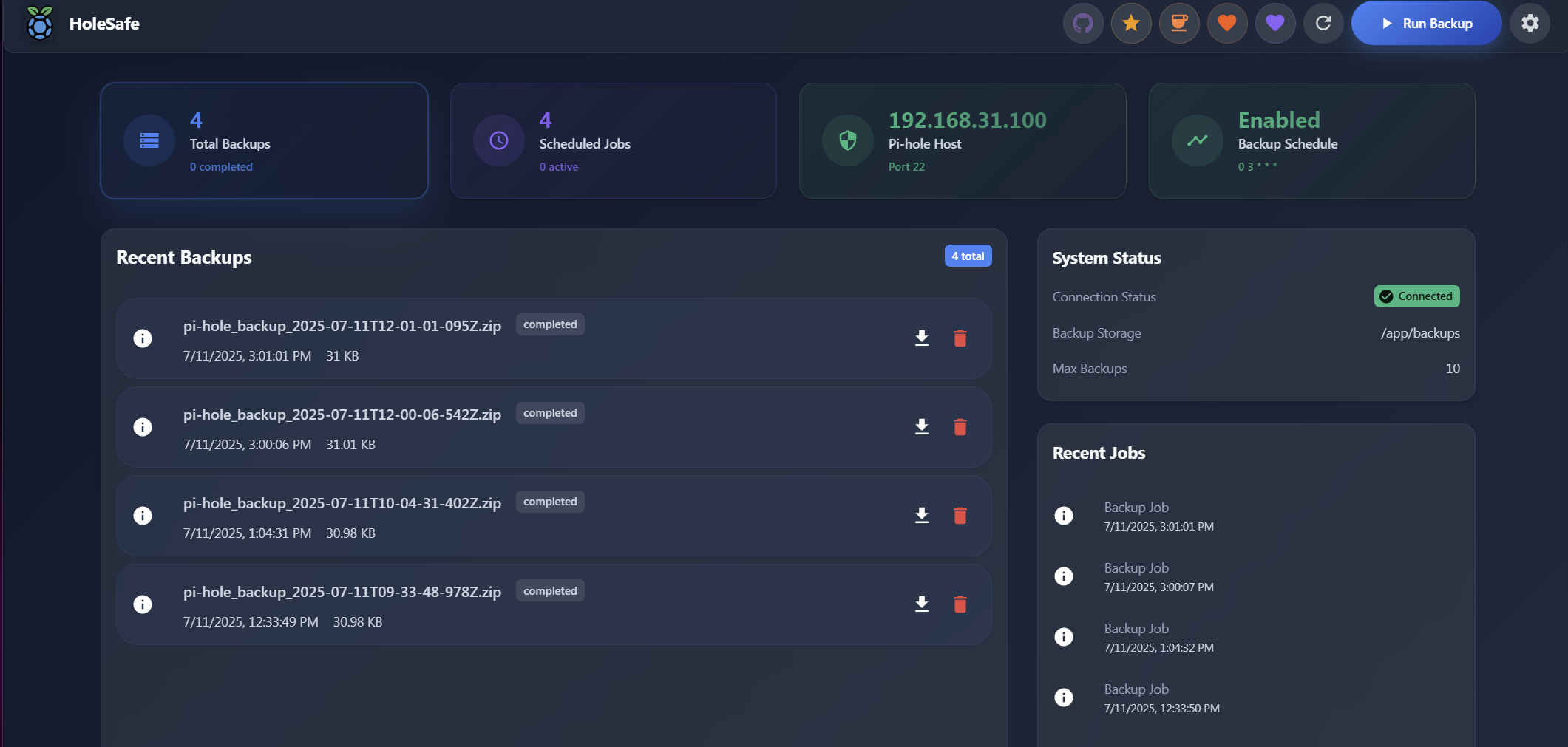
- 🌐 Web-Only Mode: No SSH required - perfect for Docker Pi-hole installations
- 🎨 Considered interface: a calm dark theme built on one accent colour, with addresses, ports, cron expressions and filenames set in a monospace face so they line up and read as machine values. Fonts ship with the app, so it looks the same on a network with no route to the internet.
- ⏰ Automated Backups: Configurable cron-based scheduling with timezone support
- 📊 Dashboard: Real-time backup statistics and job history
- 🔒 Secured by default where it matters: SSH host keys are verified, Pi-hole TLS certificates are checked, secrets never leave the server in plaintext, and the API can require a token
- 🔔 Discord Notifications: Rich webhook notifications for backup events
- 🔧 Easy Setup: Step-by-step configuration wizard
- 🐳 Docker Ready: Single-container deployment with nginx + Node.js
# Using Docker Compose
curl -o docker-compose.yml https://raw.githubusercontent.com/TheInfamousToTo/PiHoleVault/main/docker-compose.yml
docker-compose up -d

# Access at http://localhost:3000Create a .env file for optional configuration:
# Discord notifications (optional)
DISCORD_WEBHOOK_URL=https://discord.com/api/webhooks/your-webhook-url

# Debug mode (optional)
DEBUG_MODE=true
LOG_LEVEL=debugThe API is unauthenticated by default, which means anyone who can reach port 3000
can read your configuration, download backups and open SSH connections to your
Pi-hole. Set AUTH_TOKEN to require a token on every /api request:
# Generate one with: openssl rand -hex 32
AUTH_TOKEN=your-long-random-token
The UI asks for the token on first load and stores it in the browser. Requests
send it as Authorization: Bearer <token>.
Two further settings control SSH:
| Variable | Default | Meaning |
|---|---|---|
SSH_HOST_KEY_POLICY |
tofu |
tofu pins a host's key on first connection and refuses it if it later changes; strict connects only to already-pinned hosts; insecure accepts any key. |
SSH_ALLOW_LEGACY_ALGORITHMS |
false |
Set to true only for hardware that still needs ssh-dss or hmac-sha1. |
Pinned host keys are stored in data/known_hosts.json. If you rebuild your
Pi-hole and its host key changes, delete that host's entry to pin the new one.
- Open http://localhost:3000
- Follow the setup wizard to configure:
- Pi-hole connection (Web-only, SSH, or Hybrid)
- Backup settings and retention
- Schedule configuration
- Discord notifications (optional)
- Web-Only:
https://your-pihole/admin/- No SSH needed (recommended for Docker) - SSH: Traditional method requiring SSH access
- Hybrid: Combines web API for monitoring with SSH for backups
GET /health- Health checkPOST /api/backup/run- Manual backupGET /api/backups/- List backupsPOST /api/pihole/test-connection- Test Pi-hole connection
Build and run the whole thing in a container:
git clone https://github.com/TheInfamousToTo/PiHoleVault.git
cd PiHoleVault
docker-compose -f docker-compose.local.yml up -d --build
Or run the two halves directly, which gives you hot reload on the frontend:
# Backend on :3001
cd backend && npm ci && npm run dev

# Frontend on :3000, proxying /api and /health to the backend
cd frontend && npm ci && npm run dev
The frontend is built with Vite and React. All of the
styling lives in frontend/src/theme.js, so change the palette, the type scale
or the component defaults there rather than in individual components.
Debug mode: Set DEBUG_MODE=true in .env and restart container
View logs: docker-compose logs -f piholevault
Common issues:
- Web-only connection fails: Ensure Pi-hole admin password is correct
- SSH connection fails: Verify SSH credentials and Pi-hole accessibility
- Backup fails: Check Pi-hole API endpoints and authentication
MIT License - see LICENSE file
- ⭐ Star this repository
- ☕ Buy me a coffee
- 🐛 Report issues on GitHub Issues
Docker Hub: theinfamoustoto/piholevault
Latest Release: GitHub Releases
