Animation Events for Unity 6 and above. Uses State-Machine behaviour to fire custom animation events rather than using animation events directly to give more control over the events.
Using Git Url:
- Copy the git URL.
- Open the package manager window in your unity project.
- Click on the little "+" icon in the top left corner and from the dropdown, select "Add package from git URL".
- Paste the URL, click "Add" button.
Cloning the git repository directly(gives access unreleased features and access to the branches in development)
- Copy the git URL.
- Clone the repository directly into your project.
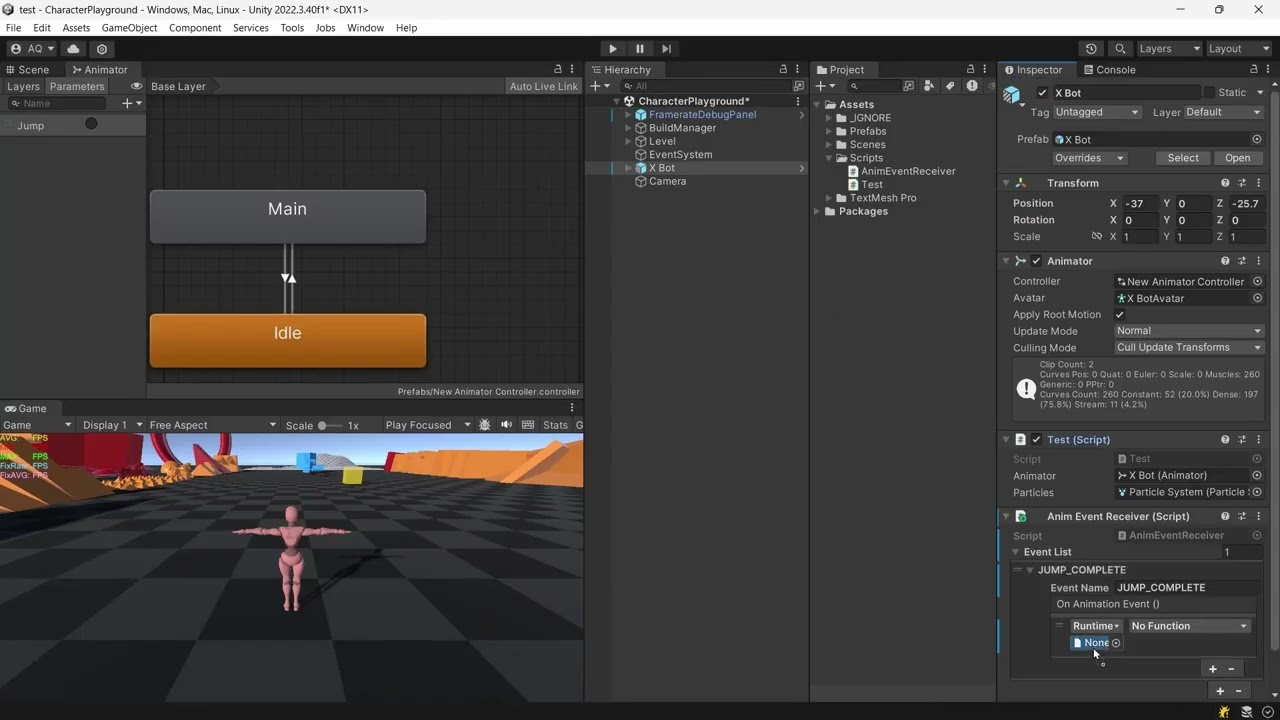
Full docs website coming soon. Quick reference below to get started.
On the Animator state where you want an event to fire, add AnimationEventStateBehaviour (Add Behaviour in the Animator window).
| Field | Description |
|---|---|
eventName |
Name to match against a receiver's event list. Must match exactly (case-sensitive). |
triggerTime |
Normalized time (0–1) within the state at which the event fires. |
Fires once per state-enter (loop-safe — won't re-fire every loop of a looping animation).
Subclass AnimationEventReceiver and put it on the same GameObject as the Animator:
using TripleA.AnimationEvents;

public class CharacterEventReceiver : AnimationEventReceiver
{
}
In the Inspector, add entries to its event list — each entry has an eventName (matching the state behaviour above) and a UnityEvent to invoke.
Select the AnimationEventStateBehaviour in the Animator state, then use the Preview button in its Inspector to scrub to triggerTime on the selected GameObject without entering Play mode.
View Changelog here.
No known issues as of 7 August 2026.
If you wish to contribute to the project, please follow the general contribution guidelines as outlined below:
- Fork the repository and create a branch from the main branch
- Make your contributions and commit your changes to your branch
- Submit a pull request detailing the changes made
- Wait for your changes to be reviewed and merged
This project is licensed under the MIT license, which can be found on the GitHub repository. The MIT license allows for the use, modification, and distribution of the code for both commercial and non-commercial purposes.
For any bug reports, issues, or help regarding the setup of the project, please feel free to contact me on LinkedIn, Instagram @oily.oli, or mail me at ali.qadir.007@outlook.com. My contact information can be found on my GitHub profile also. Alternatively you can leave comments on my itch page too.