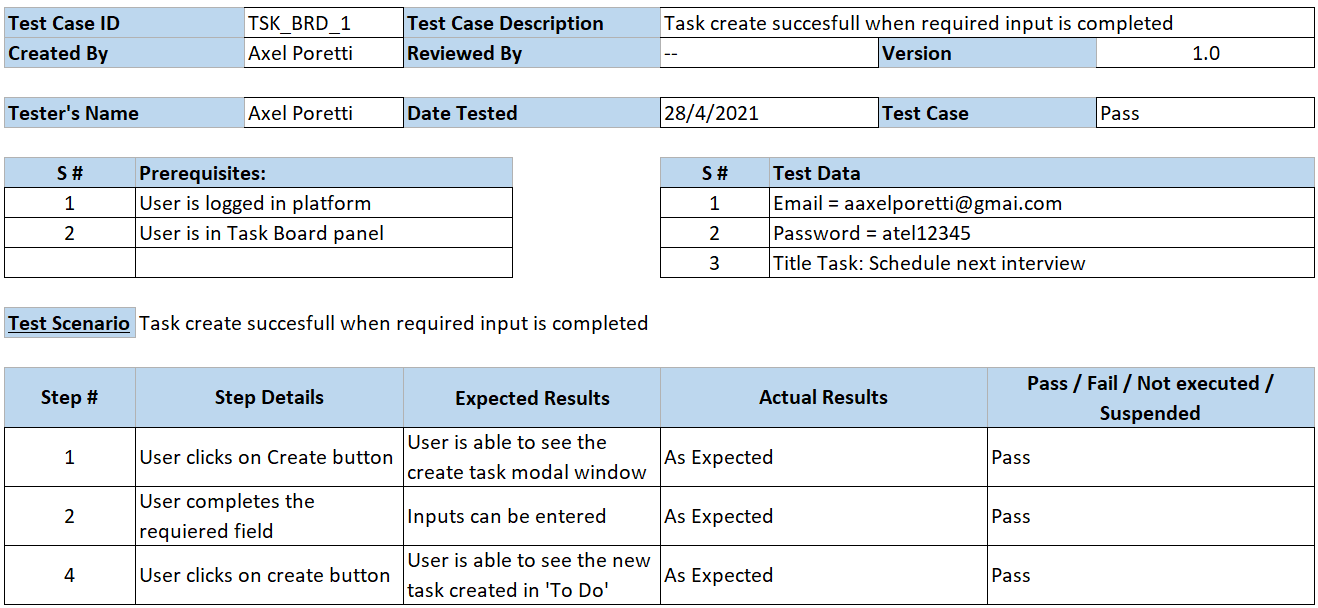
Test Plan and automation of a Test Case within it
-
Test Plan
-
Functional
-
Login
- Login successful with Valid Credentials
- Login successful with an Valid Username (Upper/Lower case) and Valid Password
- Login failed with an Valid Username (Upper/Lower case) and Valid Password (Upper/Lower case)
- Login failed with Invalid Username and Invalid Password
- Login failed with Valid Username and Invalid Password
- Login failed with an Invalid Username and Valid Password
- Login failed with blank required fields
- Verify validation message is displayed when Invalid Credentials are entered
- Forgot password functionality sends email with valid email
- Forgot password functionality don't send email with invalid email
- Verify validation message is displayed on Invalid email
- Verify 'Return to Login' link
- Limit on the total number of unsuccessful login attempts
- Verify password is in encrypted form (masked format) when entered
- Verify that cursor is focused on the 'Email Address' text box on the page load
- Verify that Enter key works as a substitute for the 'Login' button
- Verify that Tab key works to move to the next input text field
- Verify that Shift+Tab key works to move to the previous input text field
- Login successful in different browsers
-
Task Board
-
General
- Verify UI
- Verify 'Refresh' buttom updates tasks displayed
- Verify Task Board contains Title, User Name, Notification, Task Board and All Tasks links
- Verify count of total tasks in TO DO column is correct
- Verify count of total tasks in IN PROGRESS column is correct
- Verify count of total tasks in DONE column is correct
- Verify it is possible to scroll on TO DO column when tasks cannot be displayed all on the same screen
- Verify it is possible to scroll on IN PROGRESS column when tasks cannot be displayed all on the same screen
- Verify it is possible to scroll on DONE column when tasks cannot be displayed all on the same screen
- Verify My Profile link opens modal window
- Verify that the Logout link is redirected to login/home page
- Verify in each Task is displayed Task Number and Task Title
-
Profile
-
General
- Verify that information entered is not lost while changing between tabs
- Verify 'Cancel' button closes modal window
- Verify that Esc key works as a substitute for the 'Cancel' button
- Verify clicking outside of modal window works as a substitute for the 'Cancel' button
-
General Information
- Verify that First Name is updated when Saved
- Verify that Last Name is updated when Saved
- Verify that email is updated when Saved
- Verify that communication emails are sent correctly when email is updated
-
Localization
- Verify Last access updates when Timezone selection set to manual (I suppose that this has to change)
- Verify Last access updates when Timezone selection set to Automatic (I suppose that this has to change)
- Verify saved not permited when selecting 'Nothing selected' option
-
Security
- Password change succesful with Valid Credentials
- Verify validation message is displayed when succesfull password change
- Password change failed with Valid Current Password and Invalid New Password
- Password change failed with Invalid Current Password and Valid New Password
- Password change failed with Invalid Current Password and Invalid New Password
- Password change failed with Valid Current Password, Valid New Password and Invalid Phone number
- Verify validation message is displayed on Invalid Current Password
- Verify validation message is displayed when New Passwords doesn't match
- Verify password is in encrypted form (masked format) when entered
- Verify Two Factor authentication is disabled by default
- Verify message, QR code and Phone number are displayed when Two Factor Authentication is enabled
- Login succesfull with new password after changing the password
- Login failed with old password after changing the password
-
-
Create Task
- Verify modal tasks opens on click Create buttom
- Verify 'Cancel', 'Create' buttoms elements are present
- Verify Drag and Drop funtionality works with pictures files
- Verify Drag and Drop funtionality works with plain text
- Verify Drag and Drop funtionality not works with extension different than pictures or text
- Verify Number input is disabled
- Task create failed when required input are blank
- Task create succesfull when required input is completed
- Verify task number increases by one for every task created
- Verify validation message is displayed when required fields are left in blank
- Verify Status field is set to 'To Do' by default
- Verify that cursor is focused on the 'Title' text box on create task modal
- Verify Description text box can be resized
- Verify it is possible to scroll on Description text box
- Verify that Enter key works as a substitute for the 'Create' button
- Verify that Esc key works as a substitute for the 'Cancel' button
- Verify clicking outside of modal window works as a substitute for the 'Cancel' button
- Verify that 'Cancel' buttom does not open modal window when all input is blank
- Verify that modal window on 'Cancel' buttom contains 'Discard Changes' and 'Keep Editing' buttoms
- Verify that 'Cancel' buttom does open modal window when some inputs are completed
- Verify that Tab key works to move to the next input text field
- Verify that Shift+Tab key works to move to the previous input text field
- Verify that 'Style' buttom works for each option
- Verify that 'Bold' button works
- Verify that CTRL+B keys works as a substitute for the 'Bold' button
- Verify that 'Italic' button works
- Verify that CTRL+I key works as a substitute for the 'Italic' button
- Verify that 'Underline' button works
- Verify that CTRL+U keys works as a substitute for the 'Underline' button
- Verify that 'Remove Font Style' button works
- Verify that CTRL+\ keys work as a substitute for the 'Remove Font Style' button
- Verify that 'Font Family' buttom works for each option
- Verify that 'Font Size' buttom works for each option
- Verify that the last color selected is the default Recent Color buttom option
- Verify that the 'More Color' buttom works for each option
- Verify that 'Unordered List' button works
- Verify that CTRL+SHIFT+NUM7 keys works as a substitute for the 'Unordered List' button
- Verify that 'Ordered List' button works
- Verify that CTRL+SHIFT+NUM8 keys works as a substitute for the 'Ordered List' button
- Verify that 'Paragraph' button works
- Verify that CTRL+SHIFT+L keys works as a substitute for the 'Align Left' option in 'Paragraph' buttom
- Verify that CTRL+SHIFT+E keys works as a substitute for the 'Align Center' option in 'Paragraph' buttom
- Verify that CTRL+SHIFT+R keys works as a substitute for the 'Align Right' option in 'Paragraph' buttom
- Verify that CTRL+SHIFT+J keys works as a substitute for the 'Justify full' option in 'Paragraph' buttom
- Verify that CTRL+SHIFT+[ keys work as a substitute for the 'Indent' option in 'Paragraph' buttom
- Verify that CTRL+SHIFT+] keys work as a substitute for the 'Outdent' option in 'Paragraph' buttom
- Verify that the 'Line Height' buttom works for each option
- Verify that the 'Table' buttom works for 4x4 table size option
- Verify that modal window on Link buttom contains Title, Text to display input, URL text input, chekbox and Insert Link buttom
- Verify that Link generated opens in new window
- Verify that CTRL+K keys works as a substitute for the 'Link' button
- Verify that 'Horizontal Rule' button works
- Verify that CTRL+ENTER keys works as a substitute for the 'Horizontal Rule' button
- Verify that 'Full Screen' button works
- Verify that modal window on Help buttom contains Title, Keyboard shortcuts and Close buttom opens
- Verify Assignee Field is not displayed
- Verify Rank input is enabled ----(assuming thas this helps to prioritize this task among the others)
-
-
All Tasks
-
General
- Verify UI
- Verify displayed columns Number, Title, Status, Actions, Asignee and Rank
- Verify ckeckbox 'Select All' on one-lick selects all tasks displayed
- Verify ckeckbox 'Select All' on double-click selects all existing tasks
- Verify serch field in Number column filters on valid search
- Verify information message is displayed when selected input search field in Number column
- Verify serch field in Title column filters on valid search
- Verify information message is displayed when selected input search field in Title column
- Verify serch field in Status column filters on valid search
- Verify information message is displayed when selected input search field in Status column
- Verify 'Clear' button clears search fields
- Verify 'More' button changes color when existing tasks are larger than those displayed
- Verify 'More' buttom displays all tasks when selected
- Verify 'More' buttom displays first 20 tasks when deselected
- Verify 'Clear' button clears search fields
- Verify Count of Tasks Displayed changes when 'More'buttom is activated
- Verify Count of Tasks Displayed changes when 'More'buttom is deactivated
- Verify it is possible to scroll on window when current tasks cannot be displayed all on the same screen
-
Export
- Verify 'Export' button opens modal window
- Verify 'Export' buttom disabled when input fields are in blank
- Verify 'Select All' checkbox selects all options
- Verify successful export of the number of desired records
- Verify successful export of number task field
- Verify successful export of number title field
- Verify successful export of number status field
- Verify successful export of number asignee field
- Verify successful export of number description field
- Verify successful export of number rank field
- Verify successful export of all fields
- Verify successful download on alternate link
- Verify 'Close' button closes modal window
- Verify that Esc key works as a substitute for the 'Close' button
- Verify clicking outside of modal window works as a substitute for the 'Close' button
-
Import
- Verify File Explorer opens on click 'Select CSV File' buttom
- Verify Drag and Drop funtionality works with files
- Verify succesful import when Valid File is selected
- Verify message displays on succesful importing file
- Verify failed import when Invalid File is selected
- Verify message displays on error importing file
- Verify it is possible to scroll on window when modal window elements cannot be displayed all on the same screen
- Verify 'Close' button closes modal window
- Verify that Esc key works as a substitute for the 'Close' button
- Verify clicking outside of modal window works as a substitute for the 'Close' button
- Verify 'Refresh' buttom updates tasks displayed
-
Profile
-
General
- Verify that information entered is not lost while changing between tabs
- Verify 'Cancel' button closes modal window
- Verify that Esc key works as a substitute for the 'Cancel' button
- Verify clicking outside of modal window works as a substitute for the 'Cancel' button
-
General Information
- Verify that First Name is updated when Saved
- Verify that Last Name is updated when Saved
- Verify that email is updated when Saved
- Verify that communication emails are sent correctly when email is updated
-
Localization
- Verify Last access updates when Timezone selection set to manual (I suppose that this has to change)
- Verify Last access updates when Timezone selection set to Automatic (I suppose that this has to change)
- Verify saved not permited when selecting 'Nothing selected' option
-
Security
- Password change succesful with Valid Credentials
- Verify validation message is displayed when succesfull password change
- Password change failed with Valid Current Password and Invalid New Password
- Password change failed with Invalid Current Password and Valid New Password
- Password change failed with Invalid Current Password and Invalid New Password
- Password change failed with Valid Current Password, Valid New Password and Invalid Phone number
- Verify validation message is displayed on Invalid Current Password
- Verify validation message is displayed when New Passwords doesn't match
- Verify password is in encrypted form (masked format) when entered
- Verify Two Factor authentication is disabled by default
- Verify message, QR code and Phone number are displayed when Two Factor Authentication is enabled
- Login succesfull with new password after changing the password
- Login failed with old password after changing the password
-
-
Create Task
- Verify modal tasks opens on click Create buttom
- Verify 'Cancel', 'Create' buttoms elements are present
- Verify Drag and Drop funtionality works with pictures files
- Verify Drag and Drop funtionality works with plain text
- Verify Drag and Drop funtionality not works with extension different than pictures or text
- Verify Number input is disabled
- Task create failed when required input are blank
- Task create succesfull when required input is completed
- Verify task number increases by one for every task created
- Verify validation message is displayed when required fields are left in blank
- Verify Status field is set to 'To Do' by default
- Verify that cursor is focused on the 'Title' text box on create task modal
- Verify Description text box can be resized
- Verify it is possible to scroll on Description text box
- Verify that Enter key works as a substitute for the 'Create' button
- Verify that Esc key works as a substitute for the 'Cancel' button
- Verify clicking outside of modal window works as a substitute for the 'Cancel' button
- Verify that 'Cancel' buttom does not open modal window when all input is blank
- Verify that modal window on 'Cancel' buttom contains 'Discard Changes' and 'Keep Editing' buttoms
- Verify that 'Cancel' buttom does open modal window when some inputs are completed
- Verify that Tab key works to move to the next input text field
- Verify that Shift+Tab key works to move to the previous input text field
- Verify that 'Style' buttom works for each option
- Verify that 'Bold' button works
- Verify that CTRL+B keys works as a substitute for the 'Bold' button
- Verify that 'Italic' button works
- Verify that CTRL+I key works as a substitute for the 'Italic' button
- Verify that 'Underline' button works
- Verify that CTRL+U keys works as a substitute for the 'Underline' button
- Verify that 'Remove Font Style' button works
- Verify that CTRL+\ keys work as a substitute for the 'Remove Font Style' button
- Verify that 'Font Family' buttom works for each option
- Verify that 'Font Size' buttom works for each option
- Verify that the last color selected is the default Recent Color buttom option
- Verify that the 'More Color' buttom works for each option
- Verify that 'Unordered List' button works
- Verify that CTRL+SHIFT+NUM7 keys works as a substitute for the 'Unordered List' button
- Verify that 'Ordered List' button works
- Verify that CTRL+SHIFT+NUM8 keys works as a substitute for the 'Ordered List' button
- Verify that 'Paragraph' button works
- Verify that CTRL+SHIFT+L keys works as a substitute for the 'Align Left' option in 'Paragraph' buttom
- Verify that CTRL+SHIFT+E keys works as a substitute for the 'Align Center' option in 'Paragraph' buttom
- Verify that CTRL+SHIFT+R keys works as a substitute for the 'Align Right' option in 'Paragraph' buttom
- Verify that CTRL+SHIFT+J keys works as a substitute for the 'Justify full' option in 'Paragraph' buttom
- Verify that CTRL+SHIFT+[ keys work as a substitute for the 'Indent' option in 'Paragraph' buttom
- Verify that CTRL+SHIFT+] keys work as a substitute for the 'Outdent' option in 'Paragraph' buttom
- Verify that the 'Line Height' buttom works for each option
- Verify that the 'Table' buttom works for 4x4 table size option
- Verify that modal window on Link buttom contains Title, Text to display input, URL text input, chekbox and Insert Link buttom
- Verify that Link generated opens in new window
- Verify that CTRL+K keys works as a substitute for the 'Link' button
- Verify that 'Horizontal Rule' button works
- Verify that CTRL+ENTER keys works as a substitute for the 'Horizontal Rule' button
- Verify that 'Full Screen' button works
- Verify that modal window on Help buttom contains Title, Keyboard shortcuts and Close buttom opens
- Verify Assignee Field is not displayed
- Verify Rank input is enabled ----(assuming thas this helps to prioritize this task among the others)
-
-
-
Non-Functional
-
Verify whether all the text boxes have a minimum and maximum length
-
Security
- Timeout Login session
- Vulnerability to SQL injection
- Verify that password stores in a database in an encrypted format
- Verify Automatic Login succesful when cookies are present
- Verify User is able to Login when cookies are cleared
- Login succesful with same credentials at different browsers at the same time
- Login failed with diferent credentials at same browser at the same time
-
Performance
- Baseline Test
- Load Test
- Endurance Test
- Stress Test
-
-
Comments: I have grouped the Test Cases of Create Task and Profile separately for each window (Task Board and All Tasks) accordingly with the Page Object Model approach used.