AKA Chordian Knot
AKA Alto
Exploring music theory as a graph with heuristics and logic to find harmony and see how the puzzle pieces fit together
Project created with deps-new and the practicalli/application template
https://cofinley.github.io/jigsaw/
Click the image below to see the video
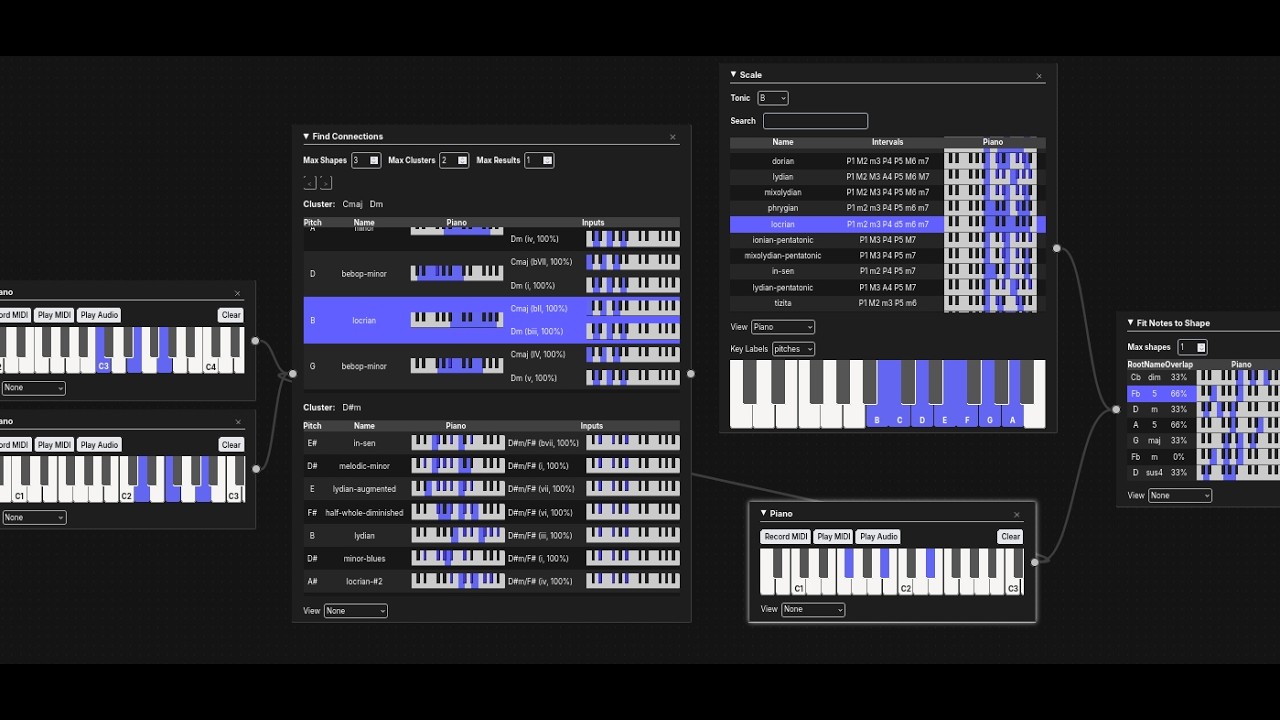
A spiritual successor to why-does-that-sound-good, I wanted a whiteboard-style app to explore connections with what I was playing to music theory.
Inspired by Bret Victor, I believe tools can raise our ceiling of abilities. Tools for thinking seem limited, but what does thinking look like? For me, it's visual and graph-like. It's slowly exposing the bigger picture. With a graph, you define your entities and rules for compatibility. Data-oriented programming and entity component systems tell us we can simplify our architecture around the presence or absence of simple keys/attributes and not get hung up around each combination of entities. I decided to take a page from that world and focus the underlying architecture of this project around music 'shapes.' These shapes are defined using spec and the presence/absence of certain keys mean certain things and it allows the algorithms to not really worry about whether I'm talking about a note or chord or scale; they're more or less the same 'stuff.' See more in theory.cljc.
make deps
npm ci
Run the app:
make appTo build tailwind css to get things running and as you introduce new styles:
make tailwind
make repl
# or
make repl-basic
# jack in with nrepl on port 8777
Practicalli workflow overview:
- start a REPL process in a Terminal
- open the project in a Clojure Editor and connected to the REPL
- write code and evaluate expressions in the editor using the source code files
Practicalli Clojure CLI Config should be used with this project to support all aliases used.
This project uses make tasks to run the Clojure tests, kaocha test runner and package the service into an uberjar. The Makefile uses clojure commands and arguments which can be used directly if not using make.
make command in a terminal will list all the tasks available
makeStart the REPL with the Practicalli REPL Reloaded aliases to include the custom user namespace (dev/user.clj) which provides additional tools for development (Portal data inspector, hotload libraries, namespace reload)
make replThe local nREPL server port will be printed, along with a help menu showing the REPL Reloaded tools available.
Evaluate the jigsaw.jigsaw namespace and a mulog publisher will start, sending pretty printed events to the console. Evaluate (mulog-publisher) to stop the mulog publisher.
Call the -main function with or without an argument, or call the greet function directly passing an optional key and value pair.
(namespace/refresh) will reload any changed namespaces in the Clojure project.
If a REPL has been run from a terminal, use the editor *connect- feature.
Otherwise, use the :dev/reloaded alias from Practicalli Clojure CLI Config to starting a REPL process from within a Clojure editor.
Run unit tests of the service using the kaocha test runner
make testIf additional libraries are required to support tests, add them to the
:test/envalias definition indeps.edn
make test-watch will run tests on file save, stopping the current test run on the first failing test. Tests will continue to be watched until Ctrl-c is pressed.
Check the code format before pushing commits to a shared repository, using cljstyle to check the Clojure format, MegaLinter to check format of all other files and kaocha test runner to test the Clojure code.
Before running the pre-commit-check
- install cljstyle{target=_blank}
- MegaLinter runs in a Docker container, so ensure Docker is running
make pre-commit-checkRun cljstyle only
make format-checkruns cljstyle and and prints a report if there are errorsmake format-fixupdates all files if there are errors (check the changes made viagit diff)
Run MegaLinter only
make lintruns all configured linters in.github/config/megalinter.yamlmake lint-fixas above and applies fixes
Run Kaocha test runner only
make testruns all unit tests in the project, stopping at first failing testmake test-watchdetect file changes and run all unit tests in the project, stopping at first failing test
Build an uberjar to deploy the service as a jar file
make build-uberjarmake build-configdisplays the tools.build configurationmake build-cleandeletes the build assets (targetdirectory)
make docker-buildmake docker-downshuts down all services started withdocker-buildmake docker-build-clean
Or build and run the service via the multi-stage Dockerfile configuration as part of a CI workflow.
Copyright © 2024 Connor Finley