I made keychain sized game console with st7789 display and using esp32-C3 SoC. In this project used part of mostly recycled parts from broken smartwatch and electronics boards.
Build your own following the step-by-step guide!
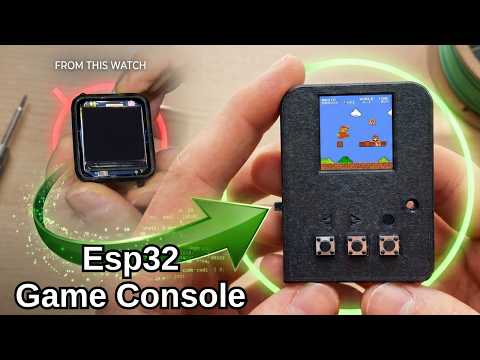
Click the image above to watch the full tutorial on YouTube.
To use this library and run the provided examples, you will need:
- Microcontroller: ESP32-C3 Development Board
- Display: 1.3" ST7789 TFT Display from old broken smartwatch
- Buttons: 3 Tactile Button From old Electronic Boards
- Wiring: Recycled cables
- Switch: Again old electronics boards
- 3D parts: Link https://cults3d.com/en/3d-model/game/diy-tiny-game-console-1-3-st7789-display-esp32-c3
By default, the library is configured to use the standard SPI pins of the ESP32-C3. You can customize these pins directly in the setup file to match your project's needs.
| Component | ESP32-C3 Pin | :--- |
|---|---|---|
| TFT MOSI | Default SPI MOSI | GPIO 6 |
| TFT SCLK | Default SPI SCLK | GPIO 4 |
| TFT CS | Defined in User_Setup |
-1 |
| TFT DC | Defined in User_Setup |
GPIO 8 |
| TFT RST | Defined in User_Setup |
GPIO 5 |
| SD Card MISO | Default SPI MISO (Only if using SD!) | -1 |
| Left | One Leg | GPIO 1 |
| Right | One Leg | GPIO 7 |
| Action | One Leg | GPIO 3 |
| Buzzer | Positive Leg | GPIO 0 |
(Note: Check your specific ESP32-C3 board's pinout diagram for the exact default SPI GPIO numbers).
1. Install the Library
- Download this repository as a
.ZIPfile from GitHub. https://github.com/derdacavga/DSN-Esp32C3-St7789 - Open your Arduino IDE.
- Go to Sketch > Include Library > Add .ZIP Library and select the downloaded file.
2. Configure the User Setup
This is an important step! Just like TFT_eSPI, you must configure the library to work with your specific wiring.
- Navigate to your Arduino libraries folder and open this library's folder.
- Open the
User_Setupfile. - Define your specific pins, SPI speed, and color format here.
⚠️ SD Card SPI Sharing: If you are using an SD card on the exact same SPI bus as the display, you must uncomment theMISOdefinition in this file. If you are not using an SD card, leave it commented out.- Save and close the file.
If you found this project helpful, please consider:
-
Subscribing to the YouTube Channel.
-
Giving the video a Like.
-
Starring this GitHub Repository!
Happy Making!
- Maze Escape: https://play.google.com/store/apps/details?id=com.DsnMechanics.MazeEscape
- Air Hockey: https://play.google.com/store/apps/details?id=com.DsnMechanics.AirHockey
- Click Challenge: https://play.google.com/store/apps/details?id=com.DsNMechanics.ClickChallenge
- Flying Triangels: https://play.google.com/store/apps/details?id=com.DsnMechanics.Triangle
- SkyScrapper: https://play.google.com/store/apps/details?id=com.DsnMechanics.SkyScraper