🏠 Home | 💻 Code | 🌐 WebApp | 📑 Menu Reference
The Ultimate Real-Time Markdown Editor for Professionals, Developers & Writers
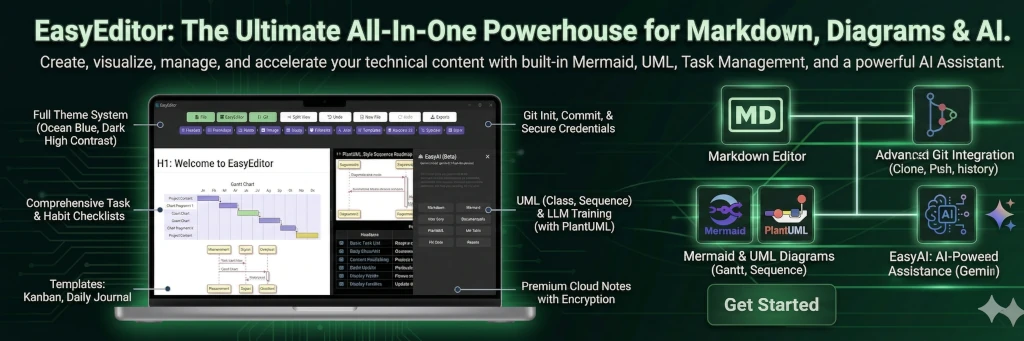
Easyeditor is not just another Markdown editor—it's a powerhouse for your documentation needs. Write Markdown (MD), create stunning diagrams with Mermaid & UML, render mathematical equations with KaTeX, and preview it all in real-time!
From simple notes to complex technical documentation, Easyeditor has you covered features rich.
- Real-time Preview: See your changes instantly.
- Rich Diagram Support: Native support for Mermaid, UML, and more.
- Math Ready: KaTeX support for beautiful mathematical notations.
- Template System: Jumpstart your docs with built-in templates.
- Git Integration: Load, stage, commit, and push directly from the editor.
- Export Power: Export to PNG, TXT, PDF, MD and secure SSTP Encryption.
- Customizable: Choose from beautiful themes or create your own!
- SSTP Encryption: SSTP (Simple Security Text Protocol) protection using modern AES-256-CBC encryption!
- EasyAI Personas: Built-in AI personas for documentation, diagrams, code fixes, and more — with full repo scanning that reads your project file-by-file to generate accurate, context-aware documentation.
- Multi-cloud Storage: Built-in Multi-cloud Storage to store your documents, GDrive, OneDrive,DropBox, Box.
- EasyTeam: EasyTeam is a privacy-first, ephemeral team communication feature.

Easyeditor is free, open-source, and yours to modify!
Skip the build process and start writing immediately! Download the latest system-compiled binary for your OS or install directly from the Microsoft Store.



Prefer a containerized environment? getting up and running is as simple as one command.
# Pull and run the latest version
docker pull ghcr.io/gcclinux/easyeditor:latest
docker run -d --name EASYEDITOR -p 3024:3024 --env-file .env.local ghcr.io/gcclinux/easyeditor:latest
Access it at: http://localhost:3024
No installation required! Try the full power of Easyeditor directly in your browser.

For contributors and those who want to customize the codebase.
- Node.js & npm
- Git
- Rust (for Tauri Desktop App)
git clone https://github.com/gcclinux/easyeditor.git
cd easyeditor
npm installWeb Server Mode:
npm run serverDesktop App Mode:
npm run appTo build the native desktop application provided by Tauri:
First, set up your environment:
- All Platforms: Install Visual Studio Code, Kiro, Antigravity, VSCodium or any other prefered IDE
- Linux: Install
libwebkit2gtk-4.1-dev,build-essential,curl,wget,libssl-dev,libayatana-appindicator3-dev,librsvg2-dev. - Windows: Install additional extention C++ workload would help.
- macOS:
xcode-select --install
Then run:
# Development
npm run dev

# Version Management
node ./scripts/check_versions.js  # Verify version consistency across files
./bump_version.sh 1.8.1           # Update all files with new version and create git tag

# Production Build
npm run tauri:build # Build Tauri desktop app (Linux/macOS/Windows)
scripts/build-tauri.bat # Windows script wrapper
scripts/build-snap.sh # Snap package build
scripts/build-docker.sh # Docker build

Template System: Jumpstart your docs with built-in templates


Seamlessly manage your version control without leaving the editor.

Multiple AI personas for documentation, diagrams, code fixes, user stories, and more. The Documentation persona scans your entire Git repository file-by-file to produce accurate, project-specific documentation.

EasyTeam privacy-first, ephemeral team communication feature

Transfer Markdown Documentation

Explore standard layout formats and templates: easyeditor-menu.md
Clean and responsive table rendering.
| Feature | Support |
|---|---|
| Markdown | ✅ |
| Mermaid | ✅ |
| KaTeX | ✅ |
| SSTP Encryption | ✅ |
| Multi-cloud Storage | ✅ |
| Collaboration | ✅ |
| Git Integration | ✅ |
This project is licensed under the GNU Affero General Public License (AGPLv3) with Commons Clause and Trademark Protection.
✅ Open Source - Anyone can view, modify, and use the code
✅ Community Contributions - Improvements must be shared back
✅ Free to Use - No cost for personal or internal use
❌ No Commercial Sale - Cannot sell EasyEditor or derivatives
❌ No Rebranding - Cannot rebrand as "EasyEditor Pro" or similar
❌ No Proprietary Forks - Cannot create closed-source versions
Use Easyeditor for any purpose (free)
Modify the code for your needs
Use it in your projects (non-commercially)
Distribute modified versions (non-commercially, with attribution)
Contribute improvements back to the project
Sell Easyeditor or any derivative
Offer Easyeditor as a paid service
Charge for hosting or support
Rebrand it as your own product
Create proprietary versions
Remove attribution or license notices