Consistent AI characters on a node canvas.
A free, open-source app for AI generation where your characters stay the same. Build a character once and keep the same face across shots and models, generate locally on your own GPU or with hosted models, train your own LoRAs, and keep every render as a versioned take.





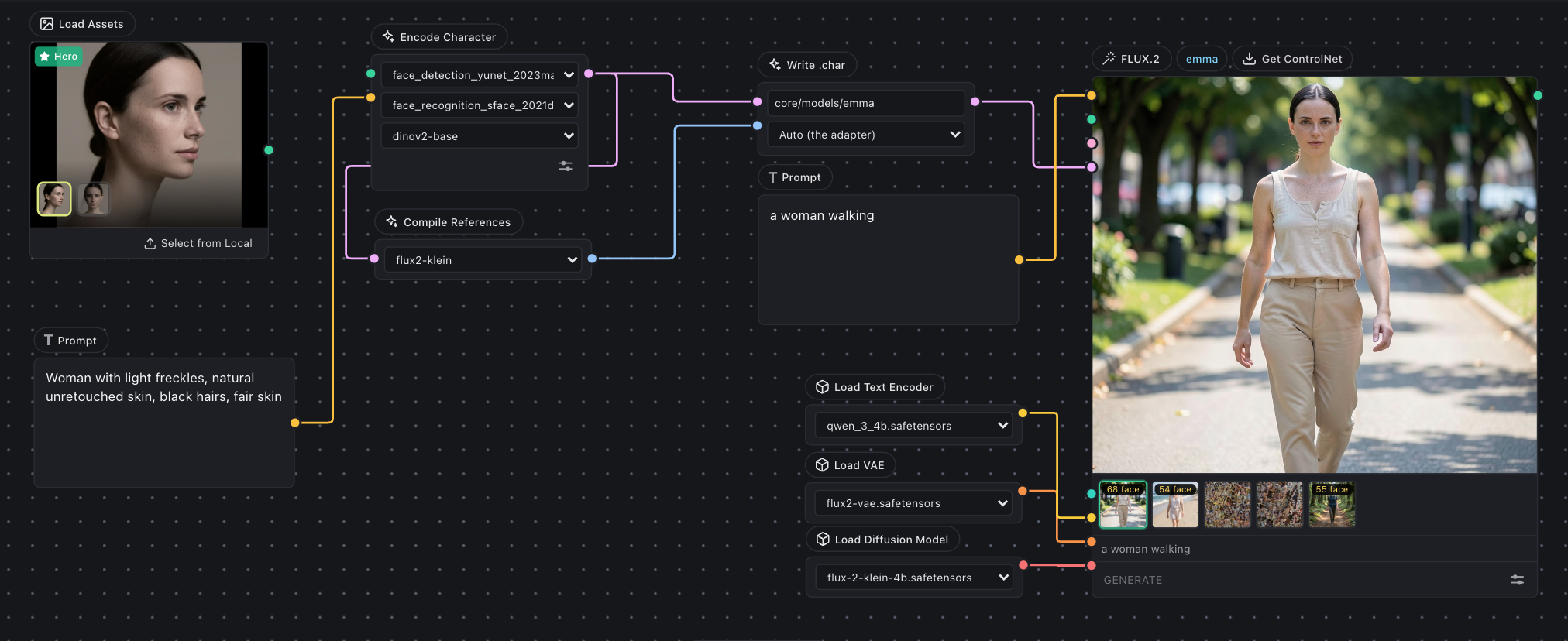
New here? Start with the getting started guide →
| Model | Train | Generate | Trains on a 16GB card |
|---|---|---|---|
| FLUX.2 (klein Base 4B) | yes | yes | yes, ~8.6GB |
| Krea 2 (RAW, 4-bit) | yes | yes | yes, ~11.9GB |
| Z-Image Turbo | yes | yes | yes, ~13.4GB |
| MiniMax H3 (video, sound) | yes | yes | yes but slowly, ~12.7GB |
| LTX-2.5 (video, sound) | yes | yes | no, wants 48GB |
| Hosted models (API Nodes) | no | yes | no GPU needed |
Those are training peaks at 512px. Training is cheaper than generating, and a LoRA trained at 512 applies at any generation resolution. H3 is the odd one: on a 16GB card its text encoder moves to the CPU, which is why it costs the least VRAM and the most time, and it wants 64GB of system RAM to do it. Not every row has been run on a 16GB card, and Benchmark results says which were measured and which are interpolated, alongside the full per-card matrix and timings.
You need Python 3.11+. The web UI ships as a Python package, so there is no
Node step. --install --extra all installs everything: the engine, the model runtime, the trainer
and the UI.
macOS / Linux:
git clone https://github.com/inlineresearch/Inline-Studio.git
cd Inline-Studio/core
./webui.sh --install --extra all
./webui.sh                         # http://127.0.0.1:8848
Windows (use webui.bat; webui.sh is a bash script and will not run in PowerShell):
git clone https://github.com/inlineresearch/Inline-Studio.git
cd Inline-Studio\core
.\webui.bat --install --extra all
.\webui.bat

rem If the CUDA build is wrong for your card, name the index yourself:
.\webui.bat --install --extra all --torch-index cu130
On NVIDIA, --install reads your GPU's compute capability and pulls the matching CUDA build of
PyTorch, RTX 50-series included. Everything lands in core/.venv, which Inline Studio owns; an
environment already activated in your shell is never touched. Re-running --install is safe.
Prefer pip? pip install -r requirements.txt from the repo root installs the whole app from PyPI,
then run inline-studio.
No GPU? Deploy Inline Studio on RunPod →
Hardware support, RTX 50-series, AMD ROCm, Apple Silicon
Honest status, what has actually been run versus what has a code path nobody has verified:
| Hardware | Status | Extra steps |
|---|---|---|
| NVIDIA, Linux | Tested, Z-Image Turbo 1024² on a T4 (16GB); Krea 2 1024² and LoRA training on an L40S (48GB) | None |
| NVIDIA, Windows | Supported | PyPI's default torch is CPU-only on Windows, so --install picks the CUDA build for your card |
| Apple Silicon (MPS) | Code path exists, untested | None. int8 does not apply on MPS, so a model too big for unified memory will not fit |
| AMD (ROCm), Linux | Untested, reports welcome | Needs a ROCm build of PyTorch, see below |
| CPU only | Works, very slow | ./webui.sh --cpu |
RTX 50-series cards are compute capability sm_120, and no wheel built for CUDA 12.4 or 12.6 has
kernels for them. --install reads the capability off the driver and picks cu130, so a plain
.\webui.bat --install --extra all is all you need.
Old driver? CUDA 13 needs driver R580 or newer. If yours predates it, --install picks cu128
and says so: cu128 still has sm_120 but is frozen at torch 2.11 and will never update, so update
the driver when you can.
--torch-index takes a short name (cu130, cu128, cu126), a full index URL, or cpu. Naming it
explicitly also replaces an already-installed torch, which a plain re-run will not do, so you
rarely need --recreate. INLINE_TORCH_INDEX does the same thing.
Not sure what you have? .\webui.bat --print-torch-index prints what the driver reported and which
index would be used, and installs nothing. That one line is what to paste into a bug report.
Nobody has verified this yet, so treat it as a starting point. Install normally first, then replace PyTorch, so nothing can overwrite your ROCm build afterwards:
cd core
./webui.sh --install --extra runtime

# Pick the index matching YOUR ROCm version: https://pytorch.org/get-started/locally/
uv pip install --python .venv/bin/python --force-reinstall \
  --index-url https://download.pytorch.org/whl/rocm6.2 torch

# hip should print a version, not None
.venv/bin/python -c "import torch; print(torch.cuda.is_available(), torch.version.hip)"
Do not run uv sync or pass --recreate afterwards; both put the PyPI torch back over your ROCm
build. The dtype heuristics key off NVIDIA compute capability, which is meaningless on RDNA and
CDNA, so open an issue either way.
Krea 2 is 26GB on disk and generation peaks near 36GB at 1024, so a 40GB card is the practical floor for inference. Training is far cheaper, see the table above. Z-Image Turbo is the low-VRAM path for generation: it is distilled to run CFG-free, so 1024² fits in about 11.5GB.
Command-line options
webui.sh (macOS/Linux) and webui.bat (Windows) map friendly flags onto the engine's INLINE_*
environment variables. core/main.py takes the same flags. Run --help for the full list.
| Flag | Env var | What it does |
|---|---|---|
--listen |
INLINE_HOST=0.0.0.0 |
Bind all interfaces so other machines can reach it |
--port N |
INLINE_PORT |
Port to serve on (default 8848) |
--models-dir PATH |
INLINE_MODELS_DIR |
Where weights are scanned from (default ./models) |
--data-dir PATH |
INLINE_DATA_DIR |
Where runs and takes are written |
--lowvram |
INLINE_PROFILE=lowvram |
Tight-VRAM profile (tiling, slicing, int8) |
--cpu |
INLINE_PROFILE=cpu |
Force CPU generation |
--vram-budget GB |
INLINE_VRAM_BUDGET_GB |
Treat the GPU as having GB of usable VRAM |
--multi-gpu [SPEC] |
INLINE_PARALLEL |
Split one image's denoise across GPUs; auto with 2+ GPUs |
--torch-index WHICH |
INLINE_TORCH_INDEX |
With --install, override the PyTorch wheel index |
--print-torch-index |
n/a | Print the GPU probe and chosen index, then exit |
--extra NAME |
n/a | Add an install extra: runtime, server, training, all |
--recreate |
n/a | Rebuild .venv from scratch |
--dev / --rebuild |
n/a | Live-reload dev loop / force a fresh SPA build |
From source (UI development): build the SPA with npm ci && npm run build:spa, then serve it
with cd core && uv run python main.py --front-end-root ../dist-web. Or ./webui.sh --dev for
Vite HMR on :5173.
Getting the same person across shots normally means training a LoRA for each one, or re-wiring the same reference photos into every node by hand. Build a character once instead, then pick it from a dropdown.
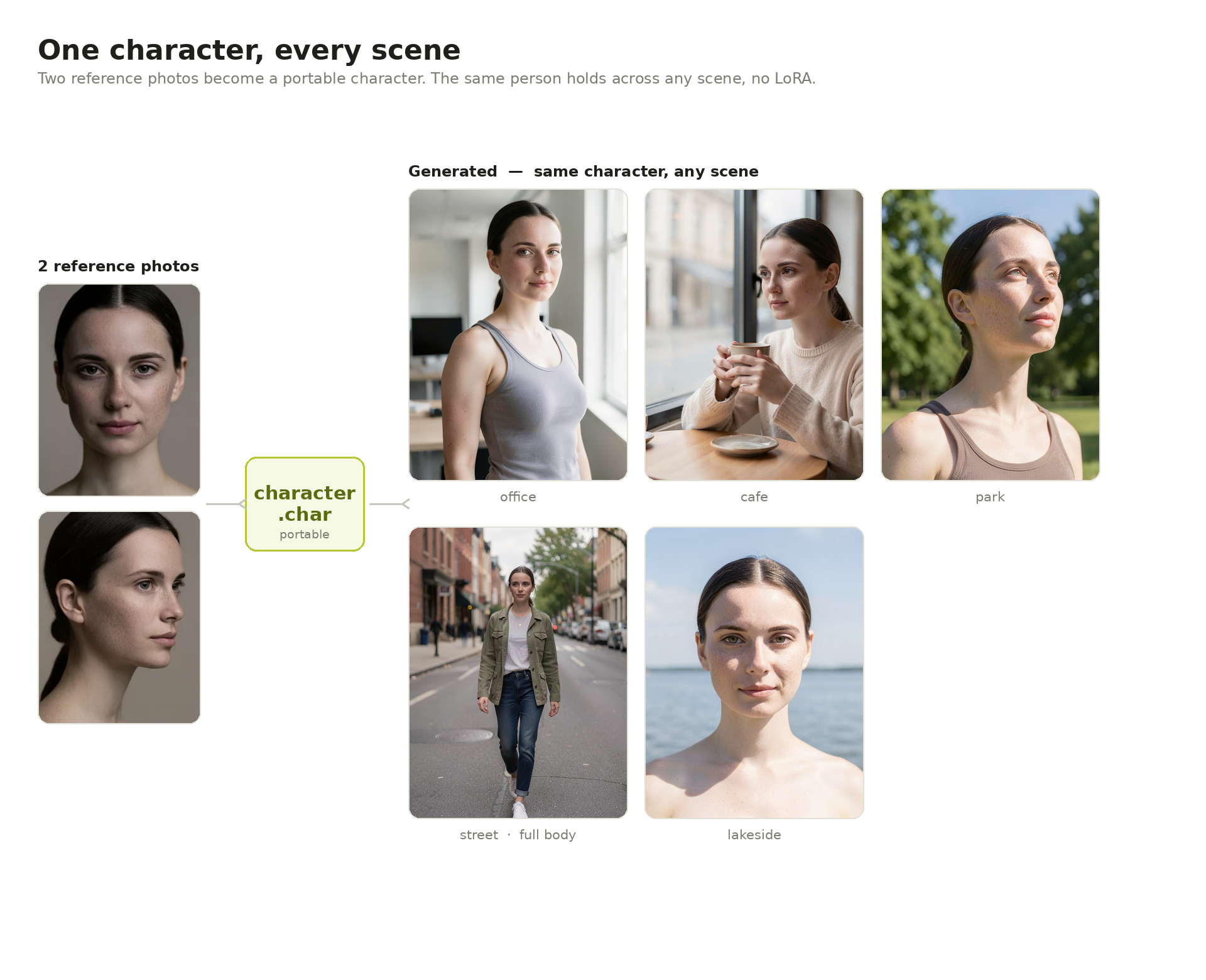
Drop in a photo or two and Inline Studio compiles a .char: one portable file holding your
references and an identity fingerprint. Describe the scene, and the references carry the likeness.
Every take comes back with a continuity score out of 100, so drift is visible rather than felt.
- FLUX.2 applies a character with no training at all. The references ride in the prompt's token sequence, so picking one costs nothing but the render.
- Krea 2 has no reference channel, so it trains a small adapter for the character once, then reuses it on every render.
How characters work, in detail →
Train on your own images, or on short video clips, on your own GPU with no cloud step. The training
nodes sit on the same canvas as everything else: wire them up, press Start, watch it run. The
finished .safetensors lands in models/loras/, where the LoRA loader node picks it up, so you can
generate with it straight away.
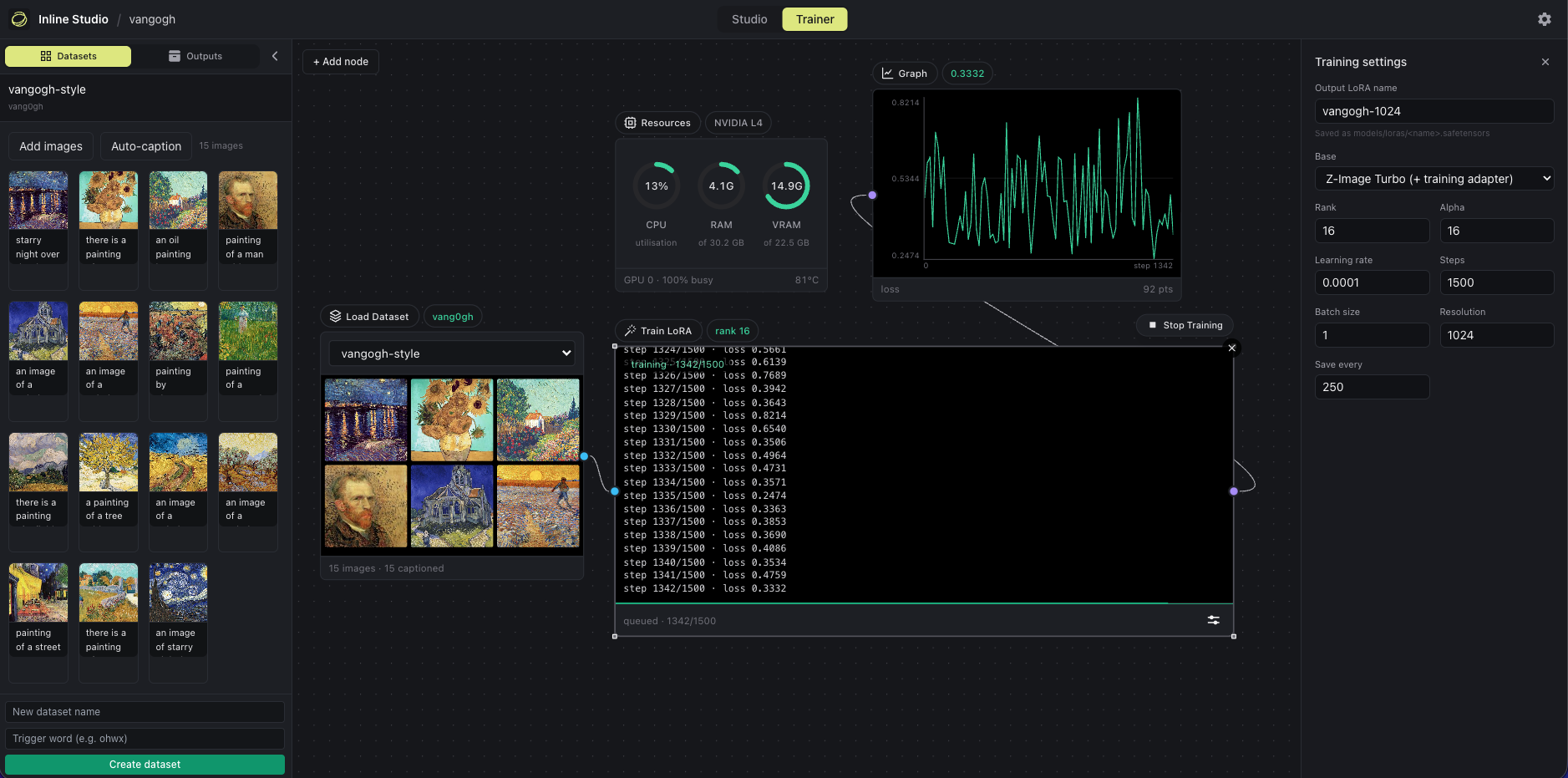
[ Load Dataset ] --> [ Caption ] --> [ Train LoRA ] --> [ Graph ]
                                          |
                                          +--> Resources (VRAM monitor)
Hyperparameters sit behind an Adjust button, so the node face stays a status surface. MiniMax H3 trains on stills for look and style, or on clips to learn motion as well, and one dataset can hold both. LTX-2.5 trains on clips, and can also learn a transform between a reference clip and a target one, which upstream calls an IC-LoRA.
Already installed with --extra all? The trainer is ready. Otherwise
./webui.sh --install --extra training.
TRAINING.md is the full reference: which base to train on · benchmarks · training on clips · control LoRAs · datasets and outputs · stop and resume · trigger words
A worked example: skin-lora-krea-2-raw,
trained here on Krea 2 RAW from the 26 pairs published as
krea2-skin-lora.
Drop a model node, wire a prompt, hit Run. One node, no loader or sampler wiring. Either put a
.safetensors in core/models/diffusion_models/, or use the node's model popup to download the
diffusion model, VAE and text encoder with visible progress. Nothing is fetched behind your back.
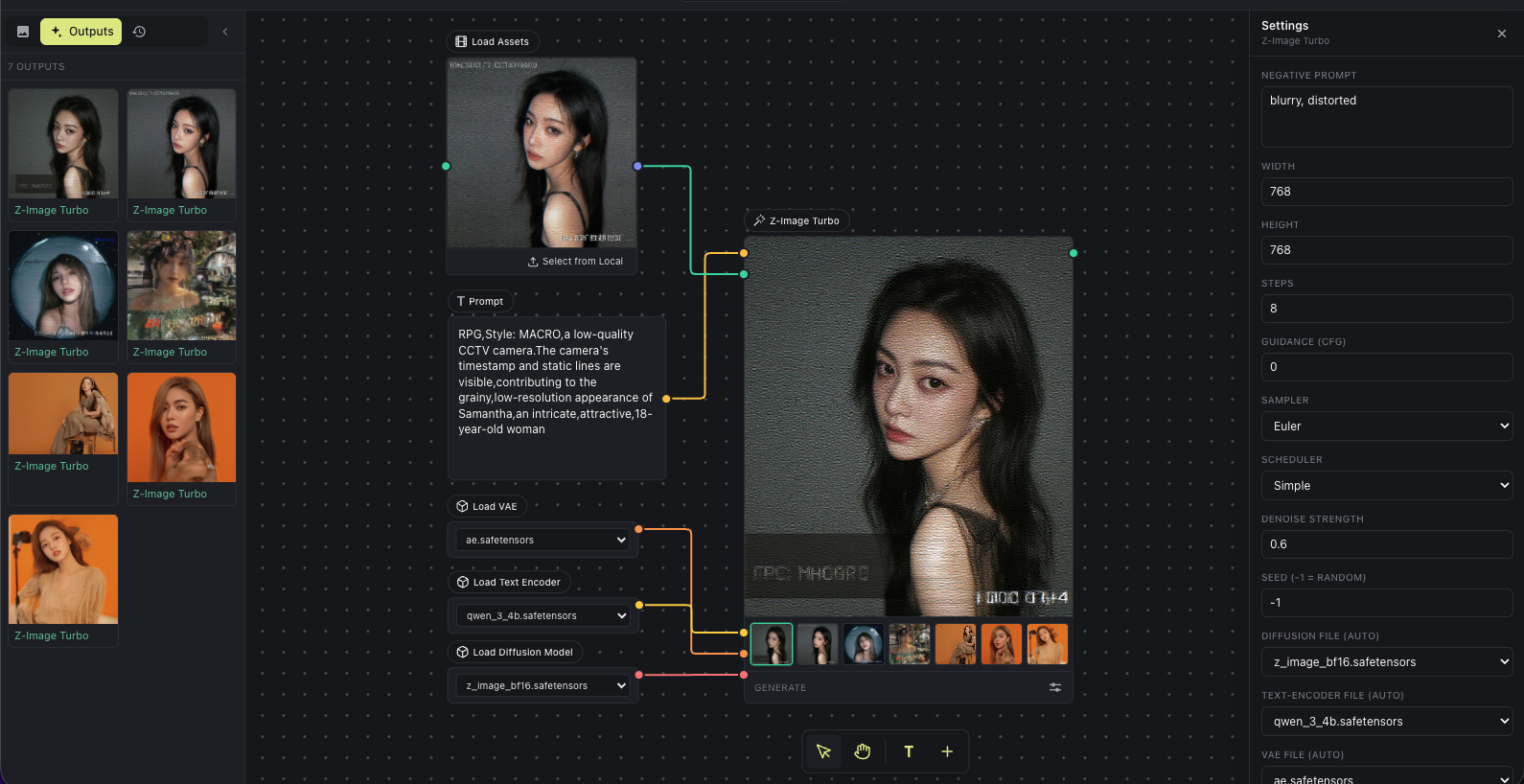
- Z-Image Turbo is the low-VRAM starting point, distilled to run CFG-free.
- Krea 2 is a 12.9B MMDiT in two halves: train on RAW, generate with Turbo. A LoRA trained on RAW applies to Turbo unchanged.
- FLUX.2 is natively multi-reference: wire several images and the prompt addresses them by position. One node covers klein 4B and 9B, their Base builds, and dev.
- MiniMax H3 generates video and its soundtrack in one pass, as four nodes (text, image, first and last frame, reference). 24fps, 5 to 15 seconds. See the open weights guide.
- LTX-2.5 is Lightricks' 22B model, video with sound again, as three nodes (text, image, first and last frame). 24fps, 1 to 20 seconds. Every node has a Fast mode on the distilled transformer and a Quality mode on dev.
- ControlNet steers a local render with a pose, depth or edge map. Control Space is a 3D pose editor in a node, so you can build the skeleton rather than find a reference photo.
Model files: what goes where
Most builds load. For MiniMax H3 that means the full bf16 file, the pruned build, and the
fp8_scaled build, which is the same model at 21.0GB instead of 66.3GB. The int8_convrot,
mxfp8 and nvfp4 files do not: their weights are stored rotated, and that is a transform only
ComfyUI can undo. A build the node cannot read is listed with the reason rather than hidden, and a
quantisation it does not recognise is refused rather than guessed at.
A smaller file is a smaller download, not a smaller model in memory. Fitting the model to your card is the device policy's job either way.
core/models/
  diffusion_models/  krea2_turbo_bf16.safetensors        <- Krea 2 Turbo (generate)
                     krea2_raw_bf16.safetensors          <- Krea 2 RAW (train)
                     flux-2-klein-4b.safetensors         <- FLUX.2 default, Apache 2.0
                     flux-2-klein-base-4b.safetensors    <- FLUX.2 base build, for training
                     minimax_h3_fl2va_bf16.safetensors   <- H3 text, image, first/last frame
                     minimax_h3_ref2va_bf16.safetensors  <- H3 reference node
                     ltx-2.5-22b-distilled-transformer-bf16.safetensors  <- LTX fast mode
                     ltx-2.5-22b-dev-transformer-bf16.safetensors        <- LTX quality mode, and training
  text_encoders/     qwen3vl_4b_bf16.safetensors         <- Krea 2
                     qwen_3_4b.safetensors               <- FLUX.2 klein 4B, shared with Z-Image
                     MiniMax-H3-text-encoder/            <- Qwen3-VL-32B, a folder
                     MiniMax-H3-processor/
                     gemma4-12b-with-proj-ltx-2.5-bf16.safetensors       <- LTX
  vae/               qwen_image_vae_diffusers.safetensors
                     flux2-vae.safetensors
                     minimax_h3_video_vae_fp16.safetensors
                     minimax_h3_audio_vae_fp32.safetensors
                     ltx-2.5-video-vae-bf16.safetensors
                     ltx-2.5-audio-vae-bf16.safetensors
  loras/             your trained adapters land here
  controlnet/        ControlNet and control-LoRA files
Krea 2's VAE is the diffusers-format one from Qwen/Qwen-Image;
ComfyUI's qwen_image_vae.safetensors holds the same weights in a layout diffusers cannot read.
MiniMax H3 is big: about 139GB for the first three nodes and 205GB with the reference node, though the fp8_scaled transformer takes 45GB off each of those. Measured on a 45GB card, a 10 second clip at 960x544 takes about 7.2 minutes, peaking at 38.9GB VRAM and 46.7GB of system RAM, so plan on 64GB of RAM. Canvas size is the biggest speed lever: 960x544 renders about 2.3x faster per step than 1344x768.
LTX-2.5 is gated and big: 71GB for fast mode, 122GB with quality mode. Accept the LTX-2 Community License on the model page first, with the account your Hugging Face token belongs to, or every download returns a permission error. It streams its own weights, so a card that cannot hold the model is slow rather than excluded.
FLUX.2 dev on a 24GB card: take the ungated
diffusers/FLUX.2-dev-bnb-4bit folder rather
than the fp8 single file. A diffusers folder is a valid checkpoint anywhere a single file is.
Everything else is public and needs no token.
Hosted models (API Nodes)
Add a Generate node and pick a model: hosted, closed models across image, video and audio, with no GPU and no setup. Bring your own provider key; it stays on your machine and you pay the provider per render, with each node estimating the price first.
The initial provider is fal: FLUX.2, FLUX.2 Edit, GPT Image 2, Nano Banana, Seedance, MiniMax H3, LTX, Sonilo and more. Add your key in Settings. MiniMax H3 and LTX are on the canvas both ways, as API nodes and as local nodes with no per-render cost.
Local and hosted mix freely in one film, and either way the frame keeps its full take history.
Multi-GPU: split one image across GPUs
With two or more GPUs, Inline Core can cut a single image's latency by running its denoise loop collectively across them. This is not one image per GPU; it is one image whose sampling is shared, so a single render finishes faster.
Built on xDiT in an isolated worker group, one process per
GPU. The split method follows the interconnect Core detects: PipeFusion over PCIe, Ulysses with
NVLink. Turn it on with ./webui.sh --multi-gpu after uv pip install -e ".[parallel]".
- Free-form node canvas with versioned, non-destructive takes
- Consistent characters from one portable
.charfile - Train your own LoRAs locally, on images or on video clips
- Local generation built in, with the Inline Core engine
- Multi-reference composition, and video with sound
- Every locally generated image embeds the graph that made it: drop the file back on the canvas to rebuild the pipeline
- Video Director, Trim Video and Trim Audio nodes
- Export and import the whole project as one archive
- Community extensions, and API Nodes for hosted models
Follow the Animated Short Film tutorial →
Generating one frame is the easy part. The work that makes a film is what comes after: exploring options, keeping what is good, and shaping a repeatable process out of it.
A frame is a slot with a history of takes, never a single file. Generating again adds a take and nothing is overwritten. Export zips a project into one archive, inputs, outputs and the graph that turned one into the other, so whoever opens it can re-run the pipeline exactly.
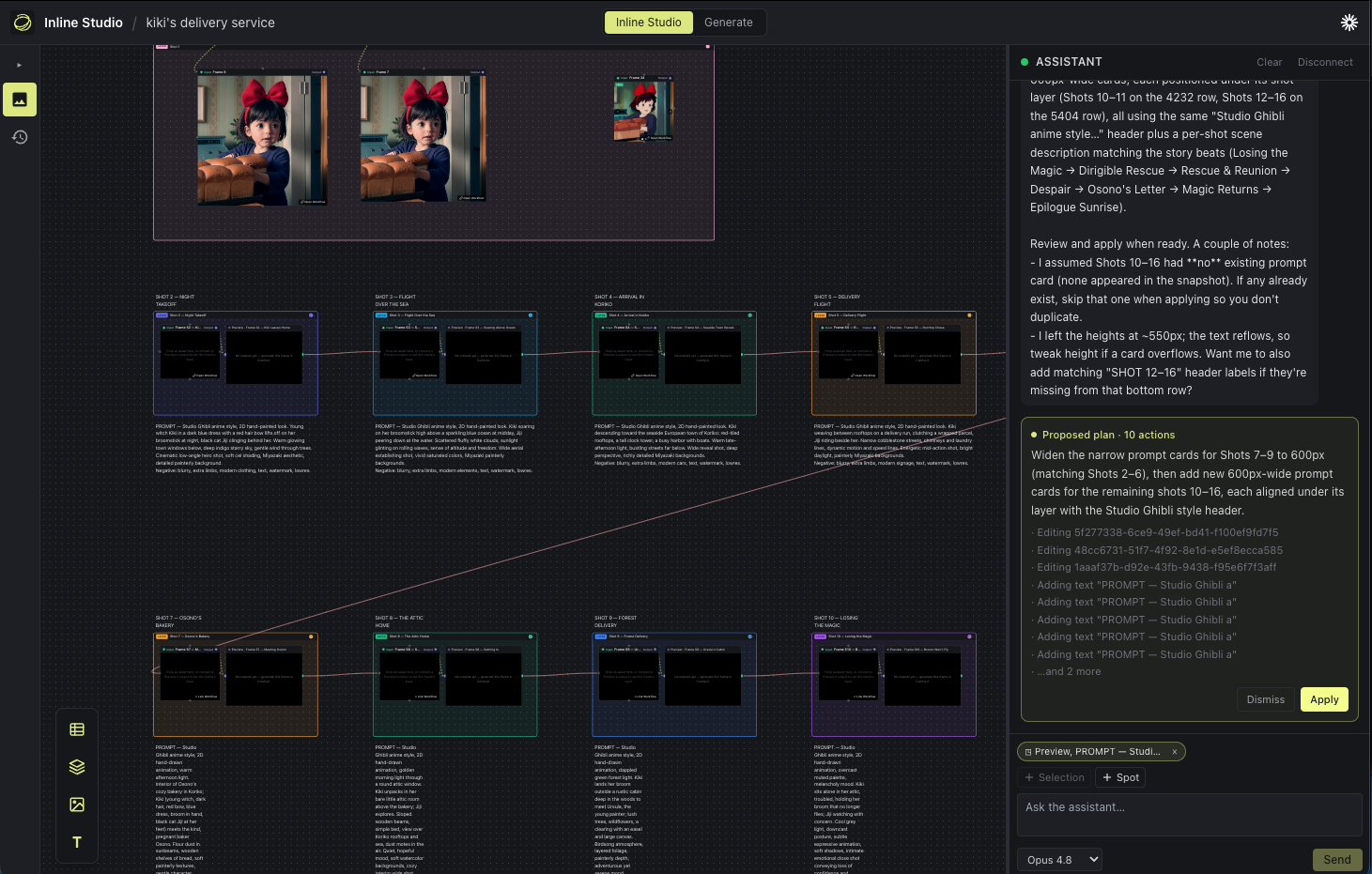
It runs as a single process on one port: the Inline Core engine (Python) serves the web UI and does the generation. No desktop install, no separate backend. For the engineering story see core/README.md and core/CLAUDE.md.
Install community-built nodes from a GitHub repo, from the Extensions dialog or a repo URL. Every install is security-reviewed, dependencies are isolated from the shared torch runtime, and nodes appear on the canvas immediately with no restart.
Browse the registry, or copy the extension guide to build your own.
Is Inline Studio free? Yes, free and open source under GPL-3.0. Local generation and training cost nothing to run. Hosted models are billed by the provider.
Do I need a GPU? Not for the canvas, planning, editing or hosted models. Local generation and LoRA training need one; see the table at the top.
Can I train a LoRA locally? Yes, for all five local models, on your own GPU. See TRAINING.md.
What models can I run? Locally: Z-Image Turbo, FLUX.2, Krea 2, MiniMax H3 and LTX-2.5. Hosted: the fal catalogue, with more providers to follow. Adding a new local model is a Core change, not a UI release.
The UI is a blank page on Windows. You are on a build older than v1.3.0. A clean Windows install
maps .js to text/plain in the registry, Python honours that, and browsers will not run a module
script served under it. Update and Core sets the type itself. Nothing to change on your machine.
Issues, ideas and pull requests are all welcome. Start with CONTRIBUTING.md for setup and the checks to run; CLAUDE.md is the deeper engineering guide. By taking part you agree to our Code of Conduct.
Want to help by using it for real? We run a paid trial feedback program: use Inline Studio on your own work, tell us what helps and what gets in the way, and get paid for your time. Come say hi on Discord, or try the creator task.
- xDiT for the PipeFusion and Ulysses parallelism behind the multi-GPU denoise.
- ai-toolkit by ostris, for the approach to training on a step-distilled model, and the Z-Image and Krea 2 training adapters.
- diffusers for the Krea 2 and MiniMax H3 reference implementations.
- Krea AI for Krea 2, under the Krea AI Community License.
- Black Forest Labs for FLUX.2: klein 4B, its Base build and the VAE are Apache 2.0; dev and the 9B builds are non-commercial.
- MiniMax for MiniMax H3, under the MiniMax H3 Community License.
- Lightricks for LTX-2.5, under the LTX-2 Community License, and for the paired dataset pipeline the control LoRA trainer follows.
GPL-3.0. Model weights are yours to obtain and carry their own licences, which the GPL does not change.