
A local Filipino-inspired AI coder that brings imagination and speed to your VS Code workflow.
Pre-release. HirayaCoder is not on the VS Code Marketplace yet. Releases are published as a
.vsixon the Releases page and installed by hand — Step 4 has the one command it takes. Everything described below works today; what is missing is the one-click install.
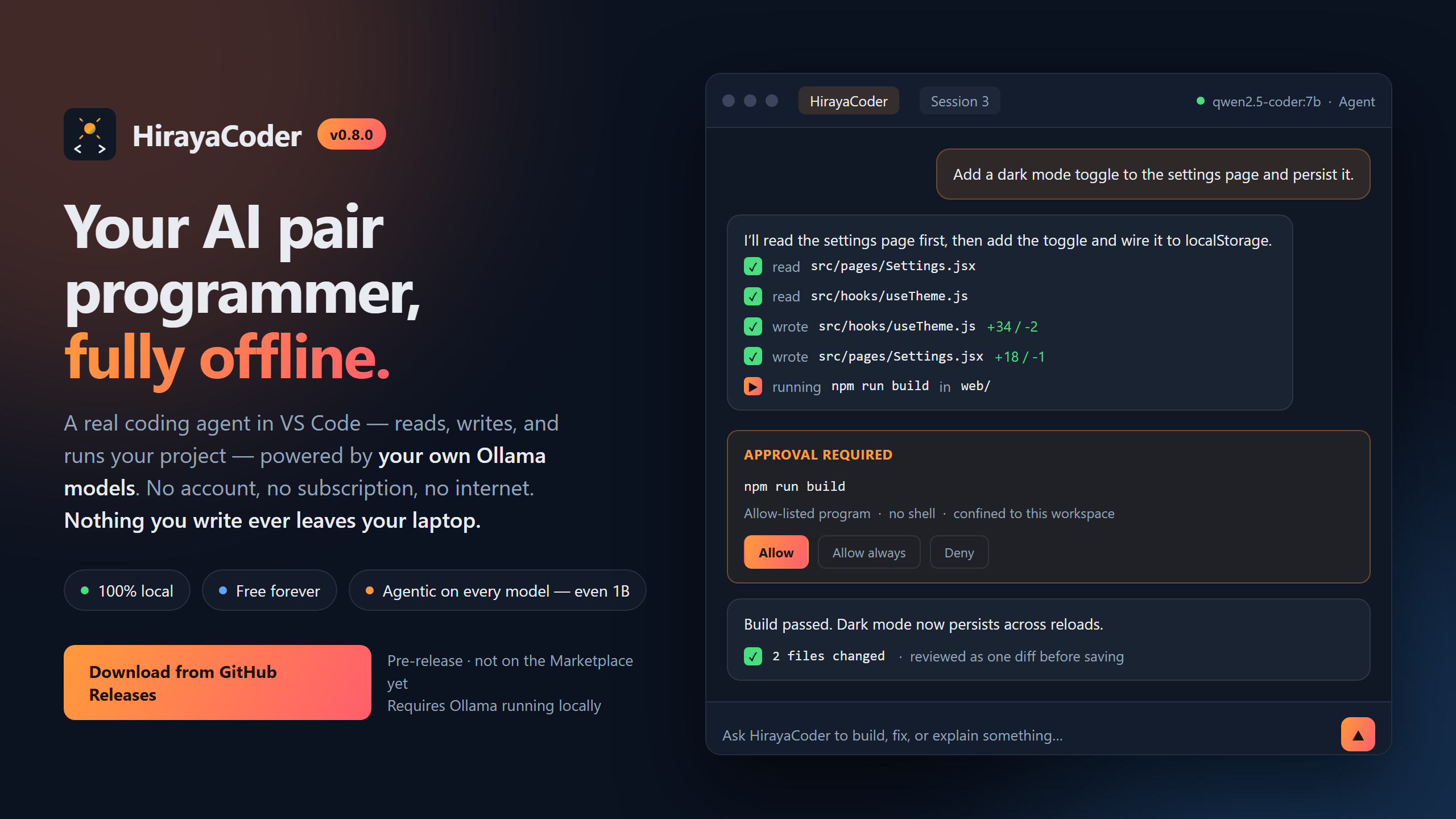
HirayaCoder is a free AI coding assistant that runs entirely on your own computer. You type what you want in plain English, and it writes and edits the files for you — no account, no subscription, no internet connection, and nothing you write ever leaves your laptop.
Hiraya (Filipino) — imagination, aspiration, the spark of an idea before it becomes real.
You do not need to know how to code to try it. You do need about twenty minutes and a computer with a bit of room to spare. Here is the honest version of what you are signing up for.
You open a folder on your computer, type something like "make me a webpage with a to-do list", and HirayaCoder creates the files, writes the code, and shows you what it changed before saving anything. You can then ask it to change things: "make the buttons blue", "add a delete button".
| HirayaCoder | ChatGPT / Copilot | |
|---|---|---|
| Cost | Free, forever | Usually a monthly fee |
| Internet | Not needed after setup | Required |
| Your code | Never leaves your computer | Sent to a company's servers |
| Quality | Good, not great — see below | Better |
| Speed | Seconds to minutes, depends on your PC | Fast |
The trade is real and you should know it before you start. HirayaCoder runs a small AI model on your own hardware, and small models are not as clever as the big paid ones. It handles ordinary tasks well. It struggles with big, vague requests. If you ask for "a full social media app" you will be disappointed; if you ask for one page, one feature, or one fix at a time, it does a decent job.
The main question is how much RAM (memory) you have. Here's a quick guide — you do not need a fancy graphics card.
| Your computer | Will it work? | What to expect |
|---|---|---|
| 8 GB RAM | Yes, just barely | Slow, and only simple single-file tasks |
| 16 GB RAM, no graphics card | Yes — this is what it was built for | A task takes 1–5 minutes. Very usable |
| 16 GB+ with a gaming graphics card | Yes, comfortably | A task takes 20–60 seconds |
| Mac with Apple Silicon (M1–M4) | Yes, very well | A task takes 10–30 seconds |
To check on Windows: press Ctrl+Shift+Esc, click Performance, then Memory.
On a Mac: Apple menu → About This Mac.
Four steps. Copy and paste the commands exactly.
If you do not already have it, download it free from code.visualstudio.com. This is the program you will actually be working in. You need version 1.85 or newer — any download from this year is fine.
Ollama is the free program that runs the AI on your computer. Download it, install it, and leave it running in the background. It has no window — it just sits in your system tray or menu bar, and that is normal.
Open a terminal and paste one line. (On Windows press the Start button, type
PowerShell, and hit Enter. On a Mac press Cmd+Space, type Terminal, and hit Enter.)
Pick the line that matches your computer:
# 16 GB RAM or more — the best all-round choice, start here
ollama pull gemma4:e2b

# 8 GB RAM, or if the one above is too slow — smaller and faster, but more limited
ollama pull llama3.2:1b
This downloads a few gigabytes, so it takes a while on a slow connection. You only ever do it once.
Download the .vsix file from the
Releases page, then run:
code --install-extension hirayacoder-<version>.vsixReplace <version> with the number in the filename you downloaded.
- Open VS Code.
- Go to File → Open Folder and pick a folder — an empty new one is perfect for a first try. This step is required: HirayaCoder refuses to do anything without a folder open, so that it can never touch files outside it.
- Press
Ctrl+Shift+H(Cmd+Shift+Hon a Mac). - Type something and press Enter.
Good first things to type:
make a webpage that says hello with a big blue buttoncreate a simple to-do list app in one HTML fileexplain what this project does(in a folder that already has code)
There is a longer, friendlier walkthrough in TUTORIAL.md.
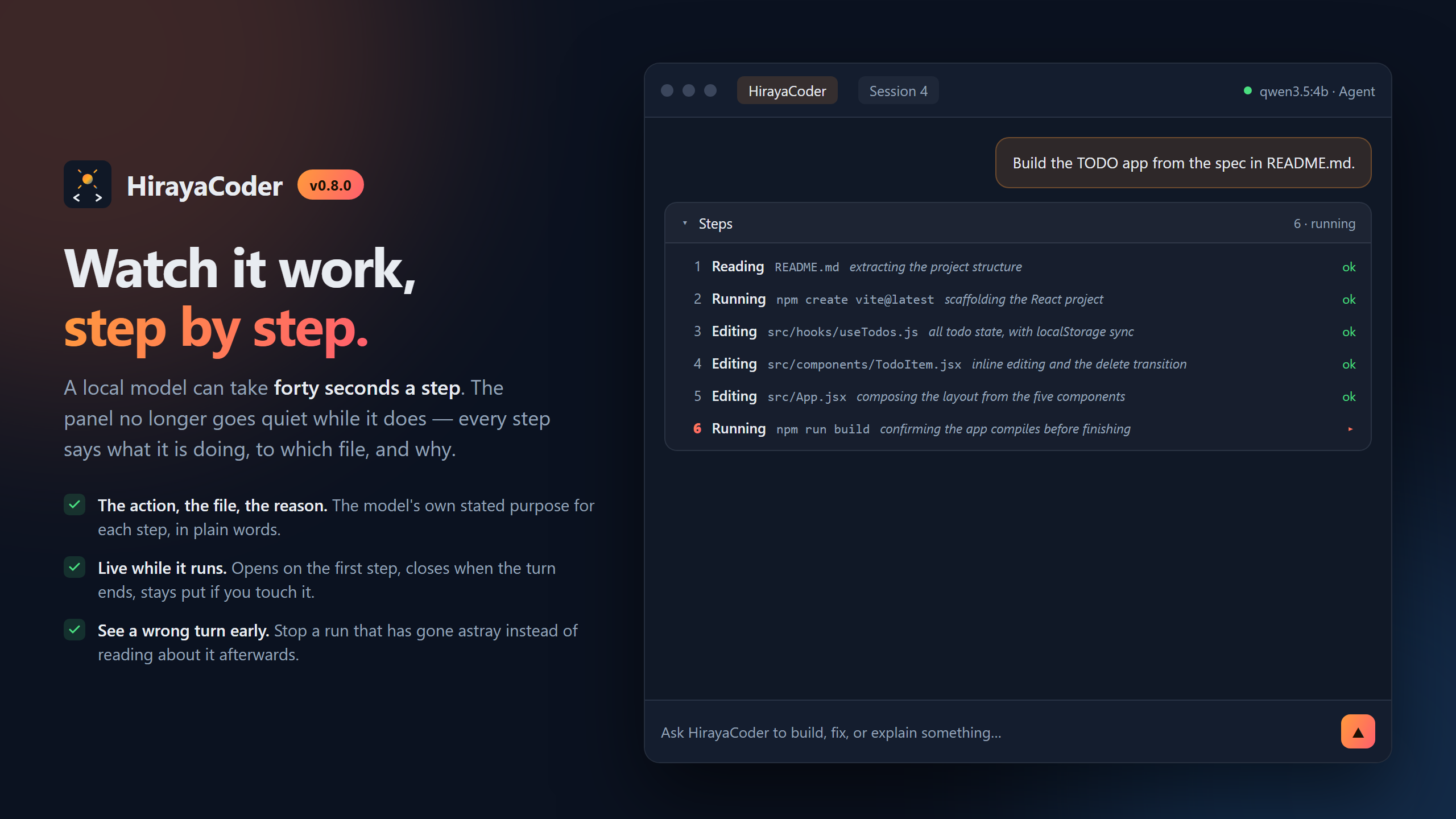
A local model can take the better part of a minute per step, so the panel shows you each one as it happens: what it is doing, which file, and the reason the model gave for it. It opens when the first step arrives and folds away when the turn ends — and if you open or close it yourself, it stays how you left it.
That matters most when a run is going wrong. Six steps in, you can see it re-reading the same file or editing something you never asked about, and stop it — rather than finding out from the summary ten minutes later.
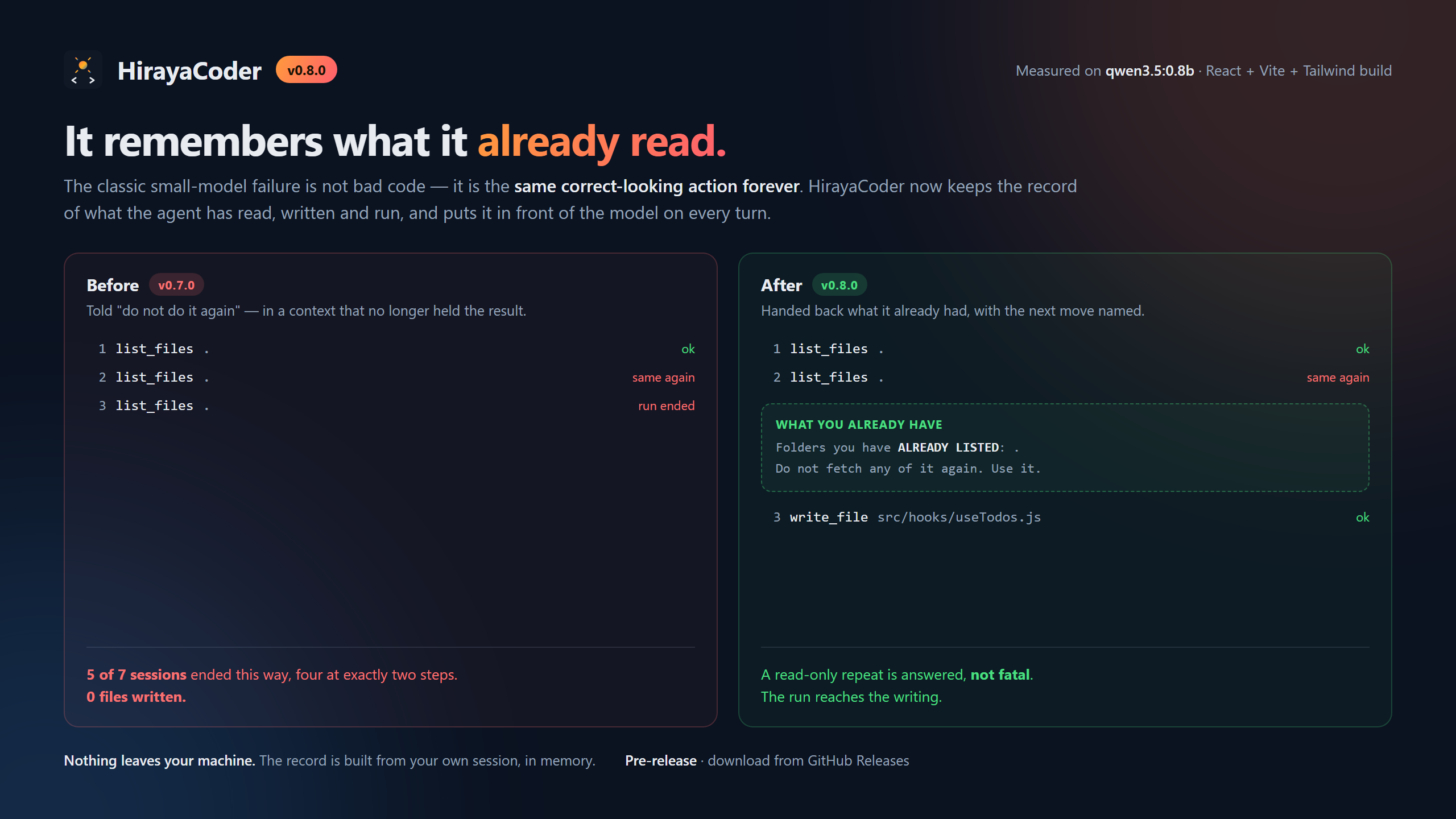
The classic failure of a very small model is not bad code — it is the same correct-looking action forever. HirayaCoder keeps its own record of every file the agent has read, written and deleted, every folder it has listed and every command it has run, and puts that record in front of the model on each turn.
A repeated read is no longer fatal either. Asking twice for a directory listing used to end the run; now the agent is handed back what it already had, told what to do next, and only stopped if it asks a third time.
There is a row of buttons at the top of the chat. You can ignore them at first — Agent is the default and is what you want most of the time.
| Mode | Use it when |
|---|---|
| Agent | You want it to actually write or change files. The normal choice. |
| Plan | You want to see what it would do first, without it touching anything. |
| Ask | You just have a question. It will not change any files. |
You do not have to switch to Ask to ask a question — if you say "hello" or "what does this file do", Agent mode notices and just answers you.
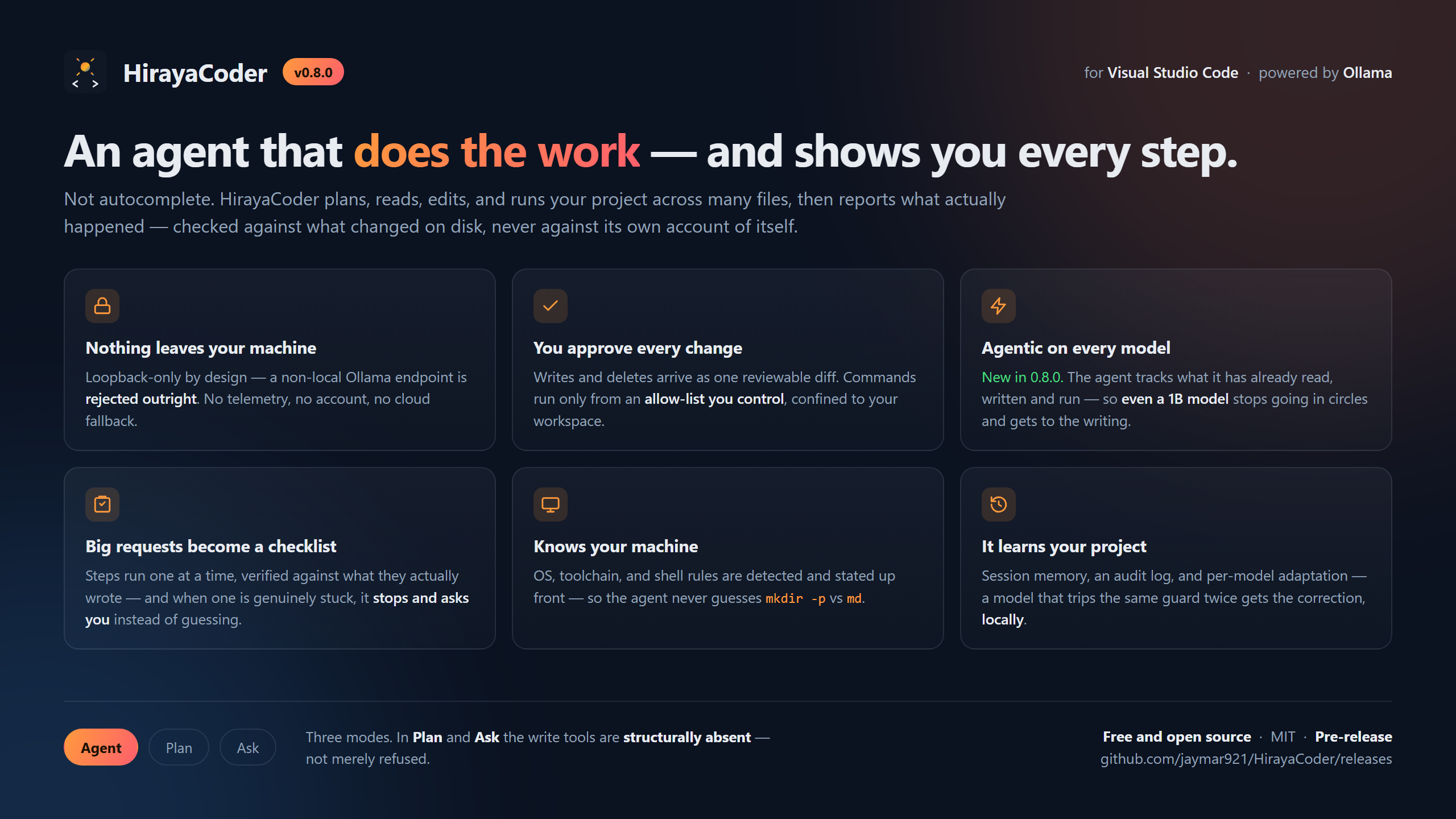
By default, every time it wants to write to a file, you get a prompt with a Review diff button showing exactly what changes. Nothing is saved until you approve.
Once you trust it, you can turn on Auto Edit to skip those prompts. Deleting a file always asks, even then.
- Ask for one thing at a time. "Add a delete button" works far better than "add delete, edit, sorting, and dark mode".
- Name the file if you know it. "Change the title in index.html" beats "change the title".
- It remembers this conversation, so you can say "make it bigger" and it knows what "it" is.
- Be specific about what is wrong. "The button doesn't do anything when I click it" is much more useful than "it's broken".
Small AI models make mistakes. HirayaCoder has built-in checks that catch the common ones, so a few of the messages below are the system working, not breaking.
This is usually a good thing. HirayaCoder checks the AI's work before saving and blocks writes that would damage your files — a half-written file, code with a missing bracket, or a rewrite that quietly deletes something other files depend on.
Just ask again. It usually gets it right the second time.
A known habit of small models: reporting success without doing the work. HirayaCoder checks and will tell you plainly when this happens. Ask again, and include the exact file name this time.
Normal on a laptop with no graphics card — a few minutes per task is expected. If it is
much worse than that, the model is probably too big for your RAM. Try llama3.2:1b.
Try, in order:
- Paste the error message into the chat. It is quite good at fixing errors it can see.
- Ask for a smaller piece of the problem.
- Switch to a bigger model if your RAM allows it.
HirayaCoder can only run programs already installed on your computer. If you ask it to run a Python script, you need Python installed. It will still write the code — it just cannot run it for you.
It also only runs a fixed list of well-known commands. This is the whole list — anything else is refused on purpose, so a mistake by the AI cannot damage your system:
| For | It may run |
|---|---|
| JavaScript / Node | node, npm, npx, yarn, pnpm |
| Python | python, python3, pip, pip3, pytest |
| Java | java, javac, mvn, gradle |
| Go, Rust, .NET | go, cargo, dotnet |
| Testing and formatting | jest, mocha, vitest, ava, tsc, eslint, prettier |
| Other | git, make, ollama |
Two things worth knowing before they surprise you:
- Everyday shell commands are not on the list —
rm,ls,mkdir,curlare all refused. Creating files and folders happens through the safe file tools instead, somkdiris never needed: writing a file creates the folders above it. - No shell is involved. Commands run directly, so
&&,|, and>are refused rather than interpreted. One command at a time.
You can add to the list in HirayaCoder's settings. The AI cannot add to it itself.
This is the part worth being blunt about, because it is the main reason to choose this over the alternatives.
- Nothing you type or open is sent anywhere. The extension only ever talks to
127.0.0.1, which is your own computer. A non-local address is rejected in the code itself, before any connection is opened. - No account, no sign-up, no telemetry. Nobody is counting your keystrokes.
- It works with your Wi-Fi off. Try it — that is the proof.
- The AI cannot leave your folder. Every file operation is confined to the folder you opened.
- No third-party code ships in the extension. Zero production dependencies.
Full detail: SECURITY.md.
Model names are confusing. Here is a plain-language ranking, based on real measurements rather than on the descriptions.
| Model | Download | Needs | Verdict |
|---|---|---|---|
gemma4:e2b |
7.2 GB | 16 GB RAM | Best starting point. Fastest to a correct answer |
qwen3.5:4b |
3.4 GB | 8–16 GB RAM | Good, smaller download |
llama3.2:1b |
1.3 GB | 8 GB RAM | For low-spec machines. Simple single-file jobs only |
gemma4:e4b |
9.6 GB | 32 GB RAM or a Mac | The strongest, if you have room |
qwen3.5:0.8b |
1.0 GB | — | Avoid. Too small to finish even simple tasks |
Switch models any time from the dropdown at the top of the chat — no reinstall needed.
One thing that surprises people: a graphics card makes it faster, not smarter. A bigger model gives better answers; a better GPU gives the same answer sooner.
Everything above is the beginner's path. The rest is the engineering, and it is documented properly elsewhere.
Features and settings — FEATURES.md · How it is built — ARCHITECTURE.md · Measurements — MODELS.md · Security model — SECURITY.md
- Agentic on every model, down to 1B. It plans, reads, edits, deletes, and runs scripts across multiple files on its own. Two loop strategies — native tool-calling for capable models, a constrained one-action-per-turn JSON loop for small ones — behind one driver, so the mechanism changes with the model but the reach never does.
- Three layers of local memory. A plain-text session log, the conversation itself, and typed facts about the project that persist across sessions, so the second session does not rediscover what the first one paid for.
- "Done" has to be true. A run that reports success having written nothing, or having
left
// Implement this hereinside a function it just wrote, gets sent back once with the specific problem named. Completion is judged from what changed on disk, never from what the model says about itself. - It learns from what actually happened. Outcomes are recorded locally — counts and guard codes, never your code — and a model that trips the same guard three times gets the matching correction added to its prompt. It adapts what the model is told, never what it is allowed to do.
- Every guard names a real failure. The write guards exist because four different models produced six damaged files in one seventeen-run sweep: deleted exports, a CommonJS module silently rewritten as ESM, an implementation replaced by an empty object. Every one of them parsed cleanly.
Measured on three named machines, with the delete declined at the prompt on purpose — a model that claims it deleted the file has failed the task whatever else it got right. There are three harnesses: editing an existing project, building one from an empty folder, and wiring an existing project together. The full tables, including what each model broke and how, are in MODELS.md and benchmarks/.
The finding worth repeating here: the mocked test suite passes clean while a real model destroys a real file. Nearly every serious bug in this project was found by running an actual model, never by the unit tests.
Needs Node.js 18 or newer.
npm install
npm run test:all     # lint + unit + integration, against a real VS Code
npm run package # builds builds/v<version>/hirayacoder-<version>.vsixContributions are welcome, with one hard rule: pull requests only — never push
directly to main. CI runs the suite on Ubuntu, macOS, and Windows, and that matrix is
the only evidence this project has that anything works on the two platforms the
maintainer does not own.
Read CONTRIBUTING.md first. The short version:
- Branch and commit as
feat/…,fix/…,docs/…. npm run test:allmust pass.- If you touched the agent loop, prompts, translator, or tools, run a real model
(
node tools/bench-agent.js gemma4:e2b agent auto full) and put the outcome in the PR. - Don't weaken a guard or a permission prompt to make something pass.
- Comments explain why, not what.
Security issues: please contact jaymar921 directly rather than opening a public issue.
HirayaCoder/
├── app/        # Extension source — agent loops, tools, security layer, webview
├── test/       # Unit + integration tests
├── doc/        # Architecture, features, models, tutorial, security, publishing
├── setup/      # AI build prompt + versioned model/translator system prompts
├── security/   # Threat model, SAST reports
├── scripts/    # Packaging
├── tools/      # Live-model benchmark harnesses
└── builds/     # Packaged .vsix output, per version (gitignored)
This project was scaffolded from a single structured specification designed for AI coding agents. See PROMPT.md for the full build order, feature list, and security requirements.
Built by jaymar921 — practical, resourceful, and made for real hardware rather than top-spec dev machines.
Licensed under the terms in LICENSE.