This project provides a set of tools for use with the NATO Confidentiality Metadata Labels as specified in ADatP-4774 and ADatP-4778.
The project is aimed as a Debian Linux project only. The intention is to produce a set of commands which can be run directly on a system. A Library containing the core functionality will also be produced, enabling other tools to integrate much of the core functionality with ease. Furthermore, a GNOME Files (Nautilus) extension is provided as the primary GUI for the functionality.
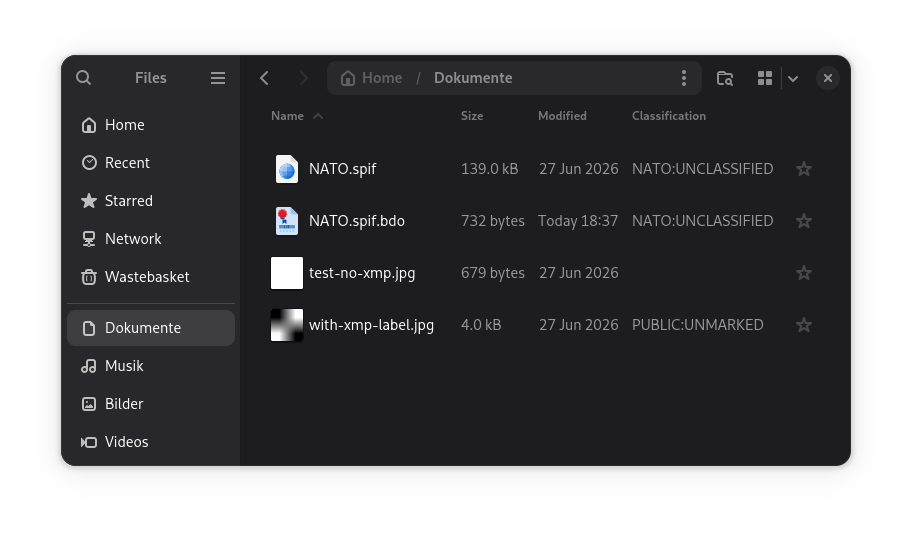
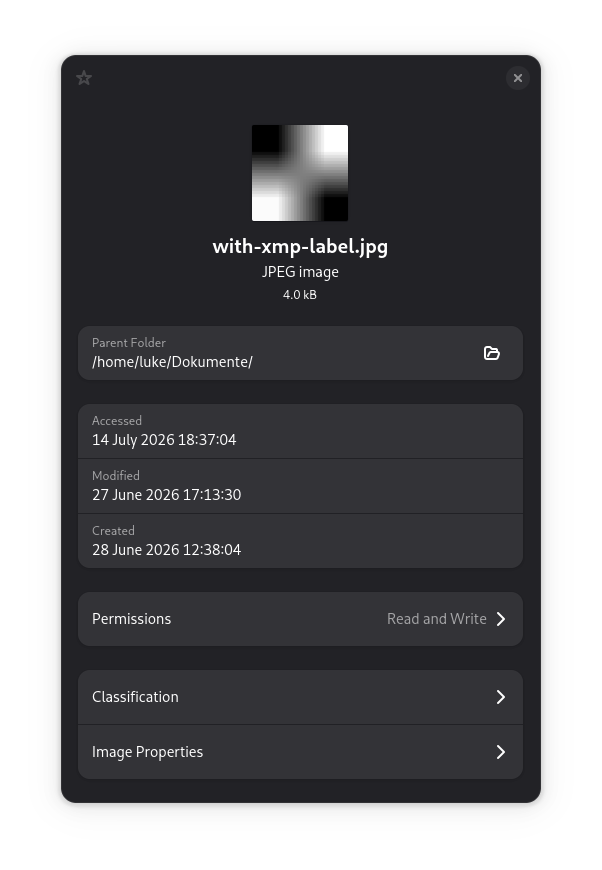
Install the package to your system using apt.
# For users
apt install nmbs

# For developers
apt install libnmbs-dev
The documentation for the CLI is packaged with the tool itself. Doxygen is otherwise available for the code in the libnmbs-dev package.
# For the CLI, use the supplied man page, or the --help argument
man nmbs-get
man nmbs-set
man nmbs-verify

# For development documentation, the doxygen can be accessed using a doc-base tool or by e.g.
xdg-open /usr/share/doc/libnmbs-dev/html/index.htmlPre-Release: v1.0.0-betaX (automatically 1.0.0~betaX in Debian Tooling) Release: v1.0.0 (automatically 1.0.0 in Debian Tooling)
There are a few methods for building this project. The primary focus is ensuring that the debian package is clean and stable. We use CMake as the primary build tool in the upstream repository, and a mix of git-buildpackage and debhelper in the downstream debian packageing repository. Here are a few common commands used.
Some Docs: https://dep-team.pages.debian.net/deps/dep14/ https://wiki.debian.org/PackagingWithGit https://wiki.debian.org/debian/watch
# Update source if a new release has been tagged upstream
gbp import-orig --uscan

# Update the build log using dch. Make sure source version is correct
dch -m

# Build the debian package
dpkg-buildpackage
lintian ../nmbs*.changes

# To update the changelog use dch. In particular, the commands --append, --increment, --edit, --release and --newversion
# Note that debhelper decides e.g. if to sign the build based on the status in the changelog. Its an important file!!!
dch -m

# Finalise the current version in the log
dch -mr

# Verify using lintian. mentors will use pedantic settings!
lintian --info --pedantic --display-info nmbs_*_amd64.changes

# After finalisation, increment the build version automatically and start the next section
dch -mi

# To tidy up after, use
dh clean
Finally, this is a CLion project. The project settings include "dpkg" and "cpack" targets, just using the GUI will work for the CMake Targets.
The following steps are mandatory for a release. They provide a pretty high level of confidence and should be executed from the downstream debian source before publishing:
# Build must succeed with a simple dpkg build call. (as a regular user)
dpkg-buildpackage -k<key>

# lintian must return no errors or warnings. Specific Info may be ignored depending on content.
lintian --info --pedantic --display-info ../nmbs_*_amd64.changes

# pbuilder must succeed in building in an isolated environment
sudo pbuilder create --distribution sid
origtargz
pdebuild --auto-debsign --buildresult ..
lintian --info --pedantic --display-info ../nmbs_*_amd64.changes

# Basic install and check
sudo apt install ./nmbs_*_amd64.deb ./libnmbs1_*_amd64.deb
nautilus -q

# Check d/watch is working
uscan -v --no-download

# chroot cheat sheet
sudo mount --rbind --make-rslave /home/<user>/Source /home/<user>/chroot/unstable/home/<user>/Source

# git cheat sheet
git branch -f upstream/latest upstream/latest~1 # Reset branches without checkoutIt is quite easy to develop for Nautilus. Quite simply, symlink the debug .so to the nautilus extensions folder. Important to know is that Nautilus runs with a daemon in the background. You must sometimes kill this or the module will not reload.
Check the run configurations of NMBS-Nautilus to see how to Debug. In CLion this is stored in git, so just debug the target to start Nautilus with gdb.
nautilus -qsudo ln -s $PWD/build/debug/targets/NMBS-Nautilus/libnmbs-nautilusd.so /usr/lib/x86_64-linux-gnu/nautilus/extensions-4/libnmbs-nautilus.so sudo rm /usr/lib/x86_64-linux-gnu/nautilus/extensions-4/libnmbs-nautilus.so| Variable | Example | |
|---|---|---|
| NMBS_LOCPATH | An override path to localisation files. No trailing slash. | /usr/share/locale |
/org/gnome/nautilus-nmbs/ originator - Used in nautilus-nmbs. This will take precedence over the env var in Nautilus and counts as user input (its passed by parameter to the lib, so technically it is...) binding-profiles/ - Profiles used for writing. sidecar ext4 xmp
The project uses gettext for localisation. Please either update the .po files in the NMBS-i18n target, or generate a new locale using the following command. Note that the CMake is fully automated. All .po files in the po folder will be automatically built and updated.
msginit --locale=de.UTF-8 --input=targets/NMBS-i18n/nmbs.pot --output=targets/NMBS-i18n/po/de.po- ADatP-4774 (Ed.A V.1 12.2017) CONFIDENTIALITY METADATA LABEL SYNTAX
- ADatP-4778 (Ed.A V.1 10.2018) METADATA BINDING MECHANISM
- ADatP-5636 (Ed.A V.1 11.2022) NATO CORE METADATA SPECIFICATION(NCMS)
Dependencies are kept to a minimum. Particular focus is paid to ensuring Licenses are all very flexible, APT presence of packages, and trustworthiness. Ideally, this project will be developed on a Debian distro, with simple calls to install the libs via APT on a Developer Machine, and APT Dependencies in release.
| Name | Type | APT | Description |
|---|---|---|---|
| Exiv2 | Product | libexiv2-dev | C++ Lib for writing metadata to numerous formats, in particular images |
| argparse | Product | libargparse-dev | C++17 Headers for parsing CLI options |
| Product | libxml2 | C XML library. Most "native" and maintained lib possible in Debian | |
| Build | libxml2-dev | ||
| Build | build-essential | ||
| Build | cmake | ||
| Build | libgtest-dev | ||
| Build | doxygen | ||
| Build | ninja-build | ||
| Build | help2man | ||
| Build | debhelper | Toolset for building .deb files | |
| Build | pkg-config | NMBS-Nautilus Toolset for building GNOME projects | |
| Product | libglib2.0-dev | NMBS-Nautilus | |
| Product | libnautilus-extension-dev | NMBS-Nautilus | |
| Development | lintian | Tool for verifying quality of .deb packages | |
| Development | devscripts | Scripts containing dch used for the debian changelog | |
| Development | libxml2-doc | ||
| Development | valgrind | Runs in CLion directly to check memory leaks | |
| Development | git | ||
| Recomended | exiv2 | CLI tools for Exiv2. Usefull for debugging |
This project ships with a small number of external resources. Many of these were shipped with the NATO Standards. Important to note is that only PUBLIC UNMARKED resources have been included. Unfortunately several XSD resources are still marked NATO UNCLASSIFIED. It will take some time to write "clean room" implementations from the standards to ship.
Their original sources are as follows.
| File | Source | Description |
|---|---|---|
| nl-cl.xsd | ADatP-4774.5 EDA V1.zip | XSD for ConfidentialityLabel |
| nl-mb.xsd | ADatP-4774.5 EDA V1.zip | XSD for BindingInformation |
| xmlspif.xsd | xmlspif.org | XSD for the "Security Policy Information File" format used to describe available classifications. |
| 20140916_PU_PUBLIC Security Policy-v1.spif | ADatP-4774.5 EDA V1.zip | This contains a list of the standard classifications used. It is not normative, but till now is the best I have found. |
| 20210506_PU_NATO Security Policy-v88.spif | ADatP-4774.5 EDA V1.zip | This contains a list of the standard classifications used. It is not normative, but till now is the best I have found. |