
Give a text-only model the web: search, X, and any page, returned as citable evidence.
简体中文 · Troubleshooting · Configuration · Output contract · Security · ModLens (vision)


npx -y skills add liustack/modsearch              # install the skill
npx @liustack/modsearch -q "current Node.js LTS"  # or just use the CLI
Models like DeepSeek-V4-Flash are cheap, fast, capable, and frozen at their training cutoff. Ask one for the current Node.js LTS and it answers from memory: confidently, and possibly wrong. ModSearch gives it a live line out. It searches the web, reads a specific page, or goes inside X, and hands back a few hundred tokens of structured, citable evidence instead of a wall of page text. No model swap, no prompt surgery, no key to start.
- A few hundred tokens, not thirty thousand. Built-in server-side search pushes whole pages into your model's context (~30k tokens for one measured answer). ModSearch keeps the reading on the engine side and returns evidence.
- Answers you can check. Every result carries titles, links, and dates, plus an
uncertaintylist that names exactly what could not be pinned down. - Reaches inside X (Twitter). With Grok Build installed, ModSearch searches the one corpus no web index can see.
- Reading a page never fails. A dependency-free local fetcher is the guaranteed floor, even with nothing installed and every quota spent.
- Engines fail over by themselves. It uses whatever is on your machine and switches mid-run when an engine dies or runs dry. The output names who answered.
- Install once, works everywhere. Claude Code, Codex, Pi, and OpenCode all take the same skill.
The ~30,000-token figure is one 2026-08 measurement, not a benchmark: a single search-backed question answered by DeepSeek-V4-Flash through Codex's Responses API endpoint. It stands for the cost of pushing whole pages into context, not a fixed number.
npx -y skills add liustack/modsearchOr tell your agent: "Install the skill from https://github.com/liustack/modsearch".
Then give it a search engine, either one. Antigravity CLI (no key, covers searching and page reading):
curl -fsSL https://antigravity.google/cli/install.sh | bash && agy # sign in, then exitOr a Tavily key (1,000 free credits a month):
modsearch config set tavily.apiKey <key>With neither, the command hands you both options rather than failing vaguely. Reading a page needs nothing installed. Requires Node 22.13+, macOS or Linux.
With the skill installed you do not type commands: ask anything that needs checking, or paste a URL, and it fires on its own. By hand:
modsearch -q "current Node.js LTS version"     # search the web
modsearch -u "https://nodejs.org/en/about"     # read one page, add -q for a focus
modsearch -q "reactions on X" --source x       # search X, automatic for X-flavored queries
Output is always a results array, one entry per corpus:
{
  "mode": "search",
  "results": [{
    "source": "web",
    "engine": "antigravity-cli",
    "summary": "The current Node.js LTS is v24.19.0 (Krypton), released 2026-08-03.",
    "items": [{ "title": "...", "url": "https://...", "published_at": "2026-08-03" }],
    "uncertainty": [],
    "warnings": [],
    "durationSeconds": 5.5
  }]
}
uncertainty is what the engine could not pin down about the facts. warnings is how the answer was routed (a fallback, a stand-in for X, redirects), and attempts records each engine tried.
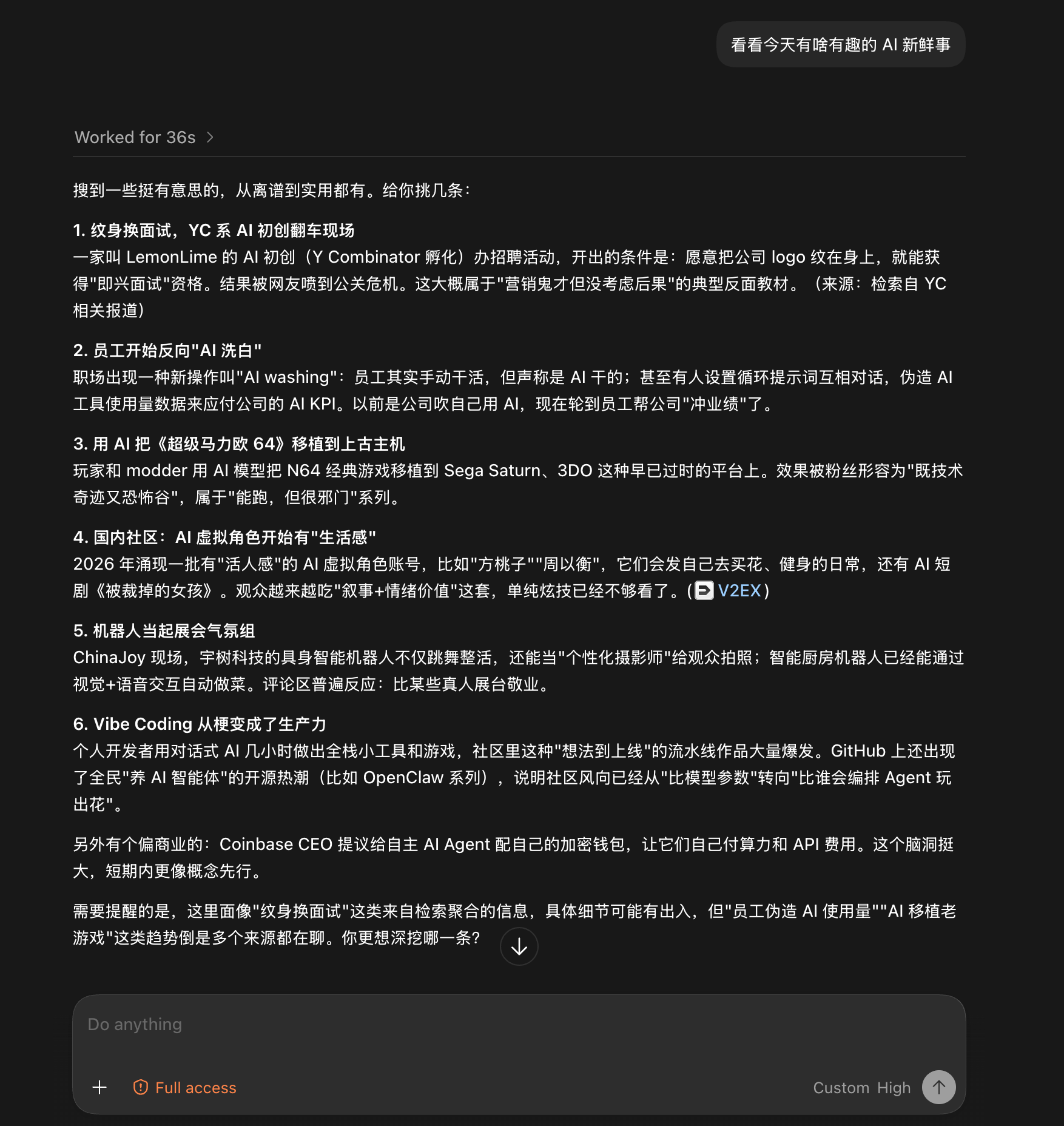
Both screenshots are unedited runs from the Codex desktop app, driving a text-only DeepSeek-V4-Flash.
Drop in a blog link and ask what it says. Twenty-five seconds later: a structured summary of the whole post, and the browser never opened.

Give it no target at all, just "anything interesting in AI today?". Thirty-six seconds later: six sourced stories, and a closing caveat flagging which details came from aggregation and deserve a second look. That honesty is carried straight out of the uncertainty field.
No magic, four steps:
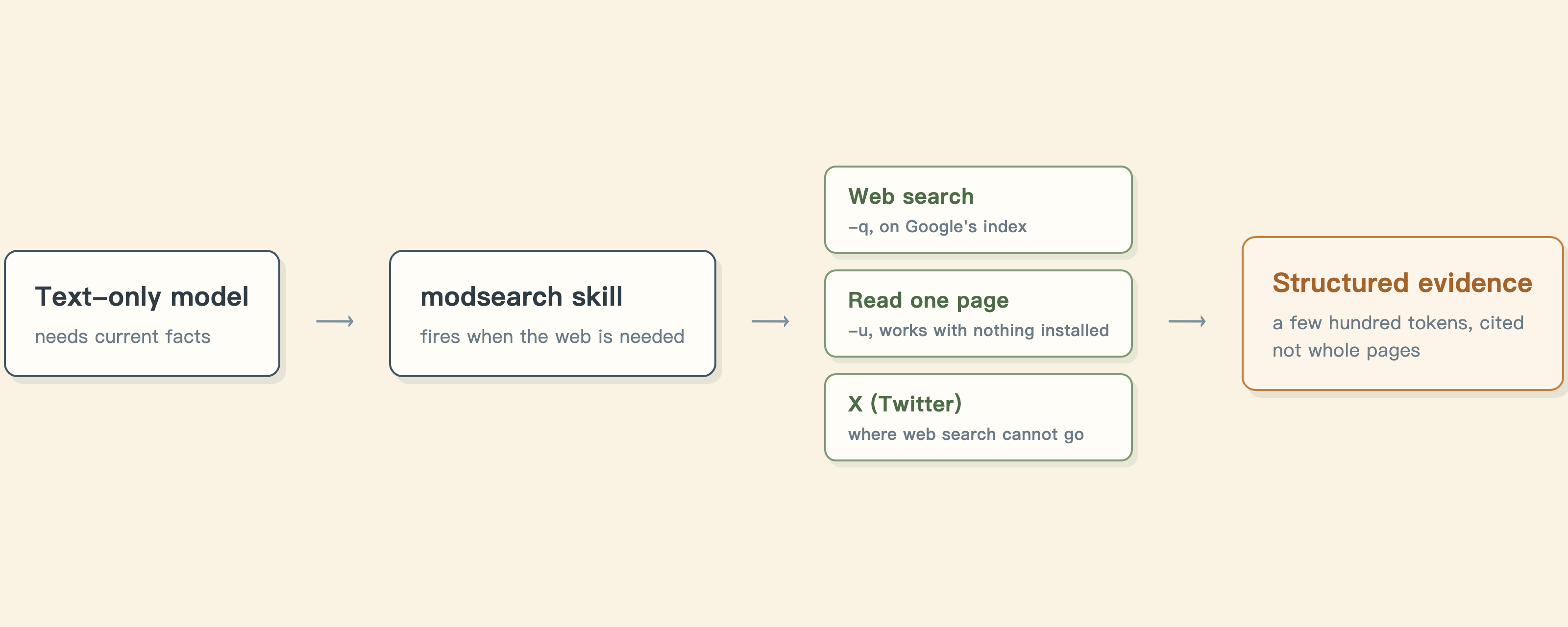
- The skill triggers when your model needs the outside world: a time-sensitive question, a pasted URL, an X-flavored query.
- It runs the
modsearchCLI, which picks an engine for the job from whatever is installed on your machine. - If that engine fails or runs out of quota mid-run, the next one takes over on its own, and the output records who answered and why it fell through.
- Your model reads the JSON evidence and answers with sources, instead of from memory.
Three jobs, each with its own engines, and only searching asks anything of you:
| Job | What it takes | How |
|---|---|---|
| Search the public web | agy or a Tavily key | -q "query" |
| Read one URL | nothing at all | -u <url> |
| Search X (Twitter) | Grok Build (SuperGrok or X Premium) | automatic, or --source x |
The weaknesses, in the same place: agy's free tier is a weekly quota and heavy use hits the wall (a Tavily key picks it up automatically), the X route needs a subscription, and the local fetcher runs no JavaScript, so client-rendered pages come back thin.
| Flag | Meaning | Default |
|---|---|---|
-q, --query <text> |
Query, or the extraction focus when paired with -u |
|
-u, --url <url> |
Fetch this page instead of searching | |
-s, --source <list> |
Corpora: web, x, or web,x |
from the query, else web |
-e, --engine <name> |
Force exactly one engine for this run. No fallback: if it cannot do the job or fails, the run errors instead of switching to another engine. Drop it to let modsearch pick and fail over. | picked from what works here |
-o, --output <path> |
Also write JSON to a file | |
-m, --model <name> |
Engine model | gemini-3.6-flash-low |
--prompt <text> |
Extra constraints for this run, passed to the engine | |
--max-results <n> |
Maximum search results | 8 |
--timeout <ms> |
Engine timeout | 180000 |
--workdir <path> |
Working directory for engines that run a command | current directory |
--allow-private-network |
Let the local fetcher reach reserved ranges, for VPNs that map public hosts into them | off |
Configuration is optional. ~/.modsearch/config.json holds one decision: which engine searches (modsearch config set engine tavily, empty means automatic). Reading pages and searching X need no settings.
Run modsearch doctor to see what is set up here: your Node version, each role's engines with why they are or are not ready, where the config comes from, and the private-network state. It spends no quota and makes no request, and --json feeds it to a tool. Reach for it first when routing surprises you.
| Doc | Read it when |
|---|---|
| Troubleshooting | A command failed and the message needs decoding |
| Configuration | Setting a key, switching engines, fixing config |
| Output contract | Parsing the JSON or building on it |
| Harness setup | Wiring it into Codex, Claude Code, OpenCode, or Pi |
| Security | SSRF guards, DNS-rebinding protection, untrusted input |
| CHANGELOG | Finding what changed in a version |
| AGENTS.md | Working on this codebase |
ModSearch does not accept pull requests. It is a small tool with one pair of hands on it, and every line stays author-owned: that tight loop is what keeps it dependable. Two ways to contribute that genuinely help:
- Open an issue. Bugs, ideas, a confusing error, docs that read wrong. Issues get read and drive what gets built.
- Fork it. MIT means your copy is fully yours: rename it, rewire it, ship it.
This project runs on LIUSTACK Skills: shaping before you build, coding while you build, dig when it breaks, snapshot when you hand off. Lighter than Superpowers, and stronger.
npx -y skills add liustack/liustack -g⭐ If it helps, star ModSearch and liustack. Stars are how the next developer finds them.
ModSearch is MIT-licensed, so use is not restricted. The author gives no warranty and no endorsement for any particular use, commercial or otherwise. The upstream engines it drives (Antigravity CLI, Tavily, Grok Build) each carry their own terms and quotas, and complying with them is the user's responsibility.
MIT