

⬇️ Download & Play (latest release — Windows · Linux · experimental macOS) · 🌍 Play Official Worlds (in the client) · 🕹️ …or in your Browser · 🌐 Website · 📝 Devblog · 🎙️ Daily Dev Podcast · 📚 Book & Audiobook · 🎬 Let's Play (German audio) · 📜 Changelog · ⭐ Star us on GitHub · 🤝 Contribute · 🐛 Report a Bug
An experimental 3D Voxel Space Game, 100% generated by AI, driven by the imagination of a 10-year-old.
👨👩👧 Made for families. Built by a dad and his 10-year-old and designed to be safe and fun for kids (~8+): no gore, no mature content. Multiplayer chat and the names players choose are kept friendly by our Code of Conduct.
⭐ Like the idea of a 10-year-old's dream game? Tapping the Star button at the top of this page takes one second, makes Justus's day, and helps more families discover Blocks Beyond The Stars. Thank you! 💛
Blocks Beyond the Stars is not a traditional indie game—it is an exploration of what is possible with Generative AI today. It was created by a father and his 10-year-old son:
- Justus (10) is the "Lead Product Manager". He imagines the universe, requests features (from corrupted planets to hover speeders), and acts as the strict lead playtester.
- Marcel (Dad) uses his professional software engineering background to prompt, orchestrate, and integrate those ideas using modern AI tools.
- Verena (Mom) handles the game balancing and tests the multiplayer.
100% of the assets in this game were created using AI:
- Code & Architecture: Generated and structured with LLMs.
- 3D Models, Textures & UI: Prompted via AI art generators.
- Music & Sound Effects: Synthesized using AI audio tools.
- Dynamic Storytelling: Powered by an optional integrated Python LLM backend (FastAPI + LangChain) for real-time NPC/ship-AI dialogue.
📚 Want the full story? The whole journey — how a 10-year-old's dream became a real game, built entirely with AI — is now a book and audiobook (available in German and English, written with AI too, of course).
We'd love your help making this game better! We made this repository Open Source not just to share our AI workflow, but to build it together with you. Whether you're a developer, an artist, a writer, or simply a player with ideas and bug reports — there's a place for you here. Big features, small fixes, balancing tweaks, fresh ideas: all are welcome, and you don't need Unity or a game engine licence for most of it — see Contribute for where to start, or just press F1 in-game (F2 in the browser version) to send feedback. Let's make it great together. 🚀 And if you're not the coding type — no problem at all: a single ⭐ is the easiest way to cheer Justus on and help us grow.
Made for families — safe for kids. Mild sci-fi combat only (no blood, bandits are chased away, never killed; weapons default to "tools only"), no purchases, no ads, no personal data — and online play ships with a content filter, a one-command report path and per-player mute. Our own assessment: PEGI 7 / USK 6 territory (no official rating yet — that needs a storefront questionnaire). The full picture for parents & teachers, including how to host a private family world: docs/user/PARENTS.md (deutsch: PARENTS.de.md).
A block-based 3D space crafting game for Windows and Linux (with an experimental macOS build), built from day one as a persistent client/server multiplayer experience.
You wake aboard your own spaceship. Out there are procedurally generated star systems—each with its own sun, planets, moons, and asteroid fields. Land on unique worlds (from airless rocks to lava fields and floating skylands), mine resources, craft gear, and unlock blueprints.
Design your ship block by block, fly real system-scale routes, dock at space stations, tame alien creatures, and build your own planet bases with your friends.
Explore
- System-scale flight: procedurally generated star systems — each with its own sun, planets, moons and mineable asteroid belts — and 29 planet types (airless rocks, lava fields, jungles, oceans, skylands, fungal and crystal worlds, red deserts, archipelagos, glaciers, …) with their own terrain, flora, fauna and sky. Worlds wrap east–west, so you can walk around a planet. Jump between systems; the far frontier is richer, and a Growing galaxy grows a new system every time you push past its edge.
- Living worlds: per-position weather and seasons (storms that drift across the land, fog, blizzards, acid rain, ember fall, ion storms, meteor showers — with real consequences and opportunities), a true day/night terminator, creatures you can scan, hunt or tame as companions, binoculars with thermal vision and an in-game camera with a photo album.
- Places to find: settlements and space stations with NPCs, rare factories, fallen ruins, treasure chests, monuments with glowing runes, bandit camps and pirate space — and a handful of one-of-a-kind mysteries per galaxy.
Build & Create
- Complete freedom: every block can be mined, reshaped and rebuilt.
- Build beyond cubes: reshape any block into slabs, ramps, stairs, domes, furniture — or draw your own forms — dye it any colour and paint your own 32×32 textures on it. All inside the game. Share whole builds with friends as blueprint codes.
- Ships, stations, bases: lay a keel and build your own ship block by block (it flies the way you built it), deploy a station core in orbit, found planet bases with a life-support field, airtight rooms and teleporter pads, repair and claim wrecks — or claim a factory as your base with a rare access code.
- Deep crafting: mine, smelt, unlock blueprints, and craft everything from hover speeders to space stations; factory terminals for bulk production, greenhouses and farming, tiered gear upgrades, and 40+ achievements with rewards along the way.
People & Story
- The VEGA Protocol: an optional story campaign narrated by your ship's AI companion — intro cinematic, lore fragments, Guardian machines, a two-route finale and an ending with credits.
- NPCs who remember you: trade and talk your way from Stranger to Friend, make choices in dialogues, get radio calls from people you know, watch settlers move into your base; missions, bounties and build jobs on the boards; bandits you can pay off or fight.
- Learn as you go: an in-game Codex wiki, DataQube arcade minigames, VEGA context tips and a built-in music library.
Together
- Rich multiplayer: form alliances, share bases, trade with other players, talk over text and voice chat (push-to-talk) with tiered radio reach — play solo, host a world for friends on your LAN, or create your own hosted world on our official servers (set a password, list it publicly, and share it with your friends).
- Made for families: no gore, friendly-name screening, mute and report tools, a host switch for voice chat, and peaceful/family world presets — see our Code of Conduct.
Platforms & Languages
- Windows, Linux, macOS & browser: native Windows and Linux clients — no Wine/Proton needed — an experimental macOS build, and a play-in-your-browser version. Auto-update with an in-game What's new? and opt-in crash reporting.
- Keyboard, mouse, controller & touch: keyboard + mouse, an Xbox/XInput gamepad (both work at once, menus are pad-navigable) and on-screen touch controls on tablets / touch browsers (controller and touch support are experimental).
- Play in your language: the whole game is localized in 14 languages — English, German, French, Spanish, Italian, Portuguese, Polish, Turkish, Dutch, Russian, Ukrainian, Japanese, Korean and Simplified Chinese — and community translations are welcome (see docs/developer/TRANSLATION_GUIDE.md).
One download — every mode. The game client runs on Windows, Linux and (experimental) macOS:
- 🧑🚀 Singleplayer — explore the universe at your own pace. No internet connection, no account needed.
- 🏠 LAN multiplayer — host a world right on your PC and play together with family and friends on your home network.
- 🌐 Official Worlds (online) — create a free account at play.blocksbeyondthestars.de (no email required) or directly in-game via Main menu → Official Worlds, then create your own world — online multiplayer with friends without running your own server. There are no open public servers: to play with friends, set a join password and list your world publicly — friends find it under Official Worlds → Public worlds and join with your password. Official Worlds are in beta — download a backup of your world regularly.
Or skip the download entirely and play in your browser — no install needed. Pick a player name and play singleplayer right away (no account — your world is saved in that browser), or create an account and a hosted world to play with friends. Only LAN hosting needs the desktop client.
See the game in action — Justus's very first playthrough (German audio):
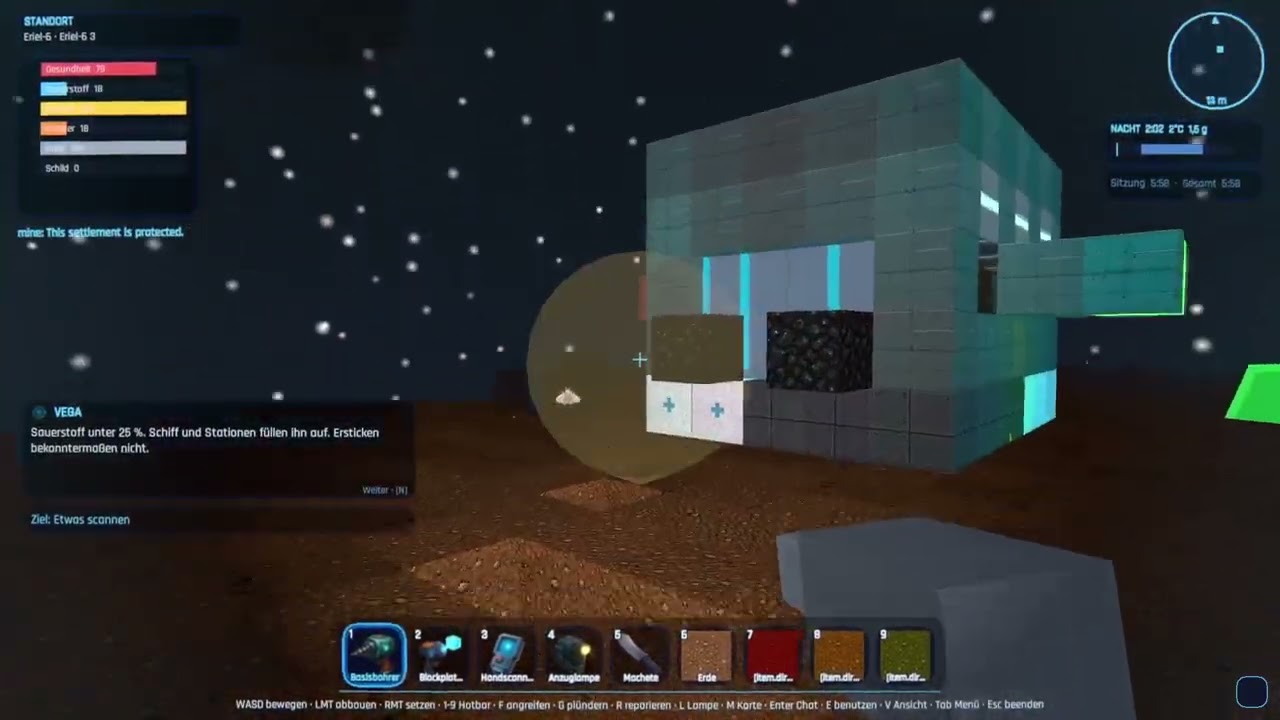
More on our YouTube channel:
🎙️ Prefer listening? A daily AI-generated audio podcast recaps what changed in the game's development — every commit, PR and release, summarized once a day: Blocks Beyond The Stars — Daily Dev Podcast on Podlog.
👍 Liking the videos already helps a lot to make the game better known — and a ⭐ here on GitHub helps even more to grow our community!
 Main menu |
 On a planet surface |
 Space flight between worlds |
 The ship cockpit |
 The in-game menu (crafting, tech, ship, map…) |
Many different worlds — every planet type has its own terrain, flora and sky:
 Jungle |
 Lava |
 Ice |
 Crystal |
 Fungal |
 Skylands |
 Ocean |
 Desert |
Generated from the live game — see docs/screenshots/.
You don't need Unity, a game engine licence, or a powerful machine to help here. The Unity Editor builds the playable client — but the server, the shared code, world generation, all game content and the entire test suite are plain C# and JSON, and everything our CI checks runs on the free .NET 10 SDK alone.
Where to start:
| 🌱 Good first issues | Small and scoped, described end to end. Several are pure JSON — game balance, recipes, tech-tree wiring — with no C# at all. |
| 🙌 Help wanted | Everything we'd be glad to hand over. |
| 🌍 Localization | No code at all. All 14 languages are complete but mostly machine-assisted — native-speaker polish is welcome, and even a handful of improved lines makes a real difference. |
| 🐛 All open issues | The full list. |
Quickstart — clone, build, test (.NET 10 SDK, nothing else):
git clone https://github.com/marceld23/BlocksBeyondTheStars.git
cd BlocksBeyondTheStars
dotnet build BlocksBeyondTheStars.sln
dotnet test --filter "Category!=Slow"
That is the same thing our CI runs. Full details in CONTRIBUTING.md and, for a deeper tour of the architecture and conventions, AGENTS.md.
Before you open a pull request, three things worth knowing:
- CI is free, fast and works from forks. Four required checks (
dotnet format,ruff,actionlint, tests), roughly five minutes, no Unity licence and no repository secrets involved. - One click of paperwork. The first time you open a PR, our CLA bot asks you to sign the Contributor License Agreement with your GitHub account. It exists so the game can one day also reach consoles; the open version stays AGPL and free forever. The reasoning is written out in CONTRIBUTING.md — worth reading before you start, so nothing is a surprise afterwards.
- Every merged contributor gets credited — here in this README and in the game's own Credits screen, in all 14 languages. That's a real name in a released game, not a line in a file nobody opens.
🤖 Working with an AI coding agent — or are one? You're welcome here, openly: this whole game was built that way. AGENTS.md is written for exactly that, and agent-authored pull requests are credited by name like any other. One thing to settle first: the CLA has to be signed by the human who owns the GitHub account, because it is a statement about copyright that only a person can make.
Blocks Beyond the Stars — JuMaVe Games — a family project by Justus, Marcel and Verena Dütscher (see The Story above).
We're hoping for community support! Get involved and join in — your name could soon be here too! See CONTRIBUTING.md for how to play, report bugs, or send a pull request, and our short Code of Conduct (the gist: be kind to one another).
(This is the same credit shown in the game's Credits screen — ui.credits.body.)
The after-school club (Schul-AG „Spiele entwickeln mit KI“) plays, tests and designs with us. The children's bug reports from the browser build went straight into the game (#1453–#1462, #1708–#1713), and their ideas became whole planets, animals and plants — the rainbow planet, the flower planet and its flowerling, the scrap planet, the gaming planet, Leni the ice creature and the Paul flower (#1756–#1765):
- Ben, Damian, Lena, Marie, Nikita, Noa, Paul and Sophie — the children of the club
- Christopher Korb (K&K Multimedia) — IT support for the club
Community contributions we're grateful for:
- Cora de la Mouche (@corarona) — Linux support: client build target, console launcher, bash build scripts and cross-platform release CI/CD (#69)
- Maqbool Ahmed (@Maqbool61) — German localization: removed duplicate keys and fixed awkward wording in
de.json(#112) - Devin Dixon (@ProdigyView) — web support: browser-playable WebGL client (WebSocket transport) and optional PostgreSQL persistence backend (#116)
- @SpaleRuby — accessibility review of the portal website: field labels, announced status messages, real form submission and the password-reset disclosure (#574)
- Francesco Quirino (@alessandroquirino-lab) — Italian localization: the game's third language, translated from scratch group by group, starting with all 290 block names and descriptions (#582)
- Ahmed Mohamed Abdelhady Kamel (@ahmdkaml) — server test coverage & hardening: an ongoing series of unit tests for core server types and contracts — from the world math primitives to the noise generators — plus protocol round-trip fuzzing and save-corruption hardening, so damaged player data is rejected with a clear message instead of being silently overwritten (#571, #1048, PRs #917–#1196)
Playtesters — hands-on testers whose feedback shaped the game:
- Severin — detailed hands-on playtest feedback (ship exit, in-game settings/volume, cursor after Alt-Tab, shallow-water fall damage, oxygen & iron discoverability)
- Bastian — hands-on playtest of the Linux build
- Lyxette — detailed in-game (F1) bug report after building a second ship: pilot wedged in the hull and stale cargo after a ship switch, base settler standing inside a wall (#1247, #1248)
- sasas — the first real macOS crash report, which uncovered why the Mac client could not send a single network message (#1250)
Want to see your name here? Pick something from Contribute — we add every merged contributor to this list and to the in-game Credits screen ourselves (how that works).
Status & docs: the project strategy (vision · mission · roadmap) lives in docs/strategy/; TODO.md is the single Done/Open status doc; player operation is in docs/user/USER_MANUAL.md; building and verifying builds is in docs/developer/DEVELOPER.md; the system overview is in docs/developer/ARCHITECTURE.md and every developer doc is indexed in docs/developer/README.md. (The original German requirement specs under
plans/were consolidated and removed.) Docs and code comments are English. In-game text is localized in 14 complete languages — English, German, French, Spanish, Italian, Portuguese, Polish, Turkish, Dutch, Russian, Ukrainian, Japanese, Korean and Simplified Chinese (Italian: community translation by Francesco Quirino, machine-topped-up) (see docs/developer/TRANSLATION_GUIDE.md).
Blocks Beyond the Stars is a free in-development game. Bugs, missing content and compatibility issues are expected. Multiplayer and server behavior may change between versions.
The software is provided as-is under the terms of the license included in this repository.
The game client ships as a Windows build (with a native Linux build and an experimental macOS build also available), but the server is cross-platform — so a Linux/macOS machine, a NAS or a VPS (including via Docker) can host a world that players join.
Game client (to play)
- Windows 10/11 (64-bit). A GPU with DirectX 11+ support (Unity 6 / URP) and a few GB of free disk for the client + worlds.
- Linux (native): a native
StandaloneLinux64build is available. Launch it from the terminal via./BlocksBeyondTheStars.x86_64or through the console launcher (./BlocksBeyondTheStars.Launcher.Console). - Linux (Proton/Wine): the Windows build also runs through Proton (Steam Play) or Wine. If the native build has issues on your distro, try the Windows build via Proton. If it feels sluggish, open Settings → Graphics and turn VSync off (optionally set a frame-rate limit), lower the quality preset (Potato/Low also disables the costlier screen-space effects) and the view distance. A recent Proton (e.g. Proton GE) generally gives the smoothest result.
- macOS (experimental): a
StandaloneOSX.appbundle (Intel x64; runs on Apple Silicon via Rosetta 2) is published as…-osx-…-Portable.zip. It is unsigned and un-notarized, so macOS Gatekeeper quarantines it — see the macOS security notice below. Consider it a preview: it builds green in CI but has had limited hands-on testing. - The client always talks to a server: a local one started automatically in singleplayer / "Host Game", or a remote dedicated server.
- Browser (WebGL, experimental): a dedicated server can also serve a play-in-the-browser build —
no install, just open the server's
/playpage, or play on the official service at play.blocksbeyondthestars.de. The browser build runs the real authoritative server in-process for singleplayer (one world per browser, no account) and joins a hosted server for multiplayer; serving it is opt-in on the host side, see self-hosting below.
Dedicated server (to host)
- OS-independent. Self-contained packages (no .NET install needed) ship for Windows x64,
Linux x64 and Linux ARM64; build them with
scripts/publish-server.ps1/.sh. - Or run the Docker image on any Docker host — Linux, macOS, Windows (Docker Desktop / WSL2), a
NAS or a VPS. Pull it from GHCR (
ghcr.io/marceld23/blocks-beyond-the-stars-server) or build it locally. See SELF_HOSTING.md §10. - Lightweight: no GPU, modest CPU/RAM. On low-power ARM64 boards prefer an SSD over a microSD/eMMC for the world database.
- From source you only need the .NET 10 SDK (see Build, test, run).
Windows release builds are currently not code-signed. We applied to the SignPath Foundation's free open-source code-signing program, but the application was declined for now — the program requires a level of public visibility (stars, contributors, external coverage) that our young project hasn't reached yet. We plan to reapply as the community grows; our Code Signing Policy documents the release process and the current signing status.
What this means for you: Windows 11 / Microsoft Defender SmartScreen may show a warning such as "Windows protected your PC" the first time you start the game, because the installer comes from an "unknown publisher" — not because anything is wrong with it. If you downloaded the game from this GitHub page (or from the official releases) and trust the source, you can choose "More info" and then "Run anyway" to start it. If you do not trust the download source, do not run the game.
Blocks Beyond the Stars uses a local/server-based multiplayer architecture. On first launch, Windows Defender Firewall may ask for permission more than once — for example for the game client and for the local/server component. To play, host, or connect to multiplayer sessions, you may need to allow these components through the firewall.
- Recommended: allow access for private networks only, unless you know you need public network access.
- Please do not disable your firewall.
The macOS build is experimental and not code-signed or notarized. macOS Gatekeeper will
therefore quarantine the downloaded .app and refuse to open it on a double-click. If you trust the
official releases, there are two ways
to run it after unzipping:
-
Right-click the app → "Open", then confirm "Open" in the dialog (only needed once), or
-
clear the quarantine flag from a terminal:
xattr -dr com.apple.quarantine "BlocksBeyondTheStars.app"
The bundle is Intel x64; on Apple Silicon (M-series) it runs through Rosetta 2. Singleplayer launches a bundled local server inside the app the same way the Windows/Linux builds do. As with the other platforms, macOS may ask you to allow the game/server through the firewall on first launch — allowing private networks only is recommended.
The Unity client is presentation and input. The .NET server is the truth of the game world.
The client sends intents; the server validates them authoritatively and broadcasts the resulting state. The client never decides resources, inventory, crafting, ship state, oxygen, damage, blueprints or travel.
| Area | Choice |
|---|---|
| Client | Unity 6 LTS (6000.4.x), URP + C# (Windows, Linux, experimental macOS) — see client/ |
| Server | .NET 10, standalone console host (no Unity runtime) |
| Admin UI | ASP.NET Core (.NET 10) minimal API + HTML dashboard |
| Database | SQLite (default, portable); optional PostgreSQL for hosted realms |
| Realtime net | LiteNetLib UDP + MessagePack for native clients; WebSocket + JSON envelope for WebGL |
| Shared logic | netstandard2.1 so the same code runs in Unity and the server |
src/BlocksBeyondTheStars.Shared/          data models, data-driven definitions, localization, protocol DTOs
src/BlocksBeyondTheStars.WorldGeneration/ seed-based deterministic chunk generation
src/BlocksBeyondTheStars.Persistence/     SQLite/PostgreSQL repositories, savegame layout, autosave, backups
src/BlocksBeyondTheStars.Networking/      transport abstraction (LiteNetLib + WebSocket + loopback), messages, codec
src/BlocksBeyondTheStars.GameServer/      authoritative tick loop + console host
src/BlocksBeyondTheStars.Api/             admin web UI + API
src/BlocksBeyondTheStars.Tools/           validate/info/backup CLI
src/BlocksBeyondTheStars.Client.Core/     Unity-free client logic (NetworkClient, ClientWorld), netstandard2.1
src/BlocksBeyondTheStars.Launcher/        Windows-only WinForms loading-splash launcher (net10.0-windows)
src/BlocksBeyondTheStars.Launcher.Console/Cross-platform console launcher for Linux (net10.0, SkiaSharp splash)
tests/BlocksBeyondTheStars.Tests/         xUnit tests (server/shared)
tests/BlocksBeyondTheStars.Client.Tests/  headless client<->server integration tests
client/                         Unity project (scripts + scaffold + Assets/Tests; open in the Unity Editor)
ai-backend/                     optional Python LLM service (mission/NPC/ship-AI text) — game runs without it
tools/                          editor-export merge tools (Python) + AI asset generation (tools/ai-assets)
data/                           data-driven content (blocks, items, recipes, blueprints, modules, planets)
data/locales/                   localization — 14 languages (en, de, fr, es, it, pt, pl, tr, nl, ru, uk, ja, ko, zh)
docs/user/                      player-facing manual (USER_MANUAL.md)
docs/developer/                 architecture, design/how-it-works docs, ADRs (docs/developer/adr/) — see its README.md index
scripts/                        build-client.ps1 (Windows) + build-client.sh (Linux) + publish scripts
Requires the .NET 10 SDK.
dotnet build BlocksBeyondTheStars.CI.slnf  # build everything (Linux: use .slnf to skip WinForms launcher)
dotnet test                       # run all .NET tests (server/shared + headless client<->server)
./scripts/run-tests.ps1           # selectable test runner (Windows); ./scripts/run-tests.sh on Linux
dotnet run --project src/BlocksBeyondTheStars.GameServer   # start a local dedicated server (UDP 31415)
dotnet run --project src/BlocksBeyondTheStars.Api          # start the admin UI (http://127.0.0.1:31416)
dotnet build BlocksBeyondTheStars.CI.slnf # build everything (skips WinForms launcher)
./scripts/run-tests.sh # selectable .NET test runner (suites: Dotnet, ClientCore, All)
dotnet run --project src/BlocksBeyondTheStars.GameServer # start a local dedicated serverThe playable client is built with scripts/build-client.ps1 (Windows) or scripts/build-client.sh
(Linux) — these publish the shared libs + bundled server and run a Unity batch build (requires the
Unity Editor). See docs/developer/DEVELOPER.md for the full build guide,
how to verify a build is fresh, and known build pitfalls. The Unity client is tested against the
real game server — the approach is documented in
docs/developer/CLIENT_TESTING.md.
Server configuration lives in config/server.json (created on first run) and is editable
via the admin UI. See docs/developer/SELF_HOSTING.md.
BlocksBeyondTheStars.Api is a standalone web host serving the server admin dashboard at
http://127.0.0.1:31416/ (adminBindAddress/adminPort in config/server.json):
status, config editing, backups, log tail and mission/content tools — optionally gated by
an admin password. Start it with dotnet run --project src/BlocksBeyondTheStars.Api, or in a
server package run BlocksBeyondTheStars.Api(.exe) from the install folder (next to the game
server, so both share config/server.json). URL, auth and the full HTTP API are documented
in docs/developer/SELF_HOSTING.md §5.
dotnet run --project src/BlocksBeyondTheStars.Tools -- validate data
dotnet run --project src/BlocksBeyondTheStars.Tools -- info saves world_001
dotnet run --project src/BlocksBeyondTheStars.Tools -- backup saves world_001ai-backend/ is a separate, optional Python service (FastAPI + LangChain/LangGraph,
provider-agnostic via the OpenAI-compatible chat API — LM Studio / OpenAI / Claude, chosen by env)
that writes mission texts and NPC/ship-AI dialogue. The game is fully playable without it — every
AI text has a scripted, localized fallback, and the C# server validates everything the service
returns. It is also bundled into the Docker image and starts automatically when you mount its
.env (otherwise no Python process runs). See ai-backend/README.md,
docs/developer/AI_MISSION_BACKEND.md and
SELF_HOSTING.md §10.
./scripts/publish-server.ps1 # win-x64, linux-x64, linux-arm64Produces self-contained, single-file packages (no .NET install needed on the host) under
artifacts/. On Linux/macOS use scripts/publish-server.sh.
You can also run the server (game server + admin/portal/download UI, plus the optional bundled AI text
backend) as a Docker container on any OS. Each tagged release publishes a multi-arch image to GHCR,
so you can just pull it — docker pull ghcr.io/marceld23/blocks-beyond-the-stars-server:latest — or
build it locally with docker compose up -d. The self-hosting guide has the full setup plus a
step-by-step local test in Docker Desktop:
docs/developer/SELF_HOSTING.md §10
(try it locally).
Players can also download and install the Windows client from the running server's own web page:
scripts/publish-client-installer.ps1 builds a Velopack installer + auto-update
feed, the admin host serves it at /download + /updates, and the /portal page links it. See
docs/developer/SELF_HOSTING.md §9.
The server can also host a play-in-the-browser (WebGL) build at /play — players just open the link,
no install. Drop a Unity WebGL build on the webgl volume (or let BBS_FETCH_WEBGL=1 pull it from a
release) and enable BBS_ENABLE_WEBSOCKET=true. localhost and LAN work over plain http; a public
deployment needs TLS for wss://, for which a ready-made Caddy setup ships (docker-compose.tls.yml).
SQLite stays the default; an optional postgres profile is available for larger realms. See
docs/developer/SELF_HOSTING.md §9–§10.
Three ways to play together, side by side: singleplayer (unchanged), self-hosting (LAN/Docker,
above), and hosted worlds — a Minecraft-Realms-style option where a player creates a persistent
multiplayer world online (optionally from a singleplayer save) that runs as one dedicated-server
container per world behind a control plane ("WorldHost"). The desktop client's "Official Worlds"
menu signs in, lists your worlds and joins with one click. There are no open public servers — every
world belongs to a player. To play with friends you make your world public and set a join
password (in the world's Manage dialog: set a password first, then "List publicly" — only
password-protected worlds can be listed); friends find it under Official Worlds → Public worlds and
join with the password you share. That is by design: everyone hosts their own world rather than
joining a shared public server. A free web portal manages worlds, community
rules, reports and account deletion. Operators get an /admin dashboard (fleet overview, reports,
bans, live server health) and a public GET /api/stats with aggregate player/world counts. Privacy is
deliberately minimal — a chosen name and a password hash, no email, no tracking. This is a beta in active development — the public service is live at
play.blocksbeyondthestars.de; the architecture, routing and operations are documented in
docs/developer/HOSTED_WORLDS.md. The web client never picks servers —
it is always bound to whoever serves its page.
Blocks, items, recipes, blueprints, ship modules and planets are JSON in data/; no code
changes are needed to add content. Player-facing names use localization keys resolved from
data/locales/<lang>.json (14 languages; EN + DE are the mandatory-complete masters). Validate with
BlocksBeyondTheStars.Tools validate.
A fully playable client + server game: multiple star systems (each with its own sun, planets, moons and asteroid belts you can mine from the ship or on an EVA), procedurally generated worlds that wrap east–west (walk around the planet, seam-free) with a real day/night terminator, 29 planet types including exotic ones (skylands, fungal, corrupted, ocean, salt flats, ash seas, …) with their own flora and fauna, per-position weather and seasons (episodic fronts that drift across the world — rain, fog, blizzards, acid rain, ember fall, spore blooms, ion storms, meteor showers — with gameplay consequences and a weather scanner), swimming/diving, a survival temperature/climate system, fire you can start and put out (vegetation-only — nothing built ever burns), creature taming with energy-fence pens, a craftable hover speeder, mining → crafting → blueprints (with tiered gear upgrades that consume their predecessor) → ship building (lay a keel, build the hull, commission it at the helm — it flies the way you built it), real system-scale space flight (with jumps between systems) with stations, settlements and NPCs, peaceful NPC trader traffic, NPC relationships (standings from Stranger to Friend, dialogues with choices, radio calls from people you know, settlers who move into your base), missions, bounty missions on bandit camps and raider ships, build jobs, robbers you can pay off or fight, rare factories with roster-limited production terminals, fallen ruins, treasure chests, monuments with scannable runes, three one-of-a-kind mystery places per galaxy (plus life-pod rescues and anomalies in space), access-code claiming that turns a factory into your own editable base, the frontier (richer rare ores far from home) and a growing galaxy option, an SPS relay network of player stations that opens jump lanes, the "VEGA Protocol" story campaign (a swappable, story-agnostic engine with lore fragments, three Guardian machine types and a two-route finale) opened by a watchable intro cinematic and a staged prologue and closed by a proper ending, multiplayer with per-player ships, player alliances, shared bases and player↔player trading, text + voice chat (push-to-talk) with tiered radio reach, planet bases + teleporter pads (and a suit teleporter) with a life-support field and airtight sealed rooms (energy door, shield dome, leak warnings), greenhouses and farming, 18 craftable block shapes plus a form editor for your own shapes, material dyeing in any colour and colored-light building, low-tech furniture (bed, campfire, chairs you can actually sit on), player-paintable 32×32 block designs and a blueprint tool that shares whole builds as codes, binoculars with thermal vision, an in-game camera with a photo album, 40+ achievements with rewards, in-game customization (avatar pixel-face/body-paint editor with outfits, content/ship/station editors), an in-game Codex wiki + data-cube arcade minigames, a built-in music library, the VEGA ship-AI onboarding/advisor companion with context tips, an in-game What's new?, world-creation options and presets (peaceful/family → dangerous), and an optional LLM backend for dynamic dialogue/mission text — all of it playable in 14 languages, from English and German to Japanese and Simplified Chinese, with keyboard + mouse, gamepad or touch. Self-hostable dedicated server. Native Windows and Linux clients (no Wine/Proton; an experimental macOS build exists), a browser build, auto-update, and opt-in automatic crash reporting so problems get fixed faster. Currently 2354 xUnit tests pass (2080 server/shared + 274 headless client<->server).
See TODO.md for the current Done/Open status, the user manual for controls/mechanics/commands, and AGENTS.md for contributor rules.
Blocks Beyond the Stars is free and open-source software, licensed under the GNU Affero General Public License v3.0 or later (AGPL-3.0-or-later). You may run, study, share and modify it; if you run a modified version for others over a network, the AGPL requires you to offer them its source code.
Source code: github.com/marceld23/BlocksBeyondTheStars — the canonical repository for the corresponding source, wherever you obtained this build.
Website: www.blocksbeyondthestars.com — play in the browser, create hosted worlds and find the latest news.
Third-party libraries and bundled assets keep their own (permissive) licenses — see NOTICES.md.
Windows code signing: releases are currently unsigned — our application to the SignPath Foundation's free open-source program was declined for now (we plan to reapply as the project grows). The release process and signing status are documented in our Code Signing Policy.
Our promise to the community: we guarantee the GitHub version always stays free, AGPL-licensed and current. We (the founders) may additionally license the code commercially only for closed console networks (e.g. Steam / Xbox / console certification), which cannot ship a pure AGPL build — never to take the open version away. This is why code contributions are made under a Contributor License Agreement; see CONTRIBUTING.md.