
- PFun Homepage
- Terminal Demo Video — performance benchmarks + 3D waveform animation
The pfun-cma-model API provides a comprehensive framework for analyzing and modeling the interplay between circadian rhythm, glucose metabolism, and hormonal dynamics. It enables researchers and practitioners to understand how physiological processes influence glucose levels over time.
A few pithy one-liners:
- Phase-based dimensionality reduction: "Included is a well-validated (on ~30million rows of CGM data) phase portrait analysis technique that can compress weeks', months', or even many-years'-worth of glucose time-series data into a minimum-length phase vector (
>= 1024b in memory)." - Interpretable, Quantifiable: It provides a way to quickly translate between qualitative ("mood", e.g.) & biophysical neuroendocrine dynamics ("cortisol levels", e.g.).
- It provides a high-speed interface for understanding how the circadian rhythm maps to glucose values.
- About the project: PFun CMA Model Documentation
- Preliminary research summary (includes citations): Chronometabolic Analysis (Markdown) ·
Generated Cortisol-Melatonin-Adiponectin decomposition (from Glucose time series)
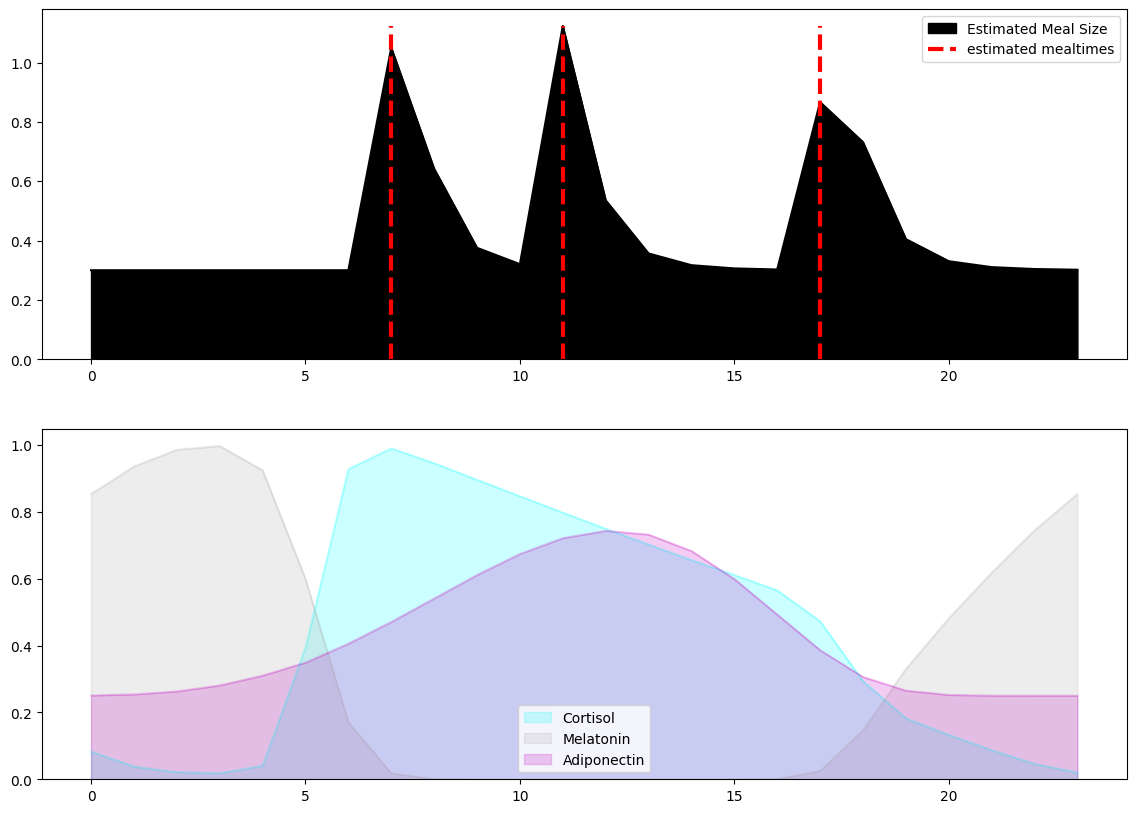
For detailed development information, check the TODO.md:
| Parameter | Type | Default | Lower Bound | Upper Bound | Description |
|---|---|---|---|---|---|
| t | Optional[array_like] | None | N/A | N/A | Time vector (decimal hours) |
| N | int | 24 | N/A | N/A | Number of time points |
| d | float | 0.0 | -12.0 | 14.0 | Time zone offset (hours) |
| taup | float | 1.0 | 0.5 | 3.0 | Circadian-relative photoperiod length |
| taug | float | 1.0 | 0.1 | 3.0 | Glucose response time constant |
| B | float | 0.05 | 0.0 | 1.0 | Glucose Bias constant |
| Cm | float | 0.0 | 0.0 | 2.0 | Cortisol temporal sensitivity coefficient |
| toff | float | 0.0 | -3.0 | 3.0 | Solar noon offset (latitude) |
| tM | Tuple[float, float, float] | (7.0, 11.0, 17.5) | N/A | N/A | Meal times (hours) |
| seed | Optional[int] | None | N/A | N/A | Random seed |
| eps | float | 1e-18 | N/A | N/A | Random noise scale ("epsilon") |
| Parameter | Value | Example Description (Human provided) |
|---|---|---|
| d | -2.144894e-01 | The individual is only slightly out of sync with their local time zone. |
| taup | 4.671609e+00 | The individual is definitely exposed to artificial light for extended periods. |
| taug | 1.097094e+00 | The individual's glucose response is within a normal range. |
| B | 1.288179e-01 | The individual has a bias towards higher glucose levels. |
| Cm | 0.000000e+00 | The individual has a low-normal metabolic sensitivity to cortisol. |
| toff | 0.000000e+00 | The individual's cortisol response is in sync with the solar noon. |
- Using
uvfor super fast dependency management, intuitive CLI, and ezpz publishing to pypi.
# https://devenv.sh/guides/using-with-flakes/#entering-the-shell
nix develop --no-pure-eval
# NOTE: only works if you have dcli (the dashlane CLI) installed locally
$ ./scripts/inject-secrets-env.sh
# convert docker-compose.yml to a Helm Chart (for kubernetes)
\# kompose convert -c -o pfun-cma-model-chart
...

# build a binary helm chart package (ready for deployment)
\# helm package pfun-cma-model-chart --destination dist/pfun-cma-model-chart
...

# install the helm chart
\# helm install pfun-cma-model-chart -f dist/pfun-cma-model-chart-<VERSION>.tgz
...
docker compose up -d \
	--build \
	--renew-anon-volumes \
	--remove-orphans

# ...or with the convenience script:
./scripts/full-rebuild.sh
The flake.nix defines two deployment artifact outputs:
| Output | Format | Use case |
|---|---|---|
.#oci-image |
OCI/Docker archive (.tar.gz) |
Container registries, Docker / Podman |
.#vm-image |
qcow2 disk image | QEMU, libvirt, cloud VMs |
After a successful build, each output is symlinked under ./result/<output-name>:
./result/
  oci-image -> /nix/store/…-pfun-cma-model-<ver>.tar.gz
  vm-image  -> /nix/store/…-nixos-…-qcow2
The flake exposes a build-all app that builds every package output and places
each symlink under ./result/<output-name> automatically.
# Build all outputs (places symlinks at ./result/oci-image and ./result/vm-image)
nix run .#build-all
You can also enter the development shell and run the same command without the
nix run prefix:
# Enter the Nix dev shell (build-all is available on PATH)
nix develop

# Inside the shell:
build-all
Any extra flags are forwarded to each underlying nix build call, e.g.:
# Show verbose build logs for all outputs
nix run .#build-all -- --print-build-logs
Build a single output and place the symlink wherever you like with --out-link:
# OCI container image
nix build .#oci-image --out-link result/oci-image

# VM disk image (qcow2)
nix build .#vm-image --out-link result/vm-image
Omitting --out-link will use Nix's default symlink name (./result,
./result-2, …).
# Load into Docker
docker load < result/oci-image

# Run (replace <tag> with the version printed by docker load)
docker run --rm -p 8001:8001 pfun-cma-model:<tag># Copy to a writable location first (result/ symlinks are read-only)
cp result/vm-image pfun-cma-model.qcow2
chmod u+w pfun-cma-model.qcow2
# Boot the VM — the API is exposed on port 8001
qemu-kvm \
-m 2048 \
-smp 2 \
-drive file=pfun-cma-model.qcow2,format=qcow2 \
-net nic \
-net user,hostfwd=tcp::8001-:8001 \
-nographicThe VM logs in automatically as the pfun user (no password). The
pfun-cma-model systemd service starts on boot and listens on port 8001.
pfun is a member of wheel and can run passwordless sudo when needed.
# Enter the devenv shell environment (see flake.nix)
devenv shell
...
# Run using fastapi development server
$ uv run fastapi dev pfun_cma_model/app.py --port 8001

# Alternatively, use the convenience script
$ scripts/serve-dev.sh
$ pfun-cma-model generate-scenario --query 'a healthy individual with a tendency to sleep in.'
{
	"qualitative_description": "This individual is a healthy young adult who is a natural 'night owl'. They have a delayed sleep phase, meaning they tend to go to bed late, around 2:00 AM, and wake up late in the morning, typically after 10:00 AM. Their meal schedule is shifted accordingly, with 'breakfast' often being eaten closer to noon. They are otherwise healthy, with a stable diet and regular activity levels, but their entire daily rhythm, including their natural cortisol cycle, is pushed back by several hours compared to someone with a more conventional sleep schedule.",
"parameters": {
    "toff": 2.5,
    "d": 0,
    "taup": 1,
    "taug": 1,
    "B": 0.05,
    "Cm": 0
	}
}

# fit the CMA model using partial least squares, plot the results
$ uv run pfun-cma-model run-fit-model --plot