
Rust-CLI-Sysinfo (RCS) is a lightweight, cross-platform, modular Rust utility for the terminal that displays the status of customizable system services
-
Comprehensive System Status
- Displays system diagnostics right out of the box:
- CPU hardware details and real-time usage
- GPU hardware details
- Operating system
- Kernel/OS build version
- IP address
- Hostname
- Currently logged-in user(s)
- System uptime
- System load averages (over one, five, and 15 minutes)
- Memory usage
- Disk usage (defaults to
/home, customizable via-d/--disk) - Battery health/status
- Displays system diagnostics right out of the box:
-
Customizable Services Layout
- Select exactly which service components to display and specify their order using service tokens (see
-s/--servicesfor details) - Configure the service key label colors with 24-bit ANSI truecolor (e.g.,
"#b4b38f")
- Select exactly which service components to display and specify their order using service tokens (see
-
Custom New Services
- New system services can be added easily by creating a new service file, dropping it into the
src/servicesfolder: RCS will automatically detect and render it as an available new service
- New system services can be added easily by creating a new service file, dropping it into the
-
Visual Service Status Indicators
-
Color-coded output for CPU, memory, disk utilization, and battery status thresholds:
-
Normal:
$\color{green}{\text{Green}}$ -
Warning:
$\color{yellow}{\text{Yellow}}$ -
Critical:
$\color{red}{\text{Red}}$
-
Normal:
-
-
Configuration-Free
- No complex dotfiles or external configurations to track down
- Manage everything directly via command-line flags
-
Highly Efficient
- Written in Rust for maximum performance, compiling down to a single binary with no external runtime dependencies
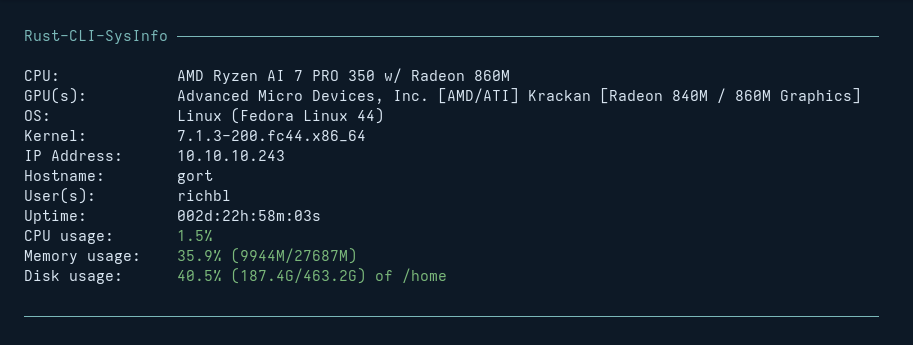
The standard output of the utility displays components with status-aware color coding:
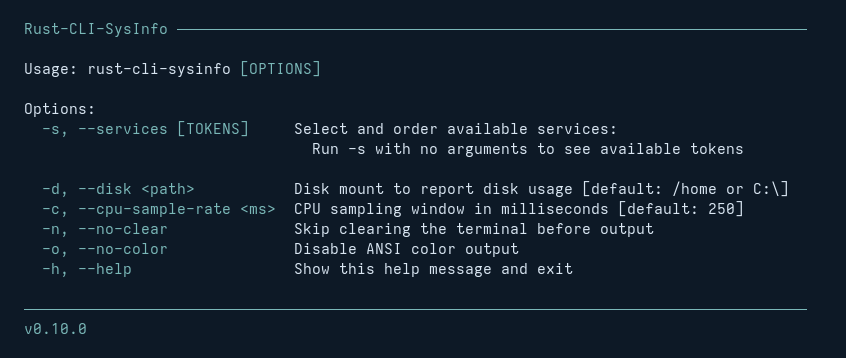
Call rust-cli-sysinfo -h (or --help) to view the complete CLI options:
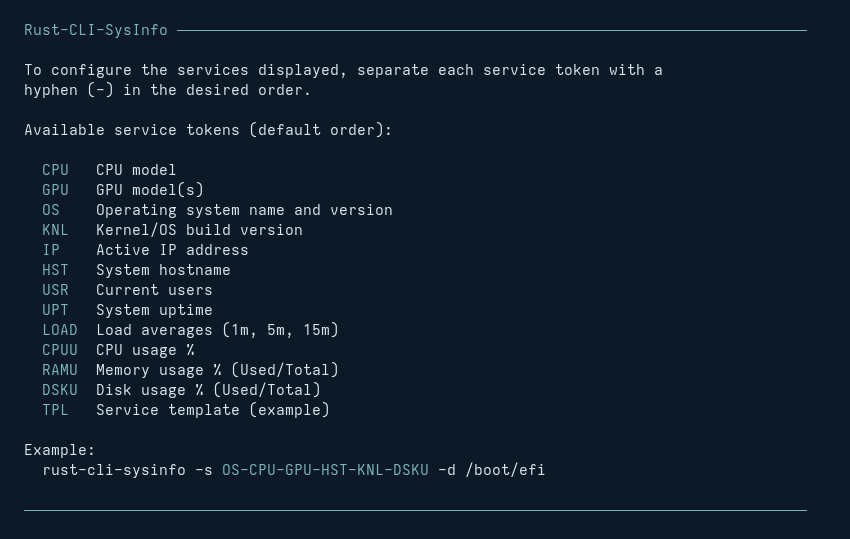
Run rust-cli-sysinfo -s (or --services) to display all available individual service tokens:
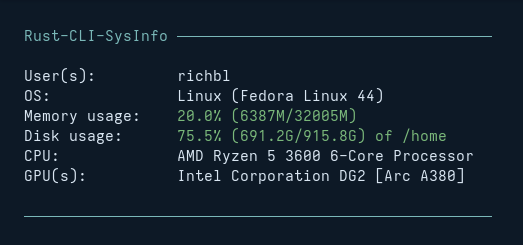
You can combine tokens to isolate and reorder specific services. For example, to focus exclusively on logged-in users (USR), OS details (OS), memory (RAMU), disk (DSKU), CPU (CPU), and GPU (GPU), use the service token layout string:
rust-cli-sysinfo -s USR-OS-RAMU-DSKU-CPU-GPUThis will result in the following output:
Want to create a new service that doesn't yet exist in RCS?
RCS follows the Open–Closed Principle (the 'O' in SOLID Programming Principles), where every service is implemented within its own Rust source file and automatically registers with the utility at compile time. No need to edit or modify existing source files: just add a separate new service file and rebuild the project.
To create a new RCS service:
-
Create a new
.rsfile inside thesrc/servicesdirectory (e.g.,ip_address.rs). Use an existing service file insrc/servicesor inspect the well-documentedtemplate.rsfile as a good starting point. -
Build the project (
cargo build --release). Your new module will instantly integrate into the default output stack.
One service.
One file.
Done.
-
Run-Time
- Rust-CLI-Sysinfo releases include pre-compiled binaries that runs natively on:
- Linux AMD64
- MacOS (AMD64 and ARM64)
- Windows
- Rust-CLI-Sysinfo releases include pre-compiled binaries that runs natively on:
-
Build-Time
- If you're interested in compiling from source, you'll need a functioning installation of the Rust toolchain (using Cargo)
Grab the pre-compiled binaries directly from the GitHub Releases Page and place it somewhere in your local system path (Linux example below):
cp rust-cli-sysinfo ~/.local/bin/That's it! You can now run rust-cli-sysinfo from within any terminal session.
If you prefer to compile this project from sources, here are the steps (Linux example):
git clone https://github.com/richbl/rust-cli-sysinfo.git
cd rust-cli-sysinfo
cargo build --release
cp target/release/rust-cli-sysinfo ~/.local/bin/
Done!
Simply invoke the tool from your terminal session:
rust-cli-sysinfoTo display help, use the -h or --help flag:
rust-cli-sysinfo -hAdding the binary call to the end of your shell startup configuration script (e.g., ~/.bashrc, ~/.zshrc or similar based on your OS/platform) will render rust-cli-sysinfo services output in your environment every time a new session starts up.
Nice!
| RCS | Platform | |||
|---|---|---|---|---|
| Service | Token | Linux | Windows | Mac |
| CPU | CPU | |||
| GPU(s) | GPU | |||
| OS | OS | |||
| Kernel | KNL | |||
| IP Address | IP | |||
| Hostname | HST | |||
| User(s) | USR | |||
| Uptime | UPT | |||
| Load Averages | LOAD | n/a | ||
| CPU Usage | CPUU | |||
| Memory Usage | RAMU | |||
| Battery Status | BAT | |||
| Disk Usage | DSKU | |||
| Template (example) | TPL |
Note that the Load Average service (LOAD) is not available on Windows, as the concept of load averages is not applicable (n/a) to that platform
RCS is designed to remain lean and fast. Here are some goals for upcoming releases:
-
Streamline modular service generation patterns following the Open–Closed Principle (the 'O' in SOLID Programming Principles) --> integration completed in RCS 0.7.0
-
Additional metric services:
- Network interfaces --> IP address service (IP) added in RCS v0.9.0
- Battery status --> battery service (BAT) added in RCS v0.14.0
- Thermal sensor(s)?
- What else?
-
Cross-platform compatibility using system-agnostic Rust crates: makes for better (safer) implementation and easier longer-term codebase maintenance
- The GPU service (GPU) is currently using platform-specific system calls, as the underlying
sysinfocrate does not yet support cross-platform GPU detection. This is expected to change in a future release ofsysinfo, at which point RCS will be updated to support true cross-platform GPU detection services - The User(s) service (USR) is currently using platform-specific system calls, as a stable cross-platform Rust crate does not exist (yet)
- The GPU service (GPU) is currently using platform-specific system calls, as the underlying