I run these scripts at my fedora laptop as part of my home personal sleep research to start session and collect data from OpenBCI. OpenBCI allows for gold-standard PSG (EEG, ECG etc) data collection. Device is good enough for daily use, setting up montage (DIY headband) and start a session usually takes 4-5 minutes. Read more here
Revealing the beauty of sleep :) Here are example plots for F7,F8,O1,O2 EEG channels referenced to AFz with ground at Fp2, ECG channel lead A-I.
Hypnogram: final consensus

Hypnogram: by channel
Top one is Max probs - select most often stage across all channels
Second one is Adj probs - for each stage sum probabilites by each channel and select stage with biggest probability sum. Only slightly differs from Max probs because takes into account predicted probabilities
Bottom 4 hypnos - prediction for each channel (channel name in header text)

Topomap, re-referenced to Average, so we can include AFz to look for most dense SWS point where N3 deep sleep slow waves originate.
Y - sleep stages, X - different power bands.

Merged Spectrum (max across all channels)

Spectrum: for each channel


Slow Waves Amplitude and count (by channel, by stage), Spindles (by channel), PSD (by channel) Early/Late density, ratio and CV (coef of variation) for spindles and slow waves density. Early period is 4.5H staring after SOL and Late 4.5H before final awake. E/L = Early Density / Late Density

Spindle density over night

Slow Waves density over night

HR & HRV (ECG) by sleep stages, major movements, arrythmia/artifacts detection (all abbreviations explained below)
- Red line - HR
- Green line & dots - HRV
- Blue bars (at the bottom) - accelerometer, Blue squares (at the top) - major movements
- Violet dots - HRV points inside major N3 segments during first two sleep cycles (first 180 minutes after SOL) which used for N3 RMSSD calculation
- Red dots - HRV points during REM, do not confuse them with HR
- Standard hypnogram stages colored (N3 violet, N2 blue, REM red, Awake yellow)

Radar plot with percentage deviations from goals, green circe is a perfect fit for goals set. Goals can be changed manually in script. Positive values meaning desired direction (less movements results in increased percentage, more N3 also leads to increase), so just aiming all metrics to reach green circle

After script is run you can import hypnogram located in cache_dir, named like datetime user probs_adj_consensus.csv file into EDFBrowser.

Each script comes with config file which is name as script but with yml extension.
- Simply rename session_start.yml.sample to session_start.yml, configure directroies
- Repeat for each script, but careful - session_dir and name should be same for sd_convert and session_start
Script to start OpenBCI session in a single click, usually for sleep EEG acquisiton purposes.
- Used to start session with data saved on sd with desired sampling frequency (for greater than 250Hz modded firmware need to be flashed, otherwise it will always write with default 250Hz).
- Saves session start timestamp and settings into sqlite file (session_dir/sessions.db). Session info will be used in sd_convert.py script
- Also embeds the same settings as a
%METAline at the start of the SD TXT file (see "Firmware-embedded %META" below) so each recording is self-describing — the sqlite row becomes a fallback rather than the only source of truth. - Config: setup port, session_dir, montages, electrode descriptions, activities list and current activity
- Montages: here you list possible montages you want to use
- Electrodes: here you list possible electrode types
- Activities: here you set settings like sample frequency, gain, choose eeg montage and emg montages by key from montages section
- Activity: set key from activities section to choose prefered activity
- sample yml file already contains simple montage I use daily, you rename it and modify it for your purposes
The script previously used fixed time.sleep between every protocol command, which conservatively summed to ~50s of idle time on each run. It now uses three small helpers around board.ser:
drain_serial(quiet=0.05, max_total=0.5)— polls the serial buffer until it stays quiet forquietseconds (ormax_totalelapses). Called before each command to clear any stale$$$(EOT) bytes from a prior response that would otherwise satisfy the next wait early.send_cmd(cmd)— drains, then writes the command. Use whenever await_for_responsewill follow.wait_for_response(end_marker='$$$', timeout=N, poll=0.02, settle=0.05)— polls until the firmware's$$$end-of-transmission marker arrives ortimeoutelapses, then sleepssettleseconds and reads any trailing bytes. Returns as soon as the firmware actually finishes — no over-conservative waits.
End-to-end this typically cuts session start to ~15s. The 12H-slot SD allocation step uses timeout=60.0 because pre-erase on slow SD cards can take 6–25s.
Added 2026-05-15. Five firmware recovery thresholds (max_resumes, ext_recovery_window_ms, ext_recovery_chunk_ms, ckpt_interval_ms, sd_write_timeout) are now overridable per session without reflashing the cyton. Useful for A/B testing per card class.
- yml block (optional, in
session_start.yml):tune: max_resumes: 25 ext_recovery_window_ms: 8000 ext_recovery_chunk_ms: 500 ckpt_interval_ms: 60000 sd_write_timeout: 1500
- CLI override:
--tune key=value, repeatable. Overlays yml on top of firmware defaults. Example:python session_start.py --tune max_resumes=10 --tune sd_write_timeout=2000. - Validation gates before any serial I/O: bool / non-integer-float / out-of-range / non-dict-yml-block / cross-key constraint (
ext_recovery_chunk_ms ≤ ext_recovery_window_ms) all raise cleanly with a human-readable message viatune_helpers.merge_tune(). tune_helpers.pyis a pure-Python module wrapping the wire-format details;test_tune_helpers.pypins the contract (42 unit tests including the new strict-coercion and cross-key checks).session_start.pysends ALL FIVETcommands every run (not just non-default ones) so a previously-tuned board can't silently retain stale state. Each command waits up to 2 s forTUNE OK <key_id>$$$; on FAIL or no-ack,sys.exitwith a diagnostic message BEFORE any recording state is built up. Pre-tune-protocol firmware (no T parser) would silently activateCHANNEL_ON_13on the leading 'T' byte — the no-ack branch catches that immediately.- SESSION.TXT always carries a
%TUNEline at the top of its payload so the firmware's boot-time auto-resume re-applies the same tuning state (binary T commands don't persist across reset). Text key names in the line match the firmware C variable names (ext_recovery_window_ms↔tuneExtRecoveryWindowMs) — no naming asymmetry that would let a typo silently roll back to defaults. - The
tunedict is also added to the%METAJSON written into the SD TXT file — primary forensic record for which tunables were active.%CKPTlines carry aT=<hex8>FNV-1a summary hash that should match the meta value for that session.
Firmware-side details (key IDs, value widths, valid ranges, wire framing): see OpenBCI_Cyton_Library_SD/README.md "Runtime tunable recovery / SD constants" section.
One file, two roles:
As a CLI — convert OpenBCI SD card .TXT files to:
- 24-bit BDF with calibrated values. Accelerometer data is upsampled to match ADS sampling rate.
- Recording timestamp and settings resolved in priority order (see "Firmware-embedded %META"): (1)
%METAline in the TXT itself, (2) sqliteSessionsrow written by session_start.py, (3) defaults. - Config: setup sd_dir (openbci sd card mountpoint, e.g. /Volumes/OBCI for mac), data_dir (for output files) and session_dir (must be equal to session_start.yml) and basic user data
- CLI driver runs only when invoked directly (
python sd_convert.py) — gated behindif __name__ == "__main__":so the module can also be imported as a library without side effects.
As a library — process_file(), parse_ckpt_line(), compute_intra_file_gaps() are top-level functions and the canonical implementation of the firmware's %CKPT heartbeat format and the SD-recovery gap-inference algorithm. Imported as a library by the private py-qs-data nightly pipeline (collect_bci) so both pipelines stay in lock-step on the firmware's evolving counter set (t/b/e/r/n/o/x as of 2026-05-13). Works on stock-firmware files too — pre-2026-05-08 recordings have no %CKPT lines so parse_ckpt_line is a no-op there and gap inference returns [].
process_file(file_path, ..., return_ckpts=True) returns the new 4-tuple (result, stops, stops_at, ckpts) where each ckpt dict carries t/b/e/r/n/o/x ints plus a sample_idx field. Feed that into compute_intra_file_gaps(ckpts, sf) to locate intra-file SD-recovery sample drops and zero-pad them so wall-clock alignment stays stable across the file. Default return shape unchanged — existing callers don't need updates.
See the docstrings in sd_convert.py for field semantics and the firmware repo's README "SD reliability and observability" section for the corresponding firmware behaviour.
Recordings made with the modded firmware carry their own settings inside the SD TXT. session_start.py builds the JSON, sends it via the firmware's M-prefixed raw-write protocol ('M' <lenLo> <lenHi> <up to 1024 payload bytes>) BEFORE issuing b (start stream), and the firmware writes it to its own SD block (newline-padded) so it can never interleave with sample data. After the write, the firmware acks META OK <len> <sum> (16-bit byte sum) which session_start.py verifies against the payload it sent — on mismatch or META FAIL the host retries once and otherwise prints a warning and continues.
Format on disk:
%META {"dts": "...", "file": "OBCI_XX.TXT", "gain": 24, "channels": {...}, "sf": 500, "ground": "...", "electrode": "...", "emg_ch": {...}, "ch_n": 8, "activity": "sleep", "device": "cyton", "note": null}
<padding newlines to fill the SD block>
%STOP AT
<sample data>
sd_convert.py:read_txt_meta() scans the first 4096 bytes of the TXT for the %META {...} line, parses it as JSON, and returns settings from there. Multiple %META candidates (which would only happen on a partial-block-write artefact) are tolerated — the first one that parses as valid JSON wins. process_file() skips any %META-prefixed line so it's never confused for data.
Benefit: SD card files become self-describing. You can re-process a TXT on any machine without copying the sqlite db across, and a swap of SD cards between sessions can no longer cross-tag the files.
The firmware's BLOCK_DIV controls how many SD blocks per second are pre-allocated; correct value is 1 for 16-channel daisy and 2 for 8-channel cyton-only. The modded firmware now auto-picks based on board.daisyPresent at SD setup time, so the requested duration label finally matches the actual recording length (e.g. 12H slot at 500 Hz cyton-only used to overshoot to ~24H of allocation; now sized correctly to ~12H = 1.24 GB). session_start.py mirrors the same calc when it reports back the SD's max duration. An explicit c / C host command from session_start still overrides via a sdBlockDivManual flag.
Documented OpenBCI 1-in-50 silent-empty-recording bug — the SD card occasionally fails one multi-block write mid-recording and the original firmware just kept going, sometimes losing the rest of the recording.
The modded firmware uses a 5-tier recovery cascade (see firmware README):
- Same-block retry → 5x skip-forward
writeStartretries → onecard.init()+writeStart→ 8 s extended-window retry loop (added 2026-05-13) →executeSoftResetto allocate the next slot file (added 2026-05-12, bounded byMAX_RESUMES=25). %Emarker line emitted on the next-good block so post-processing can locate the gap.%CKPT t=<ms> b=<block> e=<errs> r=<retries> n=<reinits> o=<over> x=<extretries>heartbeat ~once/min — the inputobci_ckpt.compute_intra_file_gaps()consumes for sample-drop inference.- Footer carries running counters:
%Errors:,%Retries:,%Reinits:,%ExtRetries:(alongside existing%Over:). ledSDErrorfast strobe on first SD error, auto-clears at next clean%CKPTso morning state reflects current health, not history.ledReplayFaildistinct double-flash +REPLAYFL.TXTforensic file when boot-time SESSION.TXT auto-resume fails.META FAILinstead ofMETA OKif the failure hits during the%METApayload — host resends.
%E markers are deferred while the firmware is mid-%META write so they can never fragment the JSON line.
Full firmware design + per-tier semantics + tested card classes: see OpenBCI_Cyton_Library_SD/README.md.
After a night of recording, a 1 MB write+verify probe runs on the SD card alongside BDF conversion, combined with the parsed %CKPT counters from last night's TXT, to produce a single per-morning verdict: HEALTHY, DEGRADING, or DYING. Persisted to sessions.db in a new SdHealth table so trends are visible (e.g. "p95 latency has crept from 80 ms → 240 ms over 30 nights → schedule replacement").
Default-on in sd_convert.py's main block (disable per-config with sd_health: false). Standalone CLI for ad-hoc checks:
python sd_health.py --sd-dir /run/media/lst/OBCI \
  --txt /run/media/lst/OBCI/OBCI_01.TXT \
  --session-db /path/to/sessions.db
Exit code mirrors the verdict (0/1/2) so a morning shell wrapper can branch on it. --json flag for machine-readable output. The probe file (.sdhealth_probe_*.bin) is always cleaned up; --keep-probe keeps it for forensic inspection.
Verdict thresholds are conservative starting values surfaced as module-level constants in sd_health.py; calibrate against a few weeks of "known-healthy" runs on your card classes (Industrial 16 GB, Max Endurance 32 GB, etc.) before treating DEGRADING as actionable.
Script to analyses recorded sessions. Suited for short sessions (like meditations etc). Periods (and other settings) are defined for each session in sessions variable inside script.
- Reads raw BDF file from sd_convert and filter it, split into epochs and rejects bad ones (autoreject)
- Plot Multitaper Spectrogram for each channel, highlights bad epochs (autoreject) and periods
- Plot Amplitude topomaps based on good epochs passed into yasa.bandpower for each period defined in sessions
- Plot PSD / Frequency plot for each channel and period computed with mne.compute_psd(method='welch')
- Plot Band Power (delta, theta, alpha, beta, gamma) vs time and highlings band epochs (autoreject) and periods
- Config: setup multitaper_dir (multitaper toolbox repo) and data_dir (where bdf files for analysis are located)
Script to analyse recored sleep session. Make sure to copy and rename sleep_analysis.yml.sample to sleep_analysis.yml and set 3 directories - bdf file directory location, cache dir location (csv will be stored here) and image dir location (plot pngs will be stored here)
- You have to pass your BDF file created by sd_convert.py into sleeps list inside config file (edit sleeps sections in yml config - add filename, use re_ref: False and ecg_invert: False by default)
- Script then reads raw BDF file and filters it according to filtering settings in config file (settings section), start with sample settings
- Builds hypnograms with YASA and make plots (for each channel, max probablity and adjusted consensus)
- Plot Multitaper Spectrogram
- Plot Amplitude topomaps grouped by sleep stage
- Plot PSD / Frequency plot (easy to see bad channels)
- Plot HR, HRV for whole sleep period and for N3 / REM. HRV Plot includes major accelerometer movements.
- Save hypnograms to csv in cache folder for easy import in EDFBrowser (Sleep Staging > How do I edit the predicted hypnogram in https://raphaelvallat.com/yasa/faq.html#sleep-staging for more details)
- Cache HRV data into CSV
- Save plots into image folder in PNG format)
- Config: setup multitaper_dir and datadir similarly as for session_analyse.yml and cache_dir (save hrv/hypnogram csv files) and image_dir to have plots save to png.
For ECG/HRV processing qskit is required and ECG channel name in BDF must be set in ecg_ch variable. I usually use ECG-AI in session_start.py, set emg_channels = {'ECG-AI':4}. If you want to use another name - thats fine, but add it to sleep_analyse.py ecg_ch list to make sure it will be detected as ECG. Only first ECG channel will be processed (manually cycle hrv_process() if you need multiple)
HRV plot have custom header:
- M38 / MH4.83 means there were 38 major accelerometer movements or 4.83 per hour of sleep (TST).
- (5% / 5%) means ~5% of HR and ~5% HRV epochs (HR and HRV processed separately) contained artifacts (which were discarded or autofixed). There always be artifacts due to movements / arrythmia / other muscle / noise. Less than 10% is good enough, if you have more than 10-15% - check your ECG signal for potential issues.
- HR & RMSSD lines contain Average±STD per whole period, then Average±STD during N3 (during 1st and 2nd sleep cycle), then Average±STD during REM
- L/H = LF / HF
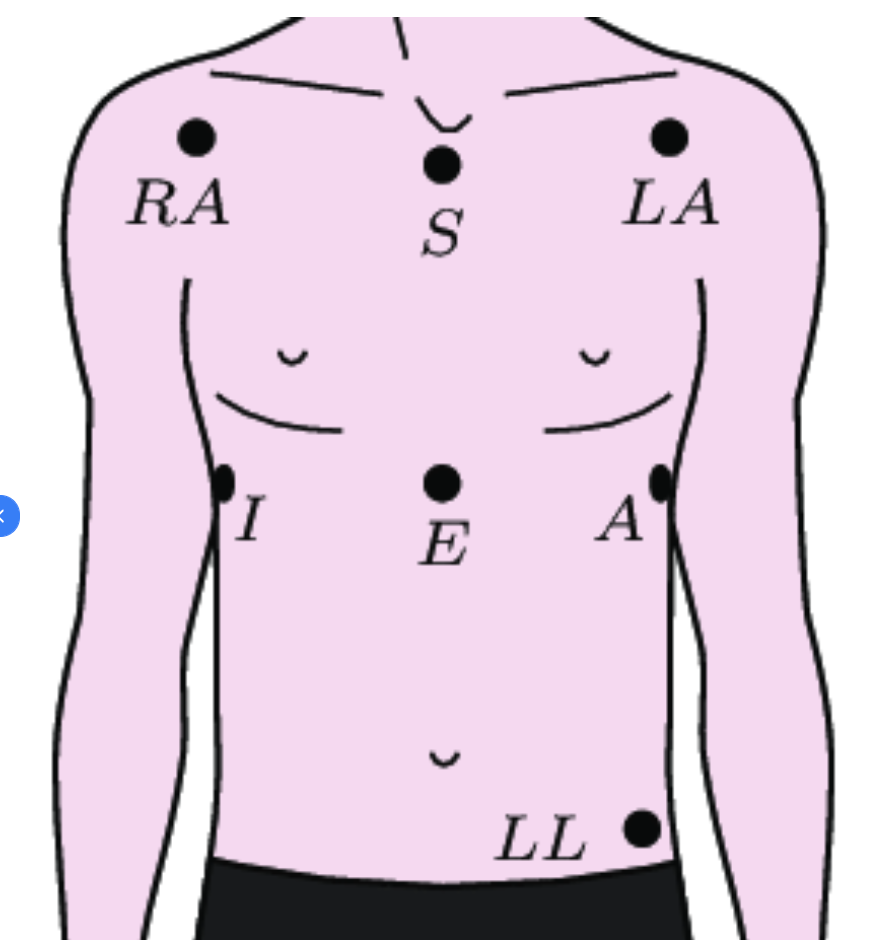
- A113 M0.5 E0.8 Ec70 L42.7 - this is stats from ECG arrythmia analysis by qskit. Its experimental. M is missed beats per hour, E is extra beats per hour, Ec is ectopic beats per hour, L is longshort beats per hour and A (all) is summ of all per hour . M/E/Ec/L is detected by neurokit signal_fixpeaks method with detection method="Kubios" and is called in qskit hrv_process.py during 1st round of R-peaks correction. I've developed this pipeline for Shimmer ECG and then adapted to OpenBCI ECG signal (Ten20 paste, bipolar gold-cup electrodes, A-I position). Make sure ECG signal R-peaks are at the top in EDFBrowser, otherwise use ecg_invert=True in sleeps variable to flip ECG signal
- install / setup Python 3.11 environment or use global
- pull repo and cd into it
- run pip3 install -r requirements.txt
- optional: flash modded firmware if you want 500Hz sampling rate and flashing LED during sd card write session
- put sd card into macbook and set desired name, for example OBCI. For mac full path should be /Volumes/OBCI, copy go sd_convert.yml.sample and rename it to sd_convert.yml, open in notepad and set sd_dir value to '/Volumes/OBCI'
- turn on board and insert Cyton USB dongle with switch at position GPIO6
- run ls /dev and look for something like /dev/cu.usbserial-D200PMQM, exact name is required to start session. Put it into session_start.yml
- turn on board into PC position
- optional: run OpenBCI_GUI for visual inspection of signal / montage and for impendance check. Stop session before running session_start.py
- it is recommended to verify/modify session_start.py and sd_convert default settings, directories set in yml configs, other settings inside script, set them according to montage: duration, channels, gain, sampling rate. The default montage is something like {'F7-T3':0,'F8-T3':1,'O2-T3':2} with sf = 250Hz, gain = 24 and 24H duration. Make sure port, session_dir, session_file setup in session_start.ymld and sd_dir, session_dir, session_file setup in sd_convert.yml, these settings are mandatory. Session_dir, session_file should be same in both files.
- device port from config will be passed to board with: board = pyOpenBCI.OpenBCICyton(port='/dev/cu.usbserial-D200PMQM', daisy=False)
- run python3 session_start.py from terminal
- watch for any error messages to appear. Script will use serial interface to check board mode, will set sf, gain, setup channels and allocate space for recording on sd card, will save allocated file name, re-check sf and start session if everything is fine. Immediately after start it will save recording filename, current time and all settings into sqlite db located in session_dir/session_file. If db isnt exists new will be created. Here is expected terminal output for python3 session_start.py:
cyton: sleep, Gold Cup OpenBCI, Ten20, g24, 500Hz, 12H
{'F8-AFz': 0, 'F7-AFz': 1, 'O2-AFz': 2, 'O1-AFz': 3}, ground: Fp2, emg: {'ECG-AI': 4}
Serial established
mode is default
sampling rate set to 500
x1060110Xx2060110Xx3060110Xx4060110Xx5060000Xx6160000Xx7160000Xx8160000X
channels set: {'F8-AFz': 0, 'F7-AFz': 1, 'O2-AFz': 2, 'O1-AFz': 3, 'ECG-AI': 4}
Wiring and sdcard is correct.
Size 4864000 SD file OBCI_CD.TXcce:T
$$$

SD blocks: 4864000 and max duration: 720 minutes
SD file init success OBCI_CD.TXT
Success: Sample rate is 500Hz$$$
Session started at 2025-02-02 01:35:24.230442
Closing Serial
- board with modded firmware will start turn on / off LED every 5s to confirm SD recording is started
- to stop session just turn off board, pull out sd card and insert it into macbook
- in macos you can format sd card from terminal
# find disk number in dev with 'diskutil list', for example disk4
# fill disk with zeros
sudo diskutil zeroDisk /dev/disk4
# format to FAT32
sudo diskutil eraseDisk FAT32 OBCI MBRFormat /dev/disk4
sudo diskutil mountDisk /dev/disk4
# use 'diskutil list' to confirm disk4 has DOS_FAT_32 type
diskutil list:
    /dev/disk4 (internal, physical):
       #:                       TYPE NAME                    SIZE       IDENTIFIER
       0:     FDisk_partition_scheme                        *31.9 GB    disk4
       1:                 DOS_FAT_32 OBCI                    31.9 GB    disk4s1
# read 100mb of data after 50mb and confirm zeros (press q after command executed)
sudo dd if=/dev/disk4 bs=1m skip=50 count=100 | hexdump -C | less
    100+0 records in
    100+0 records out
    104857600 bytes transferred in 3.251993 secs (32244104 bytes/sec)
    00000000  00 00 00 00 00 00 00 00  00 00 00 00 00 00 00 00  |................|
    *
    06400000
- make sure config dirs correct and run python3 sd_convert.py
- script will list sd_dir files, select last one and then tries to find session information for that file from sqlite db. If nothing found default settings will be used.
- as a result .BDF and .CSV with uV for EEG and g for ACCEL values will be created inside data_dir directory (create all dirs in yml configs if they arent exist before starting a session)
- it is recommended to copy .TXT file to backup it somewhere else for possible re-processing in a future.
- i didnt test scripts on windows / linux, but i assume that with no or little modifications they should work.
- if something is not working and you want it to work / or want to add functionality - feel free to send pull request with fix / functionality. You can open issue and ask questions.
- P.S. I'm not a python developer so my code might doesnt look well.