
An interactive platform for comparing, visualizing, analyzing, and cross-translating Molecular Dynamics (MD) workflows.



- Overview
- Key Features
- Engine Comparison
- Workflow Architecture
- Application Preview
- Supported File Formats
- Getting Started
- Project Directory Structure
- Roadmap
- Contributing
- Support & Donations
- License
GROMACS vs. LAMMPS Comparative Studio bridges the divide between biomolecular modeling and materials science simulations. By offering side-by-side engine comparisons, real-time 3D structure visualization, protocol translation, and integrated analysis metrics, this platform enables researchers, educators, and computational chemists to seamlessly transition between GROMACS and LAMMPS ecosystems.
| Module | Capability & Description |
|---|---|
| 🔄 Engine Comparison | Interactive side-by-side comparison of simulation parameters, boundary conditions, and execution syntax. |
| ⚙️ Protocol Translator | Smart conversion suite mapping inputs, force field flags, and units between GROMACS ↔ LAMMPS. |
| 🧬 3D Visualization | High-performance WebGL viewer supporting Ribbon, Ball-and-Stick, Space-Filling, and PBC box rendering. |
| 📊 Scientific Dashboard | Dynamic plotting tools for trajectory evaluation (RMSD, RMSF, Radius of Gyration, Energy, Temperature/Pressure profiles). |
| 📂 Unified File Import | Instant drag-and-drop parser for native GROMACS topologies/trajectories and LAMMPS data/dump files. |
| Feature / Domain | GROMACS | LAMMPS |
|---|---|---|
| Primary Domain Focus | Biomolecular Systems | Materials Science & Soft Matter |
| Proteins & Nucleic Acids | 🟢 Native / High | 🟡 Moderate / Script-based |
| Membranes & Lipids | 🟢 Native / High | 🟡 Moderate / Script-based |
| Metals, Alloys & Crystals | 🔴 Limited | 🟢 Native / High |
| Polymers & Graphene | 🟡 Moderate | 🟢 Native / High |
| Reactive Force Fields (ReaxFF) | 🔴 Not Supported | 🟢 Native / High |
| Syntax Complexity | Declarative (.mdp files) |
Scripting / Command-driven |
| System Modification Flexibility | Moderate | Extremely High |
[PDB Structure] ➔ [pdb2gmx] ➔ [editconf] ➔ [solvate] ➔ [grompp] ➔ [mdrun] ➔ [Analysis]
[Structure / Data File] ➔ [Input Script Setup] ➔ [Force Field Assignment] ➔ [Fixes & Execution] ➔ [run] ➔ [Analysis]
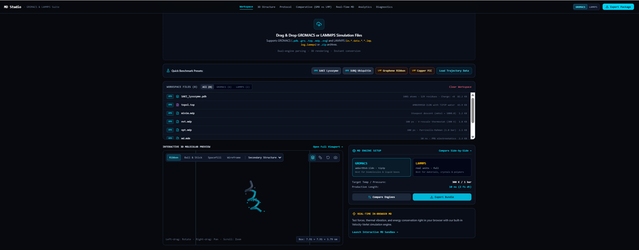
The suite natively parses and visualizes the following file extensions:
- GROMACS Formats:
.gro,.top,.itp,.mdp,.xvg,.pdb - LAMMPS Formats:
.data,.dump,.in,.log.lammps - Compressed Archives:
.zip(containing batch simulation packages)
Ensure you have Node.js (v18.0 or higher) and npm installed.
-
Clone the repository:
git clone [https://github.com/shataragh/GROMACS-vs.-LAMMPS-Comparative-Studio.git](https://github.com/shataragh/GROMACS-vs.-LAMMPS-Comparative-Studio.git) cd GROMACS-vs.-LAMMPS-Comparative-Studio -
Install dependencies:
npm install
-
Launch the development environment:
npm run dev
-
Build for production deployment:
npm run build
GROMACS-vs.-LAMMPS-Comparative-Studio/
├── public/                 # Static public assets
├── assets/                 # Repository documentation assets (banners, screenshots)
├── src/
│   ├── components/         # Shared UI components
│   ├── viewer/             # 3D Molecule rendering engines (WebGL / Three.js / NGL)
│   ├── translator/         # Logic for GROMACS <-> LAMMPS translation
│   ├── comparison/         # Engine comparison parameters & matrices
│   ├── analysis/           # Charting & numerical data analysis scripts
│   ├── utilities/          # Parsers and formatting utilities
│   └── assets/             # Application design & icon assets
├── examples/               # Sample input topologies & data files
├── docs/                   # Additional documentation
├── package.json
├── vite.config.js
└── README.md
- Comparative Workflow Engine — Interactive feature-by-feature comparisons.
- 3D Molecular Renderer — High-speed structural visualization.
- Protocol Translation Studio — Automated directive mapping between engines.
- Scientific Data Plotting — Integrated dashboard for
.xvgand.logcharts. - Interactive Trajectory Playback — Support for multi-frame trajectory files.
- AI-Assisted Parameter Advisor — Machine Learning-backed recommendations for force-field mappings.
- Benchmark Suite — Performance analysis across hardware architectures (CPU vs. GPU).
Contributions are welcome from the computational chemistry, materials science, and software engineering communities!
- Fork the project.
- Create your Feature Branch:
git checkout -b feature/AmazingFeature
- Commit your changes:
git commit -m "Add some AmazingFeature" - Push to the branch:
git push origin feature/AmazingFeature
- Open a Pull Request.
If this tool has accelerated your research, simplified your teaching, or streamlined your workflows, consider supporting the ongoing development!
You can send TRX or TRC-20 tokens directly via Trust Wallet:
TPoSnHr516phFiSrFWi2CrZvmQ5GpZTTvM
Wallet Platform: Trust Wallet
Network: TRON (TRC-20)
Supported Assets: TRX, USDT (TRC-20), USDC (TRC-20)
Your contributions help maintain cloud deployment, fund feature development, and support open-source computational science.
Distributed under the MIT License. See LICENSE for more information.
Bridging Biomolecular and Materials Simulation Workflows