



Django manage.py context for coding agents — and tab completion for you.
Your agent learns every management command, its flags, and all migration names from one file read (no Django boot at all) or one autocomplete context call — instead of running --help once per command, each one booting Django. The same cache gives you project-aware Tab completion in bash and zsh: your own commands, their flags, app labels, and migration targets.
Note: this is the pip-installable, project-aware tool. The
django-completionHomebrew formula is an unrelated static bash completion script.
Install it in the same environment as your Django project:
pip install django-completion
# or
uv add django-completion
Add the app:
INSTALLED_APPS = [
    ...
    "django_completion",
]
Install the shell hook:
python manage.py autocomplete installThen restart your terminal or reload your shell config:
source ~/.bashrc   # bash
source ~/.zshrc # zshAn agent working in a Django repo discovers commands by running manage.py help, then <command> --help once per command — each one importing Django and your settings — or by grepping management/commands/, which misses commands from third-party apps. The cache django-completion maintains already holds all of it.
python manage.py autocomplete contextprints a compact markdown summary — your project's own commands first with their flags and help text, migration names per local app, and a one-line list of everything else (--json prints the full cache):
# manage.py — 32 commands (cache generated 2026-07-05 16:40:15 UTC)

## Project commands [local]
- import_articles — Import articles from an external feed into the blog.
    --dry-run  --limit  --since  --source

## Migrations on disk [local]
- accounts: 0001_initial, 0002_add_profile
- blog: 0001_initial, 0002_add_slug, 0003_add_published_at

## Built-in and third-party commands
check, dumpdata, makemigrations, migrate, runserver, shell, test, …
Measured on this repo's minimal test project (32 commands): the --help sweep is 33 Django boots (~4 s), autocomplete context is one boot (~0.2 s), and reading .django-completion-cache.json directly takes under a millisecond — and the file read still works when settings are broken or dependencies are missing. On a real project where each boot takes seconds, the sweep costs minutes.
Add this to your project's AGENTS.md or CLAUDE.md:
## Django management commands

Read `.django-completion-cache.json` in the project root. It lists every
management command (built-in, third-party, and this project's own), every
flag with its help text, and all migration names — and it auto-refreshes
after every `manage.py` run, so it is always at least as fresh as `--help`
output.

- Do NOT run `manage.py help` or `<command> --help` — each invocation boots
  Django (seconds to minutes on large projects). The cache already has it.
- Do NOT grep `management/commands/` to discover commands — that misses
  built-in and third-party ones.
- First time in this repo? Run `python manage.py autocomplete context` for a
  compact orientation summary.
See For AI agents for the output format, the cache schema, and its stability policy.
Press Tab to complete your project's own management commands and their flags — plus app labels and migration targets — in bash and zsh. On a project with dozens of custom commands, nobody remembers every name and argument signature; django-completion introspects them from your actual project.
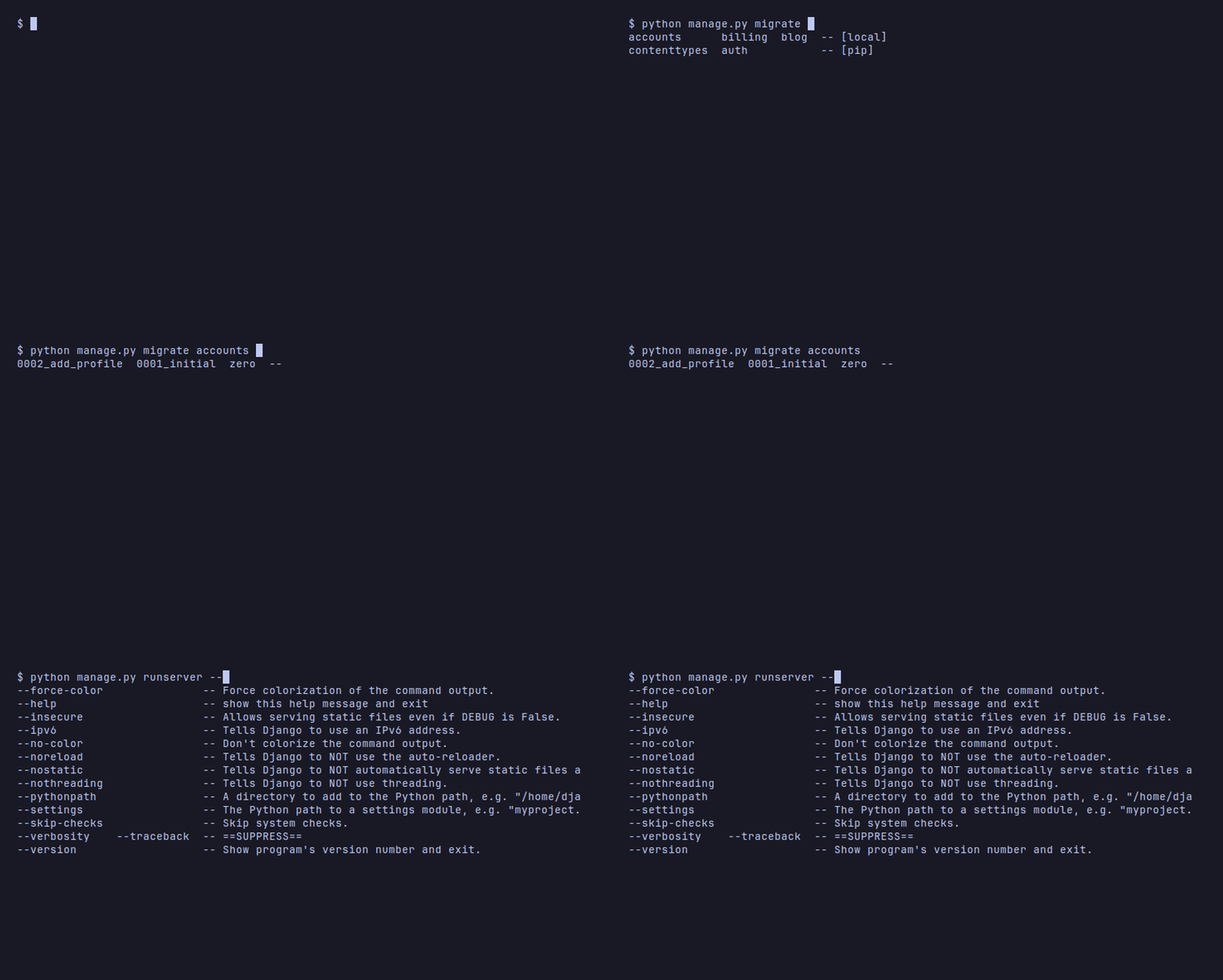
The completion cache is built from your project at runtime, so it covers your custom management commands the same way it covers Django's built-ins:
python manage.py imp<TAB>                    # → import_articles
python manage.py import_articles --<TAB>     # → --dry-run  --limit  --since  --source  ...
Supported invocation styles:
manage.py <TAB>
python manage.py <TAB>
python3 manage.py <TAB>
python ./manage.py <TAB>
uv run python manage.py <TAB>
Completion depth:
- command names after
manage.py— built-in, third-party, and your project's custom commands - option flags for every command, introspected from each command's actual argparse parser
- app labels for
migrate,check,dumpdata,test, andmakemigrations migrateapp labels filtered to apps that have migrations- migration names and
zeroafterpython manage.py migrate app_label - command and option descriptions in zsh where available
Django's built-in completion covers command names and option flags — it has no knowledge of your app labels, migration names, or project-specific targets. django-completion fills that gap. See comparison with Django's built-in completion for a full feature breakdown.
python manage.py autocomplete status
python manage.py autocomplete status --verbose
python manage.py autocomplete refresh
python manage.py autocomplete context
python manage.py autocomplete uninstall
status --verbose is the best first diagnostic when completion behaves unexpectedly. It reports the cache path, schema version, migration counts, warning count, shell hooks, installed script versions, and package version.
refresh rebuilds .django-completion-cache.json manually. The cache also refreshes automatically after manage.py commands with a 60-second cooldown. To disable auto-refresh:
DJANGO_COMPLETION_AUTO_REFRESH = False| Area | Supported |
|---|---|
| Python | 3.10+ |
| Django | 4.2+ |
| Shells | bash, zsh |
| OS | Linux and macOS expected |
| Windows | not officially supported; WSL with bash/zsh may work |
| Invocations | manage.py, python manage.py, python3 manage.py, python ./manage.py, uv run python manage.py |
| Completion depth | commands (including custom), option flags, app labels, migrate app labels, migration names |
- No telemetry.
- No network calls.
- Tab completion reads only the local cache file.
- Tab completion does not import Django.
- Tab completion does not touch the database.
- The cache is local runtime state in the project root.
- The cache contains command names, their providing apps, app labels, option names/help, migration names, warnings, and timestamps.
- Shell rc edits are marker-delimited and reversible.
autocomplete uninstallremoves managed shell hooks and managed scripts.- The package has no middleware, models, migrations, or request-time behavior.
For teams that prefer strict production settings:
if DEBUG:
    INSTALLED_APPS += ["django_completion"]
DEBUG is not always the right environment switch; separate settings modules or a custom environment flag may fit your deployment process better.
- bash and zsh only; fish is planned for a later release
- no
django-adminsupport - no official native Windows or PowerShell support
- no global options before command, such as
python manage.py --settings config.settings migrate - no custom alias support, such as
dj migrate - no database-aware applied/unapplied migration filtering
Near-term candidates include more wrapper support, better Docker-oriented examples, fish shell support, and additional command-specific completion rules.
Long term, the goal is to learn from real-world usage and explore whether parts of this approach could inform Django's own management-command completion story.
Full documentation is at https://soldatov-ss.github.io/django-completion/.
git clone git@github.com:soldatov-ss/django-completion.git
cd django-completion
uv sync
uv run pytest -q
uv run ruff check .
uv run ty check
django-completion was created in 2026 by Soldatov Serhii.