A vanilla JavaScript micro-library for comparing two images with a draggable slider.
No dependencies.
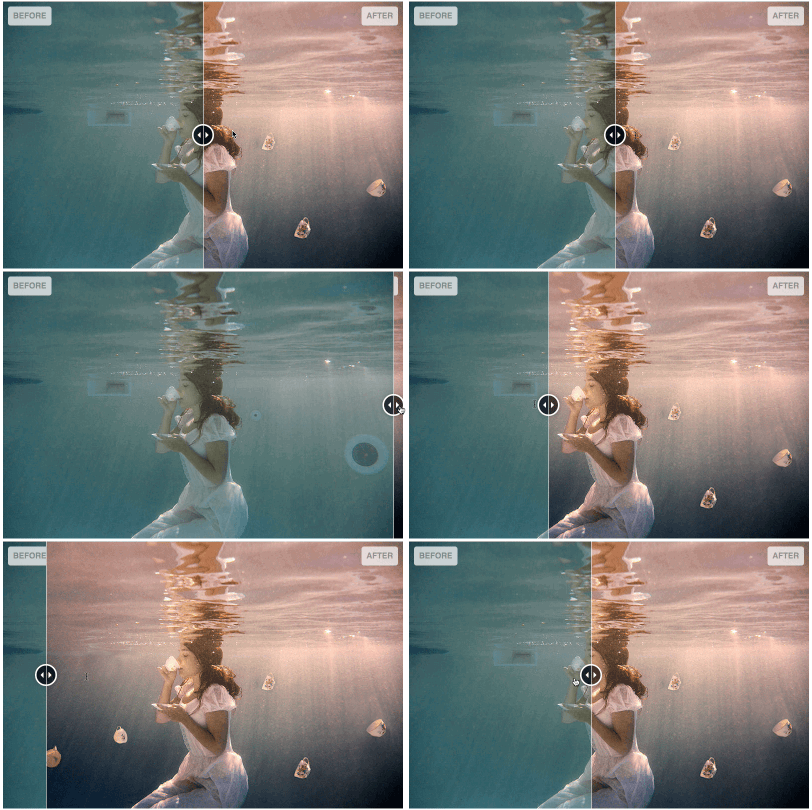





-
compatibility: Chrome 80+, Edge 80+, Firefox 74+, Safari 13.1+ (no IE)
-
Dependency footprint: none (vanilla JS)
-
Appearance fully styled via CSS (easy to skin / customize)
-
Touch friendly, mouse drag (Pointer Events), click, and mousemove modes
-
Responsive resizing support
-
Custom events:
imagesCompare:initialised,imagesCompare:changed,imagesCompare:resized -
Value API:
setValue,getValue,destroy,recycle,on,off -
Animation on value updates
NB : This library only does horizontal slide
In your head section, include the css (a minified version is also provided) :
<link rel="stylesheet" href="images-compare.css" />Include the required Javascript, before the closing body tag:
<link rel="stylesheet" href="images-compare.css" />
<script type="module" src="images-compare.js"></script>
Alternative (module import):
<script type="module">
    import ImagesCompare from "./images-compare.js";
    const container = document.querySelector("#myImageCompare");
    if (container) new ImagesCompare(container);
</script>
No legacy framework required.
Setup your html (minimal example) :
<!-- Main div container -->
<div id="myImageCompare">
    <!-- The first div will be the front element, to prevent FOUC add a style="display: none;" -->
    <div style="display: none;">
        <img src="assets/img/before.jpg" alt="Before" />
    </div>
    <!-- This div will be the back element -->
    <div>
        <img src="assets/img/after.jpg" alt="After" />
    </div>
</div>
Initialize the plugin:
import ImagesCompare from "./images-compare.js";
const imageCompare = new ImagesCompare(
    document.querySelector("#myImageCompare"),
);bun add vanilla-images-compareOr with npm / pnpm / yarn:
npm install vanilla-images-compareNo install needed — load directly from jsDelivr (recommended) or unpkg:
<!-- CSS -->
<link
    rel="stylesheet"
    href="https://cdn.jsdelivr.net/npm/vanilla-images-compare/build/images-compare.min.css"
/>

<!-- JS (as ES module) -->
<script
    type="module"
    src="https://cdn.jsdelivr.net/npm/vanilla-images-compare/build/images-compare.min.js"
></script>
Pin to a specific version in production, e.g.
.../npm/vanilla-images-compare@1.0.0/build/...
JSR (JavaScript Registry) is a modern, TypeScript-native package registry. Unlike npm, it publishes TypeScript source directly — no build step, full types out of the box, and works natively with Deno, Node, Bun, and any bundler.
# Bun
bunx jsr add @sylvaincombes/vanilla-images-compare

# Node / npm
npx jsr add @sylvaincombes/vanilla-images-compare

# Deno
deno add jsr:@sylvaincombes/vanilla-images-compare
Then import:
import ImagesCompare from "@sylvaincombes/vanilla-images-compare";Deno can also import directly without installation:
import ImagesCompare from "jsr:@sylvaincombes/vanilla-images-compare";This repo includes a mise.toml for pinning Bun. If you use mise, run:
mise installYou can also install Bun directly if you do not use mise.
To enable the pre-commit lint hook:
git config core.hooksPath .githooksYou can change settings by passing an options object, e.g. :
const imageCompare = new ImagesCompare(
    document.querySelector("#myImageCompare"),
    {
        initVisibleRatio: 0.2,
        interactionMode: "mousemove",
        addSeparator: false,
        addDragHandle: false,
        animationDuration: 450,
        animationEasing: "linear",
        precision: 2,
    },
);
List of available options :
| key | Description | Default value |
|---|---|---|
| initVisibleRatio | Visible ratio of front element on init, float value between 0 and 1 | 0.5 (front element is half visible) |
| interactionMode | The interaction mode to use, valid values are "drag" (recommended), "mousemove", "click" | "drag" |
| addSeparator | Add a html separator element ? (thin vertical blank line) - boolean | true |
| addDragHandle | Add a html "drag handle" element ? - boolean | true |
| animationDuration | default animation duration in ms | 400 |
| animationEasing | default animation easing to use ("linear", "swing") | "swing" |
| precision | Ratio precision, numbers after the decimal point | 4 |
The styling is done via css, to let you change it by css overrides.
Basic list of main css classes, for full details please have a look at the css file.
| Selector | Description |
|---|---|
| .images-compare-container | Container of the elements |
| .images-compare-before | Front element |
| .images-compare-after | Back element |
| .images-compare-separator | Separator (thin vertical blank line) |
| .images-compare-handle | Drag handle (circle) |
| .images-compare-left-arrow, .images-compare-right-arrow | Drag handle arrows |
| .images-compare-label | Label class element |
You can add labels, add the class images-compare-label to your elements.
A default styling will be applied, you can override css rules to customize to your needs.
<!-- Main div container -->
<div id="myImageCompare">
    <!-- The first div will be the front element, to prevent FOUC add a style="display: none;" -->
    <div style="display: none;">
        <span class="images-compare-label">Before</span>
        <img src="assets/img/before.jpg" alt="Before" />
    </div>
    <!-- This div will be the back element -->
    <div>
        <span class="images-compare-label">After</span>
        <img src="assets/img/after.jpg" alt="After" />
    </div>
</div>List of events the plugin triggers :
| Event name | Description |
|---|---|
| imagesCompare:initialised | This event is fired when init is done |
| imagesCompare:changed | This event is fired when the value of visible front element is changed |
| imagesCompare:resized | This event is fired when a resize window event has been received and treated |
const imageCompare = new ImagesCompare(
    document.querySelector("#myImageCompare"),
);

imageCompare.on("imagesCompare:changed", function (event) {
    console.log("change");
    console.log(event);
    if (event.ratio < 0.4) {
        console.log("We see more than half of the back image");
    }
    if (event.ratio > 0.6) {
        console.log("We see more than half of the front image");
    }

    if (event.ratio <= 0) {
        console.log("We see completely back image");
    }

    if (event.ratio >= 1) {
        console.log("We see completely front image");
    }
});You can change value of visible front part via code :
const imageCompare = new ImagesCompare(
    document.querySelector("#myImageCompare"),
);
imageCompare.setValue(0);You can change value of visible front part via code and request an animation :
const imageCompare = new ImagesCompare(
    document.querySelector("#myImageCompare"),
);

// pass true as second argument to request animation
imageCompare.setValue(0, true);

// override duration and easing for one call:
// imageCompare.setValue(ratio, animate, duration, easing);Clone the repository, then launch an :
bun installTo lint js and css use :
bun run lintTo build use :
bun run buildTo test use :
bun run test
bun run test:serve
(Then open http://localhost:41721/src/tests/test.html in a browser.)
On macOS you can also run:
bun run test:openTo open the example page:
bun run example:servebun run example:openToo look available scripts look at the scripts part in the package.json file
- @sylvaincombes (Maintainer)
- Céline Skowron
- Drag handle appearance influenced by zurb twentytwenty
This plugin uses Pointer Events for drag interactions and targets modern evergreen browsers:
- Chrome 55+
- Edge 12+
- Firefox 59+
- Safari 13+
Older browsers (including Internet Explorer) are not supported.
Images used in example are kindly provided by Céline Skowron, all rights belong to her so you can't use them anywhere without contacting her.
Released under the MIT license.