

TwLogEye is a next-generation log server that goes beyond simple storage. It integrates AI to analyze, categorize, and detect anomalies in real-time, turning raw logs into actionable intelligence.
🤖 AI-Driven Anomaly Detection: High-performance scoring for Syslog, Trap, and Netflow.
📊 Visual Log Clustering: Automatically group similar logs into patterns for faster troubleshooting.
🚀 Resource Efficient: Real-time monitoring with minimal CPU/Memory footprint.
SIGMA Rules
https://github.com/SigmaHQ/sigma
can be directly loaded for threat detection. It includes built-in recommended rule packs for Windows, Linux, network devices, and web exploits. It supports MCP servers and assists AI in log analysis. Notifications can be sent to AI-enabled automation tools via webhooks. Machine learning enables anomaly detection from logs.
Supported log formats include:
- syslog
- SNMP Trap
- Netflow
- Windows Event log (Windows environments only)
The system configuration is
 .
.
We support both Badger (a high-speed Key/Value Store built in Go) and Parquet (columnar storage format for big data analytics) for storing logs and reports. This enables us to efficiently store tens of thousands of logs per second and manage multiple terabytes of data.
It is recommended to install on Linux/Mac OS with a shell script.
$curl -sS https://raw.githubusercontent.com/twsnmp/twlogeye/main/install/install.sh | sh
Linux/Mac OS can be installed via Homebrew.
$brew install twsnmp/tap/twlogeye
Linux packages are also available for release.
https://github.com/twsnmp/twlogeye/releases
Windows downloads are available as zip files from the releases or can be installed via scoop.
>scoop bucket add twsnmp https://github.com/twsnmp/scoop-bucket
>scoop install twlogeye
The container images built by GitHub Actions are published on GitHub Container Registry (GHCR).
$mkdir ./twlogeye
$vi  ./twlogeye/config.yaml # Edit Config
$docker run --rm -v ./twlogeye:/datastore \
-p 2055:2055/udp -p 514:514/udp -p 162:162/udp -p 1883:1883 \
-e TZ=Asia/Tokyo \
ghcr.io/twsnmp/twlogeye:latest
To start with a specific version, specify the tag as follows:
$docker run --rm -v ./twlogeye:/datastore \
-p 2055:2055/udp -p 514:514/udp -p 162:162/udp -p 1883:1883 \
-e TZ=Asia/Tokyo \
ghcr.io/twsnmp/twlogeye:v0.7.0
Please create config.yaml.
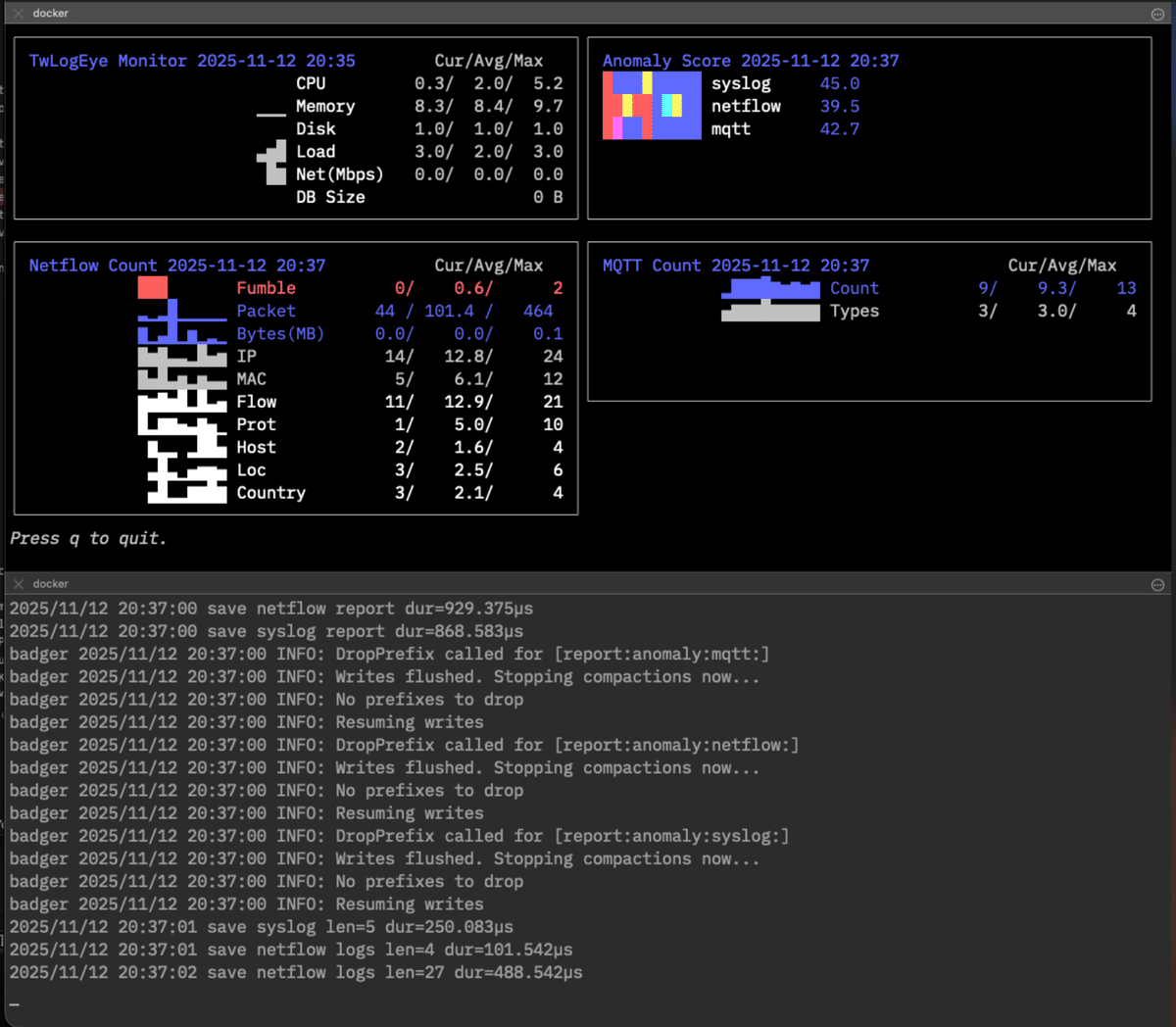
$docker exec -it <container ID> /twlogeye dashboard \
monitor anomaly netflow.count mqtt.count

- Create log and sigma rule directory.
- Create config file.
- Copy or create sigma rules to sigma rule directory
- Start server.
~$mkdir logs
~$mkdir sigma
~$code twlogeye.yaml
~$cp <sigma rules> sigma
~$twlogeye start
Illustration of command system
You can check the commands that support the Help command.
$twlogeye help
AI-Native log server to monitor threats in logs with sigma rules
Supported logs are
- syslog
- SNMP trap
- NetFlow/IPFIX
- Windows event log
- OpenTelemetry
- MQTT
You can find sigma rule here.
https://github.com/SigmaHQ/sigma

Support MCP server and webhook notify for AI

Usage:
  twlogeye [command]

Available Commands:
  clear       Clear DB of twlogeye
  completion  Generate the autocompletion script for the specified shell
  dashboard   Display twlogeye dashboard
  gencert     Generate TLS private key and cert
  help        Help about any command
  log         Search log
  mcp         Run MCP server via stdio
  notify      Search notify
  otel        Get OpenTelemetry info
  reload      Reload rules
  report      Get report
  service     Manage twlogeye as a Windows service
  sigma       Check sigma rules (list|stat|logsrc|field|check|test)
  start       Start twlogeye
  stop        Stop twlogeye
  update      Update twlogeye to the latest or specified version
  version     Show twlogeye version
  watch       Watch notify

Flags:
  -p, --apiPort int         API Server port (default 8081)
      --apiServer string    server IP or host name (default "localhost")
      --caCert string       API CA cert
      --clientCert string   API client cert
      --clientKey string    API client private key
      --config string       config file (default is ./twlogeye.yaml)
  -h, --help                help for twlogeye
      --serverCert string   API server cert
      --serverKey string    API server private key

Use "twlogeye [command] --help" for more information about a command.
$twlogeye help start
Start twlogeye

Usage:
  twlogeye start [flags]

Flags:
      --anomalyAlgo string             Anomaly detection algorithm (iforest|autoencoder|lstm|lof|knn|mahalanobis|zscore) (default "iforest")
      --anomalyNotifyDelay int         Grace period for sending notifications when detecting anomalies (default 24)
      --anomalyReportThreshold float   anomaly report threshold
      --anomalyUseTime                 Include weekends and hours in the vector data for anomaly detection
  -d, --dbPath string                  DB Path (.badger, .parquet) default: memory
      --debug                          debug mode
      --geoIPDB string                 Geo IP Database Path
      --grokDef string                 GROK define file
      --grokPat string                 GROK patterns
  -h, --help                           help for start
      --keyValParse                    Splunk Key value parse
  -l, --logPath string                 Log DB Path (.badger, .parquet) default: dbPath
      --logRetention int               log retention(hours) (default 48)
      --logRetentionDays int           log retention(days)
      --mcpEndpoint string             MCP server endpoint
      --mcpFrom string                 MCP server from ip address list
      --mcpToken string                MCP server token
      --mibPath string                 SNMP Ext MIB Path
      --mqttCert string                MQTT server certificate
      --mqttFrom string                MQTT client IPs
      --mqttKey string                 MQTT server private key
      --mqttTCPPort int                MQTT TCP Port
      --mqttUsers string               MQTT user and password
      --mqttWSPort int                 MQTT Websock Port
      --namedCaptures string           Named capture defs path
      --netflowPort int                netflow port 0=disable
      --notifyRetention int            notify retention(days) (default 7)
      --otelCA string                  OpenTelemetry CA certificate
      --otelCert string                OpenTelemetry server certificate
      --otelFrom string                OpenTelemetry client IPs
      --otelHTTPPort int               OpenTelemetry HTTP Port
      --otelKey string                 OpenTelemetry server private key
      --otelRetention int              log retention(hours) (default 48)
      --otelgRPCPort int               OpenTelemetry gRPC Port
      --parquetBufferSize int          Parquet log buffer size (default 10000)
      --parquetBufferTime int          Parquet log buffer flush interval (seconds) (default 60)
      --reportInterval int             report interval (minute) (default 5)
      --reportRetention int            report retention(days) (default 7)
      --reportTopN int                 report top n (default 10)
      --resolveHostName                Resolve Host Name
      --sigmaConfigs string            SIGMA config path
      --sigmaRules string              SIGMA rule path
      --sigmaSkipError                 Skip sigma rule error
      --sjis                           Windows eventlog SHIFT-JIS mode
      --syslogDst string               syslog dst
      --syslogTCPPort int              syslog TCP port 0=disable
      --syslogUDPPort int              syslog UDP port 0=disable
      --trapCommunity string           SNMP TRAP Community
      --trapDst string                 SNMP TRAP dst
      --trapPort int                   SNMP TRAP receive port 0=disable
      --webhookDst string              Webhook dst URL
      --winAuth string                 Windows eventlog auth
      --winEventLogChannel string      Windows eventlog channel
  -i, --winEventLogCheckInterval int   Windows eventlog check interval
  -s, --winEventLogCheckStart int      Windows eventlog check start time (hours)
      --winPassword string             Windows eventlog password
      --winUser string                 Windows eventlog user

Global Flags:
  -p, --apiPort int         API Server port (default 8081)
      --apiServer string    server IP or host name (default "localhost")
      --caCert string       API CA cert
      --clientCert string   API client cert
      --clientKey string    API client private key
      --config string       config file (default is ./twlogeye.yaml)
      --serverCert string   API server cert
      --serverKey string    API server private key

$twlogeye help log

Search log via api

Usage:
  twlogeye log [flags]

Flags:
      --end string       end date and time
  -h, --help             help for log
      --logtype string   log type  (default "syslog")
      --search string    search text
      --start string     start date and time

Global Flags:
  -p, --apiPort int         API Server port (default 8081)
      --apiServer string    server IP or host name (default "localhost")
      --caCert string       API CA cert
      --clientCert string   API client cert
      --clientKey string    API client private key
      --config string       config file (default is ./twlogeye.yaml)
      --serverCert string   API server cert
      --serverKey string    API server private key
$twlogeye help notify
Search notify via api

Usage:
  twlogeye notify [flags]

Flags:
      --end string     notify level
  -h, --help           help for notify
      --level string   notify level
      --start string   start date and time

Global Flags:
  -p, --apiPort int         API Server port (default 8081)
      --apiServer string    server IP or host name (default "localhost")
      --caCert string       API CA cert
      --clientCert string   API client cert
      --clientKey string    API client private key
      --config string       config file (default is ./twlogeye.yaml)
      --serverCert string   API server cert
      --serverKey string    API server private key
$twlogeye help watch
Watch notify via api

Usage:
  twlogeye watch [flags]

Flags:
  -h, --help   help for watch

Global Flags:
  -p, --apiPort int         API Server port (default 8081)
      --apiServer string    server IP or host name (default "localhost")
      --caCert string       API CA cert
      --clientCert string   API client cert
      --clientKey string    API client private key
      --config string       config file (default is ./twlogeye.yaml)
      --serverCert string   API server cert
      --serverKey string    API server private key
get report
$twlogeye help report
Get report via api

Usage:
  twlogeye report <report type> [<anomaly type>] [flags]

Flags:
      --end string     end date and time
  -h, --help           help for report
      --noList         report summary only
      --start string   start date and time

Global Flags:
  -p, --apiPort int         API Server port (default 8081)
      --apiServer string    server IP or host name (default "localhost")
      --caCert string       API CA cert
      --clientCert string   API client cert
      --clientKey string    API client private key
      --config string       config file (default is ./twlogeye.yaml)
      --serverCert string   API server cert
      --serverKey string    API server private key
Display dashboard.
$twlogeye help dashboard
Display twlogeye dashboard.
<panel type> is
  monitor | anomaly
  syslog.count | syslog.pattern | syslog.error
  trap.count | trap.type
  netflow.count | netflow.ip.packet | netflow.ip.byte | netflow.mac.packet | netflow.mac.byte
  netflow.flow.packet | netflow.flow.byte | netflow.fumble | netflow.prot
  netflow.host | netflow.loc | netflow.country
  winevent.count | winevent.pattern | winevent.error
  otel.count | otel.pattern | otel.error | otel.metric.<id>
  mqtt.count | mqtt.type

Usage:
  twlogeye dashboard <panel type>... [flags]

Flags:
  -h, --help          help for dashboard
      --history int   Keep report history (default 100)
      --topn int      Number of top n lines. (default 5)

Global Flags:
  -p, --apiPort int         API Server port (default 8081)
      --apiServer string    server IP or host name (default "localhost")
      --caCert string       API CA cert
      --clientCert string   API client cert
      --clientKey string    API client private key
      --config string       config file (default is ./twlogeye.yaml)
      --serverCert string   API server cert
      --serverKey string    API server private key
OpenTelemetryのメトリック、トレースを取得するコマンドです。
$twlogeye help otel
Get OpenTelemetry info via api

Usage:
  twlogeye otel <metric|trace> <list|id> [flags]

Flags:
  -h, --help   help for otel

Global Flags:
  -p, --apiPort int         API Server port (default 8081)
      --apiServer string    server IP or host name (default "localhost")
      --caCert string       API CA cert
      --clientCert string   API client cert
      --clientKey string    API client private key
      --config string       config file (default is ./twlogeye.yaml)
      --serverCert string   API server cert
      --serverKey string    API server private key
$twlogeye help stop
Stop twlogeye via api

Usage:
  twlogeye stop [flags]

Flags:
  -h, --help   help for stop

Global Flags:
  -p, --apiPort int         API Server port (default 8081)
      --apiServer string    server IP or host name (default "localhost")
      --caCert string       API CA cert
      --clientCert string   API client cert
      --clientKey string    API client private key
      --config string       config file (default is ./twlogeye.yaml)
      --serverCert string   API server cert
      --serverKey string    API server private key
Command to register and manage twlogeye as a background Windows Service. Run from an elevated Command Prompt or PowerShell (Run as Administrator).
>twlogeye help service
Manage twlogeye as a Windows service (install, remove, start, stop, status).

Usage:
  twlogeye service [command]

Available Commands:
  install     Install twlogeye as a Windows service
  remove      Remove twlogeye Windows service
  start       Start twlogeye Windows service
  status      Show status of twlogeye Windows service
  stop        Stop twlogeye Windows service

Flags:
  -h, --help          help for service
      --name string   Service name (default "twlogeye")
# Install with defaults (Auto-start enabled)
>twlogeye service install

# Install with explicit config file path
>twlogeye service install --config C:\twlogeye\twlogeye.yaml
>twlogeye service start
>twlogeye service status
>twlogeye service stop
>twlogeye service remove
Note:
twlogeyecan also be managed directly via standard Windows tools (sc.exe, PowerShellNew-Service, orservices.msc). When started by SCM, it automatically detects service mode and changes its working directory to the executable location. Startup/shutdown events are logged to the Windows Event Log (Application log).
$twlogeye help reload
Reload rules via api

Usage:
  twlogeye reload [flags]

Flags:
  -h, --help   help for reload

Global Flags:
  -p, --apiPort int         API Server port (default 8081)
      --apiServer string    server IP or host name (default "localhost")
      --caCert string       API CA cert
      --clientCert string   API client cert
$twlogeye help update
Update twlogeye to the latest or specified version from GitHub releases.

Usage:
  twlogeye update [flags]

Flags:
  -c, --check             Check for updates only
  -h, --help              help for update
      --version string    Update to specified version
  -y, --yes               Update without confirmation

Global Flags:
  -p, --apiPort int         API Server port (default 8081)
      --apiServer string    server IP or host name (default "localhost")
      --caCert string       API CA cert
      --clientCert string   API client cert
      --clientKey string    API client private key
      --config string       config file (default is ./twlogeye.yaml)
      --serverCert string   API server cert
      --serverKey string    API server private key
Clear logs ,notify report on DB.
$twlogeye help clear
Clear DB of twlogeye via api type is "logs","notify","report"

Usage:
  twlogeye clear <type> <subtype> [flags]

Flags:
  -h, --help   help for clear

Global Flags:
  -p, --apiPort int         API Server port (default 8081)
      --apiServer string    server IP or host name (default "localhost")
      --caCert string       API CA cert
      --clientCert string   API client cert
      --clientKey string    API client private key
      --config string       config file (default is ./twlogeye.yaml)
      --serverCert string   API server cert
      --serverKey string    API server private key
$twlogeye  help gencert
Generate TLS private key and cert for gRPC server/client

Usage:
  twlogeye gencert [flags]

Flags:
      --cn string   CN for client cert (default "twsnmp")
  -h, --help        help for gencert

Global Flags:
  -p, --apiPort int         API Server port (default 8081)
      --apiServer string    server IP or host name (default "localhost")
      --caCert string       API CA cert
      --clientCert string   API client cert
      --clientKey string    API client private key
      --config string       config file (default is ./twlogeye.yaml)
      --serverCert string   API server cert
      --serverKey string    API server private key
Generate client cert and key.
$twlogeye gencert --clientCert c.crt --clientKey k.key
Generate server cert and key.
$twlogeye gencert --serverCert s.crt --serverKey s.key
Inspect Sigma rules and embedded rule packs, or convert Wazuh rules:
Check sigma rules (list|packs|stat|logsrc|field|check|test|convert-wazuh)
	list: list rules
	packs: list available embedded rule packs
	stat: stat rules
	logsrc: list log sources
	field: list fields
	check: check rule
	test: test rule args
	convert-wazuh: convert Wazuh rules XML to Sigma YAML
	convert-wazuh-decoder: convert Wazuh decoders XML to named-capture regex patterns

Usage:
  twlogeye sigma [flags]
  twlogeye sigma [command]

Available Commands:
  convert-wazuh         Convert Wazuh XML rules to Sigma YAML rules
  convert-wazuh-decoder Convert Wazuh XML decoders to named-capture regex patterns

Flags:
      --custom               Filter custom (file/db) rules only
  -h, --help                 help for sigma
      --pack string          Filter rules by pack name
      --sigmaPacks strings   SIGMA rule packs (e.g. windows-essential,linux-auth)
      --sigmaRules string    SIGMA rule path

Global Flags:
  -p, --apiPort int         API Server port (default 8081)
      --apiServer string    server IP or host name (default "localhost")
      --caCert string       API CA cert
      --clientCert string   API client cert
      --clientKey string    API client private key
      --config string       config file (default is ./twlogeye.yaml)
      --serverCert string   API server cert
      --serverKey string    API server private key
Examples:
# List available embedded rule packs
$ twlogeye sigma packs

# List rules with specific embedded packs enabled
$ twlogeye sigma list --sigmaPacks windows-essential,linux-auth

# Filter rule list to a single pack
$ twlogeye sigma list --sigmaPacks windows-essential,linux-auth --pack linux-auth

# Convert Wazuh XML rules to Sigma YAML
$ twlogeye sigma convert-wazuh -o ./converted-rules ./ruleset/rules/0095-sshd_rules.xml

# Convert Wazuh XML decoders to Go named-capture regex patterns
$ twlogeye sigma convert-wazuh-decoder -o ./patterns ./decoders/0310-ssh_decoders.xmlTwLogEye includes an integrated Model Context Protocol (MCP) server that empowers LLM clients (such as Claude Desktop, Cursor, or AI SOC agents) to analyze logs, investigate incidents, and manage Sigma rules.
Run twlogeye mcp to start the MCP server over standard input/output (stdio).
Example Claude Desktop configuration (claude_desktop_config.json):
{
  "mcpServers": {
    "twlogeye": {
      "command": "twlogeye",
      "args": ["mcp"]
    }
  }
}Configure mcpEndpoint (e.g., 0.0.0.0:8080) in the configuration file to expose the /mcp endpoint using HTTP (SSE/Streamable HTTP).
If mcpToken is set, requests must provide Authorization: Bearer <token>.
Searches for logs from TwLogEye.
- Parameters:
start(string): The date and time to start the search (e.g.,2025/08/30 11:00:00). If not specified, it defaults to1970/01/01 00:00:00.end(string): The date and time to end the search (e.g.,2025/08/30 11:00:00). If not specified, it defaults to the current time.type(string): The type of log (one ofsyslog,trap,netflow,winevent,otel,mqtt).filter(string): A regular expression to filter logs.limit(int): Maximum number of logs to return (default: 100, max: 1000).
Searches for notifications from TwLogEye.
- Parameters:
start(string): The date and time to start the search (e.g.,2025/08/30 11:00:00). If not specified, it defaults to1970/01/01 00:00:00.end(string): The date and time to end the search (e.g.,2025/08/30 11:00:00). If not specified, it defaults to the current time.level(string): A regular expression to filter notification levels (e.g.,high|critical). If not specified, no filtering is applied. Level names includeinfo,low,medium,high,critical, etc.limit(int): Maximum number of notifications to return (default: 100, max: 1000).
Aggregates GeoIP location, DNS PTR hostname, and correlated logs/alerts for a given IP address.
- Parameters:
ip(string): Target IP address to investigate.start(string): Start date and time. Defaults to 24 hours ago.end(string): End date and time. Defaults to now.limit(int): Maximum number of correlated logs to return (default: 20, max: 100).
Simulates and backtests a YAML Sigma rule against historical logs to verify detection matches and false positive rates.
- Parameters:
rule(string): YAML-formatted Sigma rule string.type(string): Log type to evaluate against (syslog,trap,netflow,winevent,otel,mqtt. Default:syslog).start(string): Start date and time. Defaults to 24 hours ago.end(string): End date and time. Defaults to now.limit(int): Maximum number of matched log samples to return (default: 5, max: 50).
Retrieves OpenTelemetry trace details (span tree) by trace ID.
- Parameters:
id(string): OpenTelemetry trace ID.
Retrieves OpenTelemetry metric details by metric key/ID.
- Parameters:
id(string): OpenTelemetry metric key/ID.
Retrieves a report from TwLogEye.
- Parameters:
start(string): The start date and time for the report (e.g.,2025/08/30 11:00:00). If not specified, it defaults to1970/01/01 00:00:00.end(string): The end date and time for the report (e.g.,2025/08/30 11:00:00). If not specified, it defaults to the current time.type(string): The type of report (one ofsyslog,trap,netflow,winevent,otel,mqtt,anomaly,monitor).wineventrefers to Windows Event Logs.
Get anomaly report from TwLogEye database.
- Parameters:
start(string): Start date and time to get report. Empty is 1970/1/1. Example: 2025/10/26 11:00:00end(string): End date and time to get report. Empty is now. Example: 2025/10/26 11:00:00type(string): type of anomaly report. type can besyslog,trap,netflow,winevent,otel,monitor.
Get last report from TwLogEye database.
- Parameters:
type(string): type of report. type can besyslog,trap,netflow,winevent,otel,anomaly,monitor.
Retrieves a list of Sigma rule evaluators from TwLogEye.
- Parameters: None
Retrieves a list of Sigma rule IDs from TwLogEye.
- Parameters: None
Retrieves a Sigma rule with the specified ID from TwLogEye.
- Parameters:
id(string): The ID of the Sigma rule to retrieve.
Adds a new Sigma rule to TwLogEye.
- Parameters:
rule(string): The Sigma rule string in YAML format.
Deletes a Sigma rule with the specified ID from TwLogEye.
- Parameters:
id(string): The ID of the Sigma rule to delete.
Reloads the Sigma rules loaded in TwLogEye.
- Parameters: None
Retrieves a list of available built-in Sigma rule packs, or detailed rule list of a specific pack.
- Parameters:
pack(string, optional): Specific pack name (e.g.,windows-essential,linux-auth) to get its rule list. If omitted, returns all packs with descriptions and rule counts.
Converts Wazuh XML rules into Sigma YAML rules, resolving parent/child rule hierarchies (if_sid, if_matched_sid) and correlation attributes (frequency, timeframe).
- Parameters:
xml(string, required): Wazuh XML rules content.min_level(int, optional): Minimum Wazuh rule level to convert (default 0).skip_frequency(bool, optional): Skip frequency/timeframe correlation rules.default_product(string, optional): Default Sigma logsource product (e.g.linux,windows).default_service(string, optional): Default Sigma logsource service (e.g.sshd,sudo).
Converts Wazuh XML rules and immediately imports them into TwLogEye's Sigma rule database, triggering automatic rule reload.
- Parameters:
xml(string, required): Wazuh XML rules content.min_level(int, optional): Minimum Wazuh rule level to convert (default 0).skip_frequency(bool, optional): Skip frequency/timeframe correlation rules.default_product(string, optional): Default Sigma logsource product.default_service(string, optional): Default Sigma logsource service.
Converts Wazuh XML decoders into Go named-capture regular expression patterns for log parsing.
- Parameters:
xml(string, required): Wazuh XML decoders content.
Clients can read resources directly using the twlogeye:// URI scheme:
twlogeye://status: System performance metrics and storage statustwlogeye://sigma/rules: List of active Sigma rule IDstwlogeye://sigma/packs: Available built-in Sigma rule packs with descriptions and rule countstwlogeye://reports/{type}/latest: Latest report for specified category (syslog,trap,netflow,winevent,otel,mqtt,monitor,anomaly)
investigate_incident: Deep-dive investigation prompt for target IP, hostname, or alert IDdaily_security_briefing: Comprehensive 24-hour security summary prompttest_and_add_sigma_rule: Sigma rule development and backtesting workflow promptsearch_log,search_notify,get_report,get_last_report,get_anomaly_report: Query and report generation prompts
Use the file specified in --config or the current directory ./twlogeye.yaml as the configuration file. YAML format. It corresponds to the following keys.
dbPath: Specifies the path to the database file (e.g.,./twlogeye.badger,memory).logPath: Specifies the path to the dedicated log database. Supports Parquet format (e.g.parquet:///path/to/logs,./logs.parquet) or Badger format (e.g../logs.badger). Defaults todbPathif omitted.parquetBufferSize: In-memory buffer size for Parquet logs (count, default: 10000).parquetBufferTime: Flush interval for Parquet log buffer (seconds, default: 60).
syslogUDPPort: The port for receiving Syslog messages over UDP.syslogTCPPort: The port for receiving Syslog messages over TCP.netflowPort: The port for receiving NetFlow data.snmpTrapPort: The port for receiving SNMP trap messages.otelHTTPPort: The port for receiving OpenTelemetry messages over HTTP/JSON.otelgRPCPort: The port for receiving OpenTelemetry messages over gRPC.mqttTCPPort: The port for the MQTT broker over TCP.mqttWSPort: The port for the MQTT broker over WebSocket.
otelRetention: The log retention period in hours for OpenTelemetry.otelFrom: A list of allowed client IP addresses for OpenTelemetry.otelCert: The path to the server certificate for OpenTelemetry.otelKey: The path to the server private key for OpenTelemetry.otelCA: The path to the CA certificate for OpenTelemetry.
mqttUsers: A comma-separated list ofuser:passwordfor MQTT clients.mqttFrom: A list of allowed client IP addresses for MQTT.mqttCert: The path to the server certificate for MQTT.mqttKey: The path to the server private key for MQTT.
winEventLogChannel: The name of the Windows Event Log channel to monitor (e.g., "System", "Security").winEventLogCheckInterval: The interval in seconds to check for new event logs.winEventLogCheckStart: The starting point in hours from which to begin monitoring event logs.winRemote: The hostname or IP address of the remote Windows machine.winUser: The username for authenticating with the remote machine.winPassword: The password for authentication.winAuth: The authentication method to use.winLogSJIS: A boolean flag (trueorfalse) to indicate if Windows logs are in SHIFT-JIS encoding.
syslogDst: A list of destination hosts to forward Syslog messages to.trapDst: A list of destination hosts for forwarding SNMP traps.webhookDst: A list of webhook URLs to send data to.mqttDst: A list of destination MQTT brokers to forward messages to.trapCommunity: The SNMP community string used for traps.
logRetention: The log retention period in hours.logRetentionDays: The log retention period in days (for Parquet storage, the larger oflogRetentionandlogRetentionDaysis used).notifyRetention: The notification data retention period in days.reportRetention: The report data retention period in days.
reportInterval: The interval in minutes for generating reports.reportTopN: The number of top entries to include in reports.
anomalyReportThreshold: A floating-point value representing the threshold for anomaly detection.anomalyUseTimeData: A boolean flag to include time and day of the week data in anomaly detection analysis.anomalyNotifyDelay: The grace period in hours before sending a notification for a detected anomaly.anomalyAlgo: The anomaly detection algorithm to use (iforest,autoencoder,lstm,lof,knn,mahalanobis,zscore, default:iforest).
grokPat: A list of file paths containing Grok patterns.grokDef: The path to the Grok definition file, likegrok-patterns.namedCaptures: Configuration for named capture groups to extract specific information from logs.keyValParse: A boolean flag to enable or disable key/value log parsing.
sigmaPacks: List of embedded rule packs (see Detailed Sigma Rule Packs Guide). Available packs:windows-essential: Windows standard security events (logon failure, log cleared, new service, etc.)windows-ad: Active Directory / Domain Controller threats (Kerberoasting, DCSync, etc.)windows-client: Windows endpoint threats (suspicious RDP, UAC bypass, USB plugged, etc.)linux-auth: Linux authentication logs (SSH brute force, sudo failure, etc.)linux-system: Linux system persistence / tampering (cron modified, systemd added, etc.)network-threats: Network devices / Firewalls (VPN failure, admin login failure, port scan, etc.)web-attacks: Web server attacks (Log4Shell, path traversal, SQLi, WebShell, etc.)wazuh-linux: Converted Wazuh Linux rules (SSHD brute force, sudo escalation, PAM failure, etc.)wazuh-web: Converted Wazuh Web rules (vulnerability scanners, hidden file reconnaissance, etc.)wazuh-network: Converted Wazuh Network rules (Cisco admin auth failure, FortiGate VPN brute force, etc.)wazuh-compliance: Compliance & audit benchmarks (PCI-DSS, NIST, GDPR, CIS account audit, tampering detection)
sigmaRules: The path to custom Sigma rule files or directories.sigmaConfigs: The path to the Sigma configuration files.sigmaSkipError: A boolean flag to skip a rule if an error occurs during processing.
resolveHostName: A boolean flag to enable or disable resolving host names from IP addresses.geoIPDB: The path to the GeoIP database file.mibPath: The path to the SNMP MIB files.mcpEndpoint: The endpoint URL for Model Context Protocol (MCP).mcpFrom: The "from" address for messages sent to MCP.mcpToken: The authentication token for MCP.debug: A boolean flag to enable or disable debug mode.
The following environment variables are available.
| Key | Descr |
|---|---|
| TWLOGEYE_APIPORT | API port number |
| TWLOGEYE_APISERVER | API server ip or host name |
| TWLOGEYE_SERVERCERT | Server cert file path |
| TWLOGEYE_SERVERKEY | Server private key path |
| TWLOGEYE_CLIENTCERT | Client cert file path |
| TWLOGEYE_CLIENTKEY | Client private key path |
| TWLOGEYE_CACERT | CA cert file path |
Use go-task for builds. https://taskfile.dev/
$task
see LICENSE
Copyright 2025 Masayuki Yamai